



Is there a workaround for the hypertext character style formatting rule
I've found out that the hypertext formatting of "Lists" are forcing us to use a single character style format for each row on the list (for each paragraph). Add hypertext commands to documents
The "Define an active area for a paragraph" section on this page says that "Ensure that the same character format is applied to the entire paragraph.". What I understand from this statement is that a hypertext marker does only create the actual clickable link on the first character style in a paragraph.
I'm changing the style of the "paranum" part of my list row reference definition to "emphasis" (bold) and the actual "paratext" parts back to "body" (normal). This cuses my list texts to only be clickable on the "paranum" parts and not on their "paratext" parts. My reference definitions are :
<Emphasis><$paranum> <Body><$paratext> ⭾....<$pagenum>
"Emphasis" is the character style for "bold" text and "Body" is the character style which changes it back to normal.
The resulting lists do look like this :
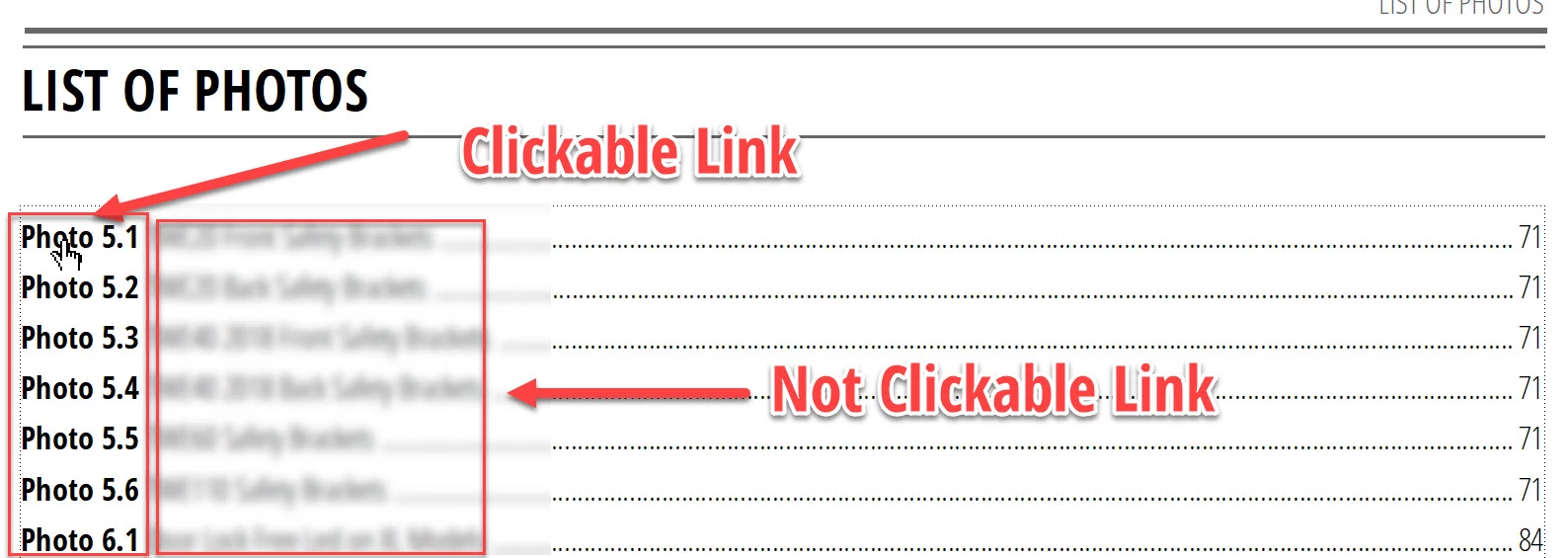
My question is if there is a workaround to this? Can I both have different character styles in a paragraph and also mark/format the complete paragraph as hypertext?
 AdChoices