Known Participant
November 2, 2022
Answered

Line Formatting in List of Figures/Tables

  • November 2, 2022
  • 5 replies
  • 1145 views

Hi, 


I am creating a List of Figures and a List of Tables for my document. Some of my figure and table headings are fairly long, and, the description text in the list continues onto a second line. I placed an extra tab before the <$chapnum> and a nonbreakable hyphen between <$chapnum> and <$pagenum> on my reference page (see below). However, when the text length is such that the number is split between the first and second line, the alignment does not work. Please see the example below and let me know if there is anything that I can do to get the chapter and page numbers to align right.



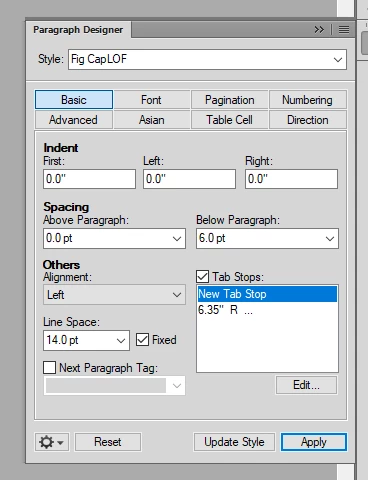
Tab Setup:


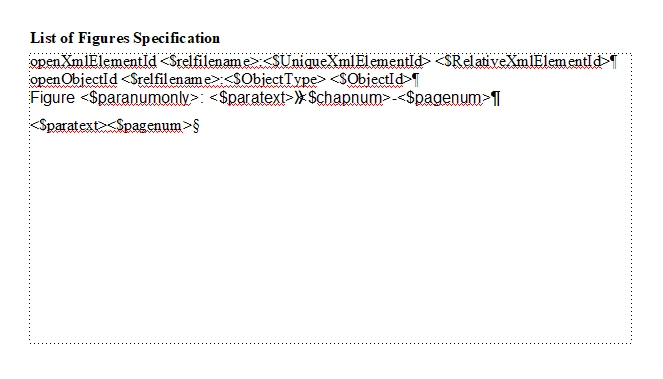
Reference Page:


Thank you,

Nick 

    This topic has been closed for replies.
    Correct answer Barb Binder

    Hi Nick:


    I'm out of class but unclear if you are good to go, or not, since you marked answers as correct, but just in case:


    On the reference page, remove the two tabs and the space between <$paratext> and <$chapnum>, replace with a single tab.


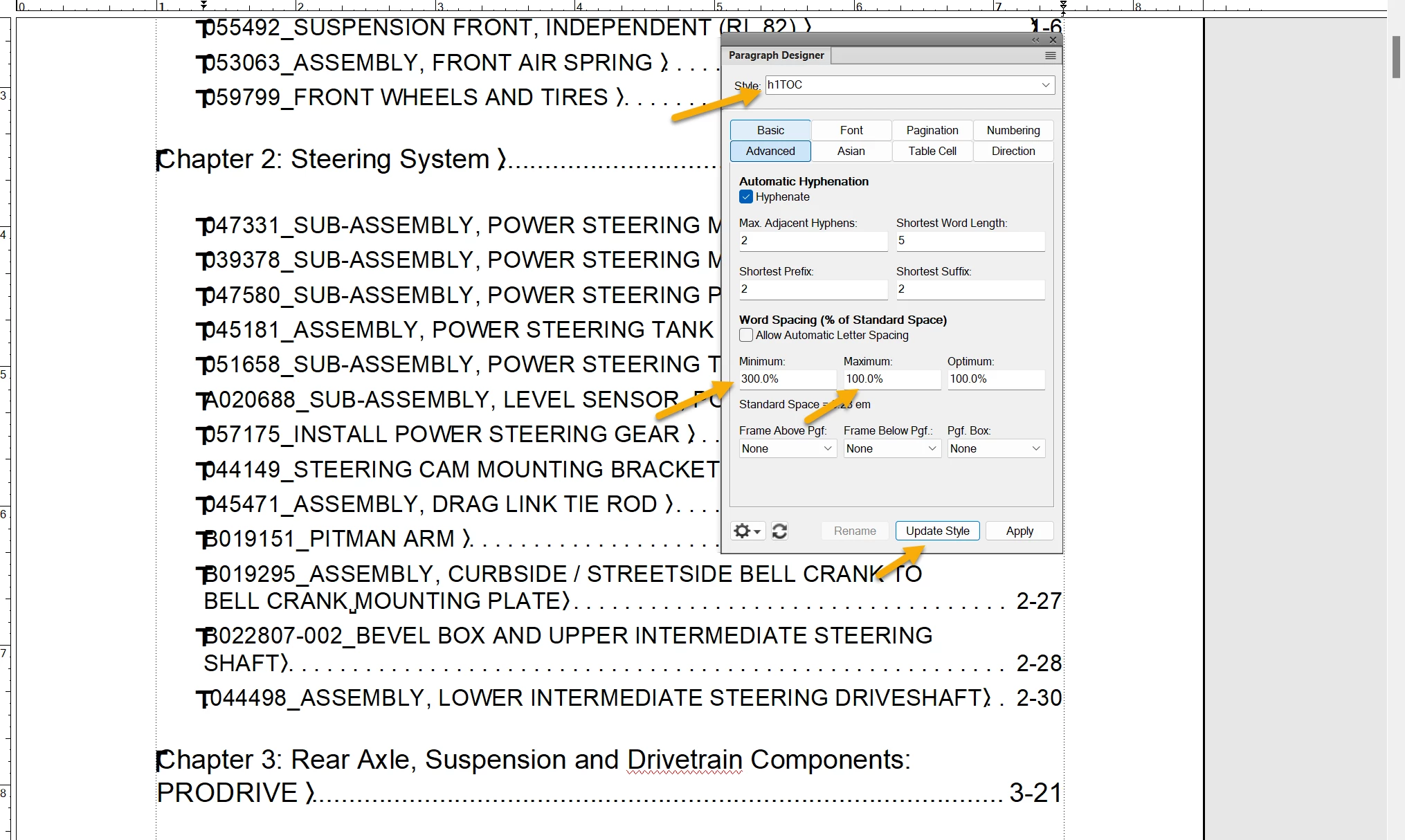
    On the body pages, edit the h1TOC style as shown below and click Update Style.


    ~Barb

    5 replies

    Barb Binder
    Community Expert
    Community Expert
    November 12, 2022

    We are always happy to help, Nick.


    ~Barb

    ~Barb at Rocky Mountain Training
    Barb Binder
    Community Expert
    Barb BinderCommunity ExpertCorrect answer
    Community Expert
    November 10, 2022

    Hi Nick:


    I'm out of class but unclear if you are good to go, or not, since you marked answers as correct, but just in case:


    On the reference page, remove the two tabs and the space between <$paratext> and <$chapnum>, replace with a single tab.


    On the body pages, edit the h1TOC style as shown below and click Update Style.


    ~Barb

    ~Barb at Rocky Mountain Training
    Known Participant
    November 11, 2022

    That worked! Thank you Barb.

    Nick

    Barb Binder
    Community Expert
    Community Expert
    November 10, 2022

    Hi Nick:


    Here is a trick for older versions of FrameMaker that I learned from @Winfried Reng: restore the single tab between <$paratext> and <$pagenum> and update your book.


    Then click in the problem style:

    Paragraph Designer > Advanced: set the Minimum Spacing to 200% and the Maximum Spacing to 100%. Update the style. 


    Let us know if that works for you.


    ~Barb


    EDIT: It's early here. @LinSims referenced the same answer in the post directly above mine on November 3. Did you give it a shot?

    ~Barb at Rocky Mountain Training
    Known Participant
    November 10, 2022

    That worked! Thanks. Btw, just saw @LinSims response. Thanks a buch y'all!

    Nick


    Known Participant
    November 10, 2022

    I may have spoken a bit too soon. I made the spacing changes, and all but the two entries shown below look great. Should I make a change to the spacing values? 


    Barb Binder
    Community Expert
    Community Expert
    November 2, 2022

    What version are you on, @Nick26557183qsr8? If you are on Fall 2022, then this is a good use for the brand new last line right indent. The bonus is it will push ROOFTOP to the next line, so the page number won't be alone. 

    https://www.rockymountaintraining.com/adobe-framemaker-last-line-right-indent/


    ~Barb at Rocky Mountain Training
    LinSims
    Community Expert
    Community Expert
    November 2, 2022

    I was going to suggest that, but her screenshot of the Basic tab doesn't show the new Last Line Right field. She's at least on 2020 and maybe earlier.

    Barb Binder
    Community Expert
    Community Expert
    November 2, 2022

    Yes, Lin, I realized that as I was grabbing my screen shot. 


    Nick, if you have a subscription, it 's a free upgrade. 


    ~Barb

    ~Barb at Rocky Mountain Training
    LinSims
    Community Expert
    Community Expert
    November 2, 2022

    You put an extra tab in on the reference page, but not on the paragraph definition.