


New Participant
November 27, 2020
Answered

Matching cross-reference font to local paragraph

  • November 27, 2020
  • 2 replies
  • 595 views

I am using FM 2019 Unstructured.

How can I get the font of the cross-reference (in blue) to match the font of the paragraph containing the cross-reference?

The cross-reference format is <Default ¶ Font><zTDref><$paratext>

zTDref is set to As Is for everything except color. I have tried with and without <Default ¶ Font> but the cross-references are always in the source font.
 

This topic has been closed for replies.
Correct answer Winfried Reng

Hi,


Yes, you are correct. With Microsoft YaHei UI as the font of the source paragraph the cross-references will also use this font. Other properties like colour or font size are not picked up.

This is not related to your character font. When there isn't any character format in the cross-reference, the cross-references still use this font.

Microsoft YaHei UI is a double byte font, and I assume that this is the cause.


Best regards


Winfried

2 replies

Adobe Expert
November 30, 2020

Hi,


Your character format is correct, everything as is and only the colour set.

For your cross-reference format you should just set:

<zTDref><$paratext><Default ¶ Font>

(The default font at the end sets everything back.)

In your picture this seems to work. Your cross-reference has the same format as the paragraph it is in and it is blue.


Best regards


Winfried

CRTechDPBAuthor
New Participant
November 30, 2020

Thank you for the replies, everyone. Together, the recommendations helped me solve the mystery.


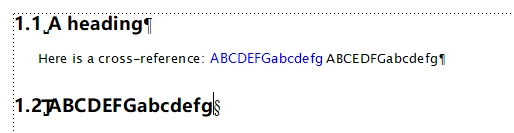
First, the cross-reference text in blue matches the font family of the heading and not the text immediately after the cross-reference. Note the cap height and the bar(?) on the uppercase G. My mistake for choosing two font families that are so similar. To be more clear, I have used a different body font in the images below.


Anyway, the problem appears to be related to the font family I selected for the headings. Regardless of using As Is or a specific font family for zTDRef, the cross-reference will keep the heading FF if the heading is Microsoft YaHei UI. If I change to another font (I've tested about five), the cross-reference matches the current paragraph FF using either As Is or the body paragraph font family for zTDRef.


Now I have to decide if I want to replace my chosen heading font family or accept the slight differences.


zTDRef definition:

Cross-reference format:


With MS Ya Hei UI as the heading font


With MS San Serif as the heading font

Winfried RengCorrect answer
Adobe Expert
December 1, 2020

Hi,


Yes, you are correct. With Microsoft YaHei UI as the font of the source paragraph the cross-references will also use this font. Other properties like colour or font size are not picked up.

This is not related to your character font. When there isn't any character format in the cross-reference, the cross-references still use this font.

Microsoft YaHei UI is a double byte font, and I assume that this is the cause.


Best regards


Winfried

Bob_Niland
Brainiac
November 27, 2020

I'd create a Character Format that matches the Font spec of the target para (other than any decoration for being a link, such as color), and call for it (replacing both <Default ¶ Font> and <zTDref>) in the Xref def.

So if the target text is in a ¶References, create a ƒReferences, and Xref:
<References><$paratext>

Bob_Niland
Brainiac
November 29, 2020

I might add that the FM Xref data structures don't have a standard building block for picking up the formatting of the target(source) text.

And if it did, chances are it might not anticipate needing any modifications for hypetext offsetting (blue, underline, etc.)

In particular, the building block <$paratag> does not pick up any attributes of the ¶target. Rather, it merely reports the format name of the target.