Inspiring
June 7, 2024
Answered

Ordered list issues in Responsive HTML5 output

  • June 7, 2024
  • 6 replies
  • 3002 views

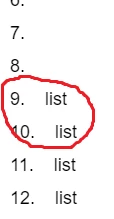
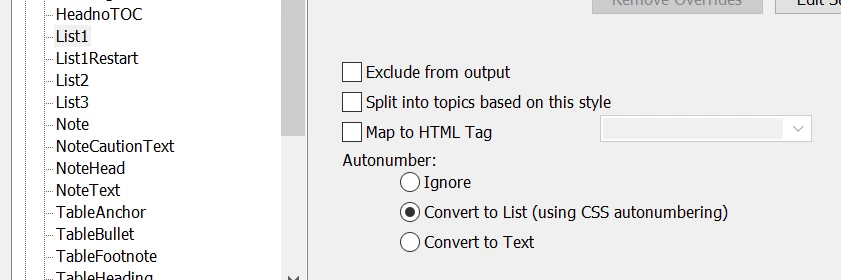
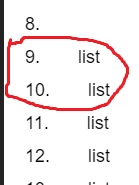
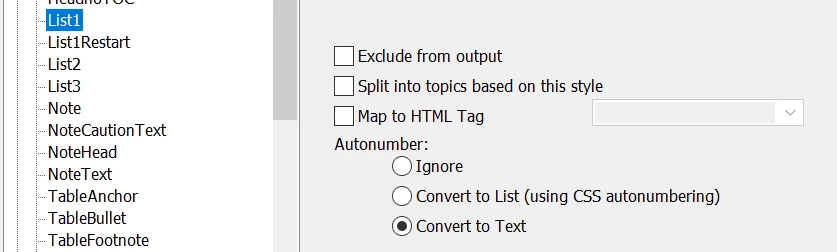
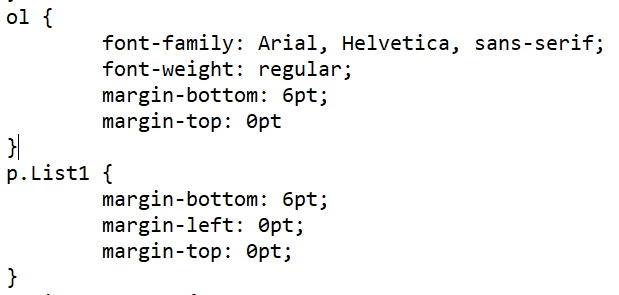
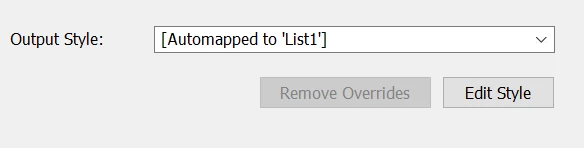
I'm trying (with my very limited HTML abilities) to create a custom .css for my Responsive HTML5 output but at the moment, numbered lists are defeating me. If I select Convert to Text for my list style  then I get this in the HTML output. . If I select Convert to List then I get this in the HTML output . Essentially the same, except a bigger gap after the number in the list. My .css looks like this . If I change p.List1 to li.List1 then FM can no longer see the List1 style here . I'm hoping someone can tell me what I need to change in either my .css or the selections on the FM Publish Settings to sort this out. 
    This topic has been closed for replies.
    Correct answer ArmadilloC

    In late breaking news, I've managed to get the latest version of FM and this issue is sorted now. Hooray!

    6 replies

    ArmadilloCAuthorCorrect answer
    Inspiring
    September 6, 2024

    In late breaking news, I've managed to get the latest version of FM and this issue is sorted now. Hooray!

    Jeff_Coatsworth
    Adobe Expert
    September 6, 2024

    FM2022 patch 4? Using p or HTML ol/li elements?

    milliee62922081
    Participating Frequently
    September 8, 2024

    Hi Jeff, this is the OP on my home account. Yes, the latest 2022 version. I ended up following the instructions in the link you posted https://techcommtools.com/fm-publishing-html5-lists/. Even doing that with the old FM version was giving fairly rubbish results though and have improved enormously with the version upgrade. As you can see in the excerpt I've posted below from your link, FM no longer provides an option to use ol/li elements. Everything maps to p elements instead. 

    Matt-Tech Comm Tools
    Adobe Expert
    June 17, 2024

    If your HTML list is using p elements, you may not ever be happy with your results, as you are trying to use paragraphs to manage your items.

    Think of it the same as if you manually typed in your list numbers in your FrameMaker list...


    Instead, map your content to HTML lists, which allows you to format your LI elements inside your OL elements as you would in a normal HTML file.

    You may need to customize the CSS, but getting the proper nested LI inside the OL is the first step.


    -Matt SullivanFrameMaker Course Creator, Author, Trainer, Consultant
    Inspiring
    June 18, 2024

    If you're able to provide detailed instructions on how to do that, that'd be great. As far as I can tell, it's not possible.

    Adobe Expert
    June 18, 2024

    Hi @ArmadilloC 

    You need to define the unordered and ordered paragraph styles as "lists" like this:

    When you publish as HTML5, FrameMaker will generate a folder structure, where the published output resides. The output folder will be named after your job, so the job folder may, for instance, be "SystemManualTemplate".

    Inside that folder, we will find the HTML5 folder. And inside the HTML5 folder, we will find the actual topics.

    In the topics folder we will find the css file belonging to the topic.

    the css file can be opened in a text editor and willl look somewhat like this. I have marked the List css properties

    You can work both ways now. You can copy out the css file into another directory and edit it. And copy it into the HTML5 topics folder and watch how the formatting changes.

    OR - which is what I prefer, keep all the editing in FrameMakers HTML5 editor. Keeping an eye on the actual generated code, can be very practical, though.


    Bjørn Smalbro - FrameMaker.dk
    Adobe Expert
    June 10, 2024

    I just did a test and converted a copy of one of my files to HTML5.

    I applied an "instruction" paragraph format to about 40 paragraphs. And it looks great without customizing anything.

    The CSS code for this instruction paragraphs is:

    p.instruction {
    margin-left:14.17pt;
    margin-right:0.00pt;
    margin-top:4.00pt;
    margin-bottom:4.00pt;
    text-align:left;
    text-indent:-14.17pt;
    line-height:12.00pt;
    word-spacing:0.25em;
    hyphens:auto;
    direction:inherit;
    color:#000000;
    font-family:"Open Sans Light";
    font-size:10.00pt;
    font-weight:300;
    font-style:normal;
    background-color:transparent;
    text-decoration:none;
    letter-spacing:0.00em;
    font-stretch:normal;
    text-transform:none;
    font-kerning:none;
    counter-increment:I_1;
    }

    The HTML code of one of the paragraphs is e.g.:

    <p class="instruction" id="12868654"><span class="numbering">14<span style="padding-right:4pt ;">&#8203</span></span>Status monitor&#x3A; with LED</p>

    The indentation is not interrupted as in your screenshot.

    Therefore, can you go back and start with a new sts file and see, what FrameMaker does with your list.

    Then you can start customizing.

    Inspiring
    June 11, 2024

    Winfried, can I ask if you have this selected?  and which option you have selected here? . I'm starting to think this is actually a FM bug because the numbers should automatically be right aligned, but they're not.

    Adobe Expert
    June 11, 2024

    Yes. Convert to Text is selected.


    And Automap Paragraph Styles is not selected.

    Adobe Expert
    June 7, 2024

    I believe it is because you are not using tabs. This is a screen dump from the Extra Anejo template:

    ... and this is from the corresponding FM file. I am using tabs after the autonumbers.


    Bjørn Smalbro - FrameMaker.dk
    Inspiring
    June 9, 2024

     I am using tabs for that style.

    Jeff_Coatsworth
    Adobe Expert
    June 7, 2024

    Have you tried using the option to map to an HTML element? I would go mapping my FM lists to an ol tag in the HTML. Then you can concentrate on the styling of them in the CSS.

    Inspiring
    June 9, 2024

    "I would go mapping my FM lists to an ol tag in the HTML." Yes, this is what I'd like to do. Are you able to provide detailed advice on how to do that? I've been creating and importing a .css to do just that but I'm having the issue detailed in my question.

    Jeff_Coatsworth
    Adobe Expert
    June 10, 2024

    I think you'd do that by selecting the "Map to HTML Tag" option in that screenshot you posted.

    Adobe Expert
    June 7, 2024

    Hi,

    As far as I remember, FrameMaker/HTML5 uses spaces to create the gap between the number and the text. Can you check this?

    You might get better results, when you change your numbering in your FrameMaker file from e.g. <n+>\t to <n+> and a single space. Then the conversion will not replace the tab with several spaces, but only one.

    Best regards, Winfried

    Inspiring
    June 9, 2024

    Using a space instead of a tab then causes the same issue in the PDF output and didn't fix the HTML unfortunately

    Adobe Expert
    June 10, 2024

    You can ignore the PDF output here. You would use formats either for PDF or HTML5 and when you want to export to the other, import those format into your FrameMaker files.

    The goal here is to get a fix for your HTML5 output.