


Known Participant
June 11, 2021
Answered

Page break within table row

  • June 11, 2021
  • 2 replies
  • 680 views

Hi!

I have a table with quite a long row. I want to allow a page break within the row, i.e. allow the row to continue on the next page, without the whole row to jump to the next page, leaving a big white space on the previous page. How can I achieve this?
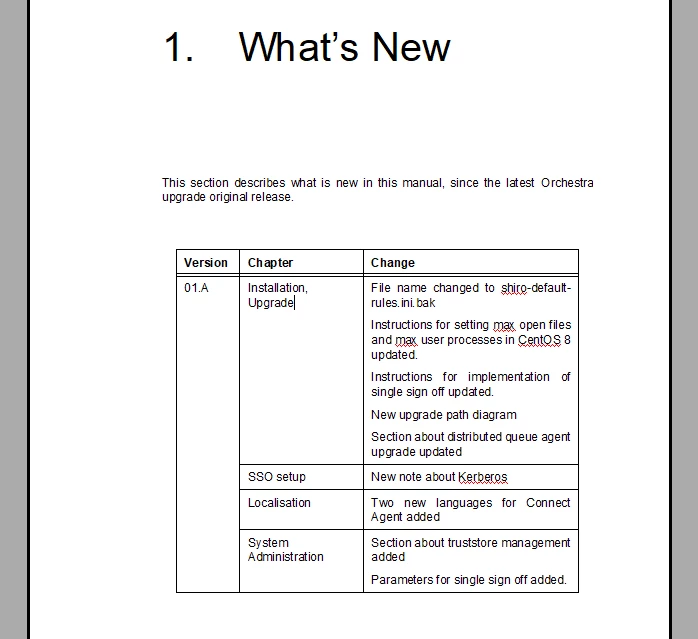
I have used Straddle in the "Version" column to merge cells.
    This topic has been closed for replies.
    Correct answer frameexpert

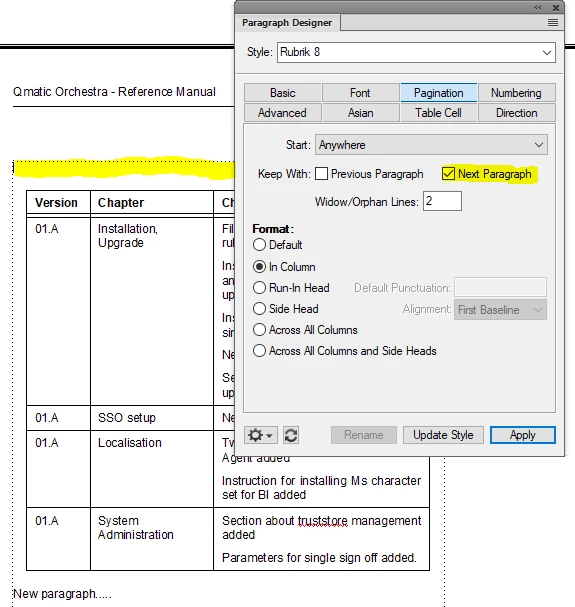
    The paragraph that your table is anchored in is set to Keep With Next Paragraph and that is pulling the entire table to the next page.


    2 replies

    frameexpert
    Community Expert
    June 11, 2021

    Can you post a link to your FrameMaker document?

    Known Participant
    June 11, 2021
    Known Participant
    June 11, 2021

    Sorry here:

    https://www.dropbox.com/s/7vxuaum98f7pxu9/00_03%20WhatsNew.fm?dl=0


    I actually managed to make it work by removing the paragraph after the table. But I want to be able to have a paragraph there...

    Community Expert
    June 11, 2021

    In FrameMaker table rows cannot split to several pages.

    You must unstraddle the cell in your first column and straddle only the rows of the first page.

    Known Participant
    June 11, 2021

    Ok, good to know. So I tried to unstraddle the row I want as the first row on the next page. But the first rows still jump to the next page.

    • I have check that Keep with next/previous page in unchecked
    • Orphan rows is set to 1


    https://www.dropbox.com/s/31k5zhe6y6dagvz/Recording%20%236.mp4?dl=0


    I might be missing something obvious here

    frameexpert
    frameexpertCorrect answer
    Community Expert
    June 11, 2021

    The paragraph that your table is anchored in is set to Keep With Next Paragraph and that is pulling the entire table to the next page.