


QuintinSeegers
Legend
November 24, 2021
Question

PDF Bookmarks no longer useful after changing to Structured FM (FM2019)

  • November 24, 2021
  • 3 replies
  • 1466 views

We previously used Unstructured FrameMaker. Our Table of Content was generated using Paragraph Styles. Whenever we converted our documents to PDF and opened the PDF in Acrobat Reader, the bookmarks appeared like this:
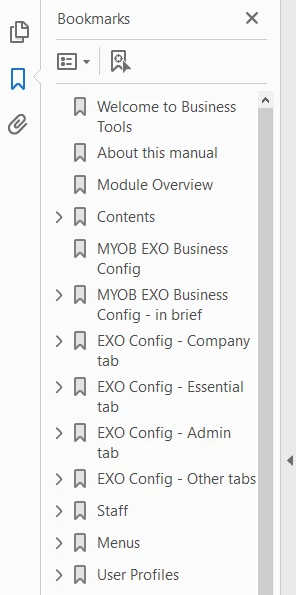
 

Clicking on the bookmark would take you to the corresponding page in the document.


We have since moved to Structured FrameMaker. Our Table of Content is now based on Element tags instead. When we convert our documents to PDF and open the PDF in Acrobat Reader, the bookmarks appear like this:
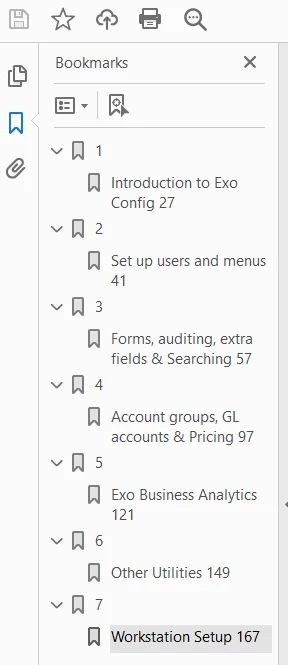
 

Clicking on any of the bookmarks takes you to the location in the Table of Content, not the corresponding content page in the document. (Incidentally, clickin on the topic in the Table of Content does take you to the corresponding content page in the document.)


We are creating PDFs using the Save as PDF option. (Don't like that using Publish option because it creates a sub-folder in our selected destination folder to save the generated PDF file to, rather than saving it to our selected destination folder.)

    This topic has been closed for replies.

    3 replies

    JonBe
    Inspiring
    December 20, 2021

    Hi Quintin,


    You have had lots of good advice that will hopefully help!


    Bookmarks, sigh! I have spent considerable time over the last several years with bookmarks for structured books. The first issue was that when a customer moved from unstructured, where the number and heading were one paragraph style, to a //no and //heading element with different styles, bookmarks were initially dropped. Then consumers of the PDFs complained, so I wrote code that post processed the bookmarks using Acrobat Pro via a COM interface, to produce the expected, clickable links. Now when I come across PDFs without bookmarks, it is phiff, why not provide them!


    So a bookmark goes from 

    to

    The other issue I have had is that the book file seems to retain information about paragraph styles that gets imported when the components are added. A problem with this surfaced with FrameMaker 2019, where a incorrect bookmark style would get used, despite going through the PDF properties for the book and all of the components and setting them correctly. In the end, I created an Extendscript to run over all the document templates to set DocAcrobatElements to the desired elements and iterate over all the paragraph styles to set AcrobatLevel and PDFStructureLevel as required. Then updating the associated book allowed bookmarks to be generated correctly.


    As you can see I both love and loathe bookmarks!


    Good luck!


    Jon

    frameexpert
    Community Expert
    Community Expert
    December 20, 2021

    On another note: Adobe delivered a brand new PDF engine with the FrameMaker 2019 release. It is no longer PostScript based so they eliminated the ability to use PostScript text frames. (They put a legacy "Use Acrobat Distiller" setting in the Publish panel; see the screenshot.)


    I had written several scripts for clients that built custom bookmarks and put the bookmark code in a PostScript textframe. That ability is now gone unless the setting above is used. I argued against this during the pre-release and I had to demo the usefulness of PostScript text frames to the engineering team.


    Of course, the new PDF engine has the ability to add bookmarks by some internal method and Adobe should expose it somehow to the FDK/ExtendScript (and by extension, FrameScript). They have already done so with page cropping, which I won't detail here.

    JonBe
    Inspiring
    December 21, 2021

    Thanks Rick,


    I never clocked the change as we were always going to use Distiller, so it was always set. I never really liked the Publish concept, tho I guess it ties together other ways to output from FrameMaker.


    I think it would be a lot easier if Adobe exposed ways of generating bookmarks that provide more flexibility than the current single element or paragraph style approach. Not everyone has Acrobat Pro installed to use the COM based approach I used, or the coding skills/experience.


    Jon

    Community Expert
    November 25, 2021

    Your screenshot indicates that there are two paragraphs or elements for the PDF bookmarks.

    And when the bookmarks take you to the TOC, then the wrong paragraphs or elements are selected.

    Rick told you how to change this in the PDF Setup.


    Yes. You can use this as default when you use this book as basis for others, but a change in one book will not change this in other existing books.

    I have a template book (with title, copyright, TOC, some default content files, index, back) in which everything is set up correctly. Just change this in your template.

    QuintinSeegers
    Legend
    November 25, 2021

    We, too, use a template book with default documents/settings, so it will work for new manuals. Unfortunately, it looks like we will need to manually update the PDF settings on our existing training manuals. Fortunately we are going through a rebranding process, so all our training materials have to undergo a review, so I can use this opportunity to fix the PDF settings in our existing manuals.


    frameexpert
    Community Expert
    Community Expert
    November 24, 2021

    You can use Format > Document > PDF Setup to set which elements appear as bookmarks. You should be able to do this a the book level as well.


    Also, if you EDD calls paragraph formats in your template, you can still use paragraph formats as your bookmarks. In the PDF Setup dialog box, just choose Paragraphs from the Bookmark Source dropdown list.


    QuintinSeegers
    Legend
    November 30, 2021

    After changing the PDF Setup to the following:

    bookmars are still not appearing/functioning correctly. Previously the bookmarks listed the topics in the correct hierachical structure, each bookmark directing to the corresponding page in the content. Now it's just a flat list of topics (instead of the hierarchical Element structure) that redirects back to the topic listing in the Table of Content, not the corresponding page in the document.

    QuintinSeegers
    Legend
    December 1, 2021

    Hi,


    I do not know about the setup in structured FrameMaker. Obviously these buttons to change the hierarchy are only available for paragraphs, but not for elements.

    In Bookmark source you should select paragraphs instead of elements (as Rick suggested). Then you will get these buttons below the paragraph list.


    Best regards


    Winfried


    The only Paragraph Styles we have are those used for the Table of Content, and some static text on our master pages. All other formatting is determined by the Elements. (We've gone this route because some of our writers have a tendancy to overwrite the styles and therefore not comply with our design guidelines.)

    I'll have a bit more of a play to see if I can get some sort of acceptable result.