


QuintinSeegers
Legend
November 24, 2021
Question

PDF Bookmarks no longer useful after changing to Structured FM (FM2019)

  • November 24, 2021
  • 3 replies
  • 1466 views

We previously used Unstructured FrameMaker. Our Table of Content was generated using Paragraph Styles. Whenever we converted our documents to PDF and opened the PDF in Acrobat Reader, the bookmarks appeared like this:
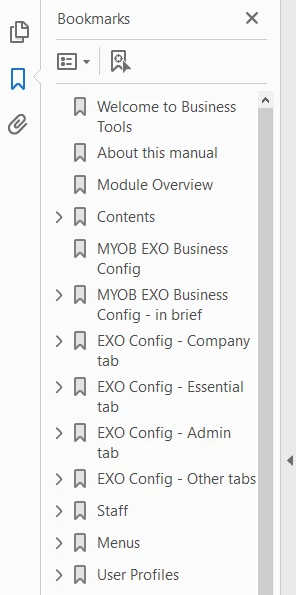
 

Clicking on the bookmark would take you to the corresponding page in the document.


We have since moved to Structured FrameMaker. Our Table of Content is now based on Element tags instead. When we convert our documents to PDF and open the PDF in Acrobat Reader, the bookmarks appear like this:
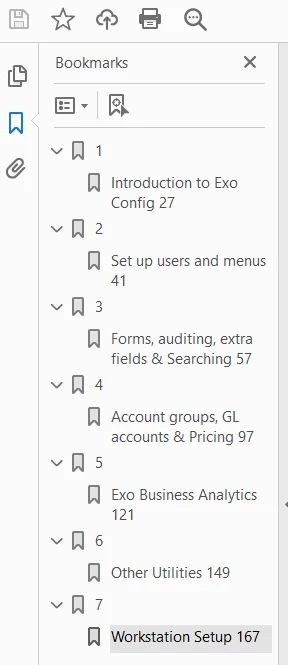
 

Clicking on any of the bookmarks takes you to the location in the Table of Content, not the corresponding content page in the document. (Incidentally, clickin on the topic in the Table of Content does take you to the corresponding content page in the document.)


We are creating PDFs using the Save as PDF option. (Don't like that using Publish option because it creates a sub-folder in our selected destination folder to save the generated PDF file to, rather than saving it to our selected destination folder.)

    This topic has been closed for replies.

    3 replies

    JonBe
    Inspiring
    December 20, 2021

    Hi Quintin,


    You have had lots of good advice that will hopefully help!


    Bookmarks, sigh! I have spent considerable time over the last several years with bookmarks for structured books. The first issue was that when a customer moved from unstructured, where the number and heading were one paragraph style, to a //no and //heading element with different styles, bookmarks were initially dropped. Then consumers of the PDFs complained, so I wrote code that post processed the bookmarks using Acrobat Pro via a COM interface, to produce the expected, clickable links. Now when I come across PDFs without bookmarks, it is phiff, why not provide them!


    So a bookmark goes from 

    to

    The other issue I have had is that the book file seems to retain information about paragraph styles that gets imported when the components are added. A problem with this surfaced with FrameMaker 2019, where a incorrect bookmark style would get used, despite going through the PDF properties for the book and all of the components and setting them correctly. In the end, I created an Extendscript to run over all the document templates to set DocAcrobatElements to the desired elements and iterate over all the paragraph styles to set AcrobatLevel and PDFStructureLevel as required. Then updating the associated book allowed bookmarks to be generated correctly.


    As you can see I both love and loathe bookmarks!


    Good luck!


    Jon

    QuintinSeegers
    Legend
    December 20, 2021

    @JonBe 

    We ended up removing the bookmarks because they're a complete mess with Structured FM using Elements. We deliberately made the decision to remove the paragraph styles and use FormatChangeLists in our EDD because some of our writers like to format things 'their way' and not comply with our corporate style guide, so using Paragraph Styles fore the Table of Content is not an option anymore.


    I'm completely unfamiliar with writing scripts for FM (and am hesitant to do so). Getting someone external to write one for us, or to purchase one from a developer, is outside of our budget, unfortunately.


    It would be nice if you had the same functionality in the PDF setup to set the bookmark level, like you can with Paragraph styles (or have some sort of hierarchy setup of the bookmarks for PDF).

    4everJang
    Legend
    December 21, 2021

    Have to get our writers used to using Structured FM, working with Elements instead of Paragraph/Character Styles first.

    Having spent 6 months investing in converting to Structured FM, going the full XML path is another project several months down the track. It would require extensive work as we'll need to write the translation to XML ourselves. (I have made attempts to convert our EDD to DDT, but ran into several errors with no indication of what the actual problem is or how to resolve it.)

    One of the reasons we moved away from using Paragrah Styles was that maintaining/updating them was cumbersome and time consuming. The way we designed our FormatChangeLists is that we have a single base format that specifies the standard formatting (alignment, spacing, font, colour, size, etc.). This is used for all Elements. Each Element (where required) has an additional FormatChangeLists to change only those properties needed, e.g. font size, colour, spacing. This way, if we ever need to change font, we only need to change our base FormatChangeList, instead of the 150+ Paragraphs we historically had.

    Moving away from using Paragraph Styles to Elements with FormatChangeList then back to using Paragraph Styles seems a step backwards to me because it opens it up again for our writers to change the Paragraph Styles to suit them, rather than enforcing our corporate styles via ChangeFormatLists against the Elements.


    I do understand your frustration about my suggestion of saving to XML and the extra work that would involve. For my customers I have always started with the XML, then mapped it to the required styles in the EDD, then started the conversion (automated or manual) from unstructured to structured FrameMaker, then got the authors to work with the structured interface. It saves a lot of hassle with the format change lists. Still, to move to XML saved documents it is not required to get rid of the format change lists and move back to paragraph styles. The EDD can remain as it is. The only extras you need are a DTD and a resd-write rules text file. For the authors, nothing changes except the files use the .xml extension rather than .fm

    Community Expert
    November 25, 2021

    Your screenshot indicates that there are two paragraphs or elements for the PDF bookmarks.

    And when the bookmarks take you to the TOC, then the wrong paragraphs or elements are selected.

    Rick told you how to change this in the PDF Setup.


    Yes. You can use this as default when you use this book as basis for others, but a change in one book will not change this in other existing books.

    I have a template book (with title, copyright, TOC, some default content files, index, back) in which everything is set up correctly. Just change this in your template.

    QuintinSeegers
    Legend
    November 25, 2021

    We, too, use a template book with default documents/settings, so it will work for new manuals. Unfortunately, it looks like we will need to manually update the PDF settings on our existing training manuals. Fortunately we are going through a rebranding process, so all our training materials have to undergo a review, so I can use this opportunity to fix the PDF settings in our existing manuals.


    frameexpert
    Community Expert
    Community Expert
    November 24, 2021

    You can use Format > Document > PDF Setup to set which elements appear as bookmarks. You should be able to do this a the book level as well.


    Also, if you EDD calls paragraph formats in your template, you can still use paragraph formats as your bookmarks. In the PDF Setup dialog box, just choose Paragraphs from the Bookmark Source dropdown list.


    QuintinSeegers
    Legend
    November 24, 2021

    I did not know about the PDF Setup (embarrasing to admit for a 10+ years FM user!). Will definately look into that. Can this be set up as a Default?

    frameexpert
    Community Expert
    Community Expert
    November 25, 2021

    This is a document property so it should be preserved when you save the document.