


Inspiring
February 17, 2017
Question

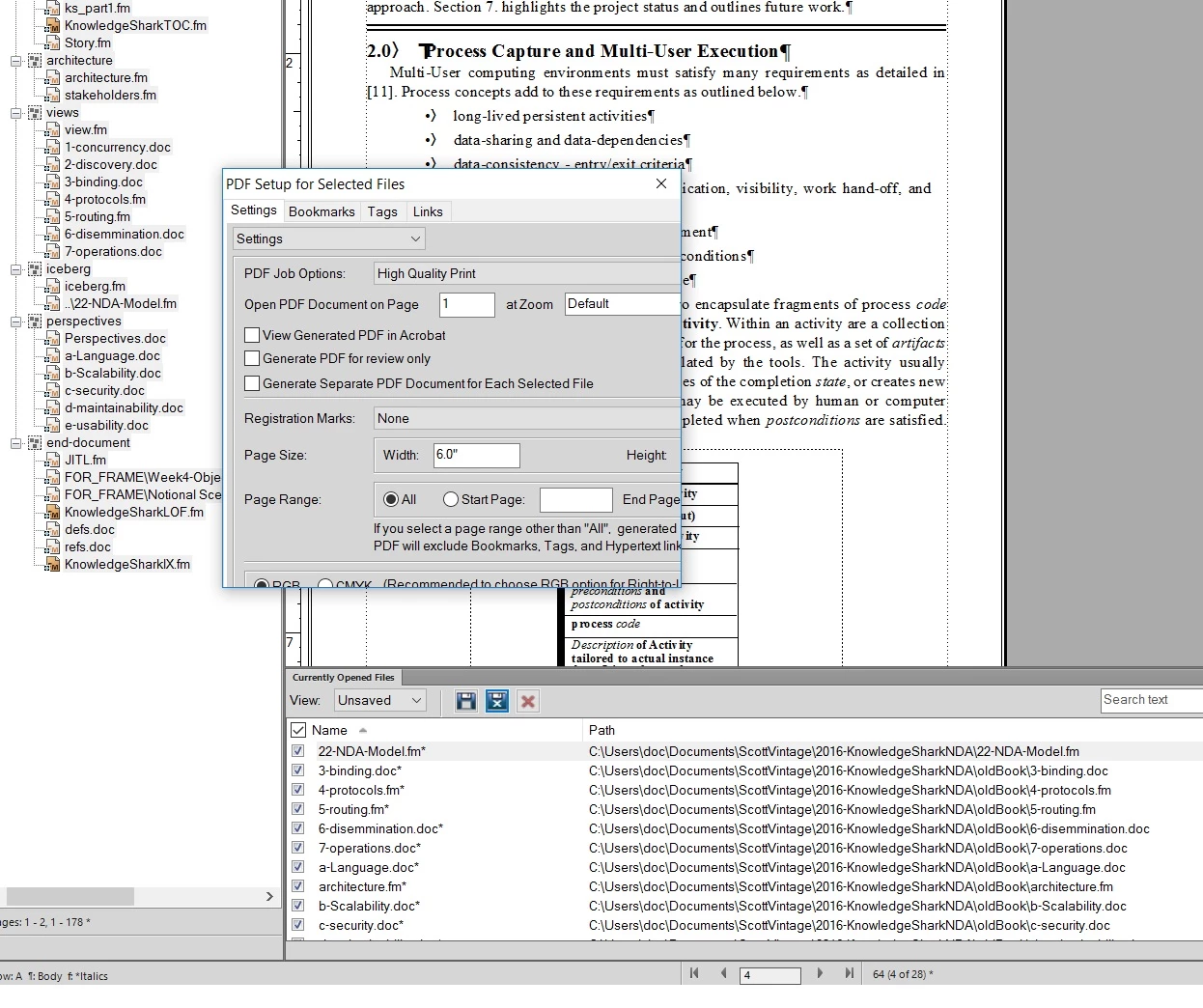
PDF Setup for Selected Files window is cropped, won't resize, cannot set page height
  • February 17, 2017
  • 4 replies
  • 957 views

In FrameMaker 13.0.1.385,  when saving a book as PDF, the "PDF Setup for Selected Files" window shows up as displayed in the enclosed image. This is cropped such that I cannot enter values that are hidden. In particular, the "Height" for the page cannot be modified, something that I need in this case (it's defaulting to 11").

I cannot resize the window. Hitting "CR" will at least perform the next action of creating the PDF.

Help.

thanks,

scott

This topic has been closed for replies.

4 replies

ct84033189
New Participant
December 12, 2018

Version 13.0.5.547 here with the same issue. Any word on a fix?

Jeff_Coatsworth
Community Expert
December 12, 2018

For FM2015? Not a chance now that FM2019 is out, I suspect. I would try the workaround on the shortcut to change the DPI settings for compatibility - that sometimes works on those dialog windows.

Inspiring
February 19, 2017

I actually have tried with all files open and the same results.

I'm wondering if I should create a new book from scratch and add the files back. I just tried that with a new book.

(1) the first print with no files works fine,

(2) as soon as there are 2 files in the book - the same cropped windows shows up.

I also haven't been able to get a single master layout and formats to apply to entire book, but that is a separate issue.

Thanks

Scott

Ps I've been using FrameMaker since about 1987 and still enjoy its power.

Arnis Gubins
Inspiring
February 20, 2017

Hi Scott,

That certainly is weird in your installation, that the book window is smaller for the PDF setup, but not for any individual file. I don't have any such issues in my installations.

Please file this as a bug using the Tracker system [ https://tracker.adobe.com/#/home  ] and provide a link to this thread. Please attach some screenshots showing the different wndow sizes. Also, please turn on your rulers before you take the screenshots, so the relative sizes of the windows can be gauged.

Inspiring
February 19, 2017

Thanks for the reply. Unfortunately I'm not using anything out of the ordinary for the screen. It is not scaled, or greater than HD. I've tried to run on just my laptop for example, and the same things happens.

It seems that only for Books does the PDF setup get sized wrong.

For example, this is for a PDF even for setup of the book - but unfortunately those values for Height don't transfer over to the print of the book.

But once I try to print that book the following screen shows up:

And the resulting PDF is now 8x11.5.

So any more ideas would be appreciated.

Thanks,

scott

Arnis Gubins
Inspiring
February 19, 2017

Try opening all files in the book first - press the Shift key before you select the File menu and you should see the option to "Open All Files in Book".

Now try the PDF Setup for the book.

Inspiring
February 17, 2017

I just upgraded FrameMaker to 13.0.5.547 and it did NOT fix the issue.

If I save a single file to PDF the window shows up correctly. But printing an entire book won't let me change the Height as it's hidden. I had hoped that setting the height in the single file would stay when I printed the entire book but that didn't work.

So I still have the same issue where I cannot set the Height.

thanks,

scott

Arnis Gubins
Inspiring
February 17, 2017

Are you using system scaling greater than 100% and are you using a high-res (i.e. greater than HD) monitor?