



Question
PDF Setup Window is truncated
Hello. I am using FM 2015 in a Windows 10 environment.
I have set my printer to Adobe PDF and have opened all the files in a book containing about 20 files.
When I put the cursor in an open file and select Save as PDF, the PDF Setup window is truncated:
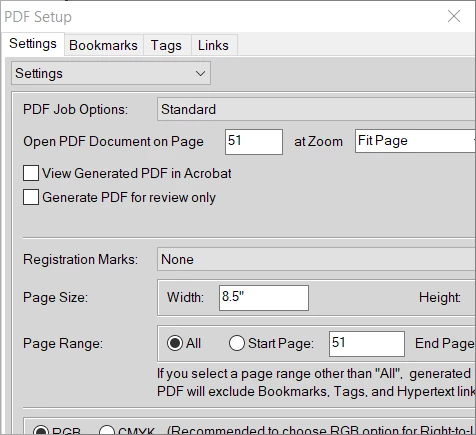
I can't grab the edge of the window to expand it.
When I select the book file and select Save as PDF, I get the full PDF Setup for Selected Files window with no problem.
I note that someone wrote in with the same problem but opposite behavior back in February of 2017. That person had a corrupted PDF setup window for the book file and got the correct window for the individual .fm files. A resolution was never posted.
Any ideas as to why this is happening and how to stop it? Thanks.
 AdChoices