Known Participant
April 2, 2019
Answered

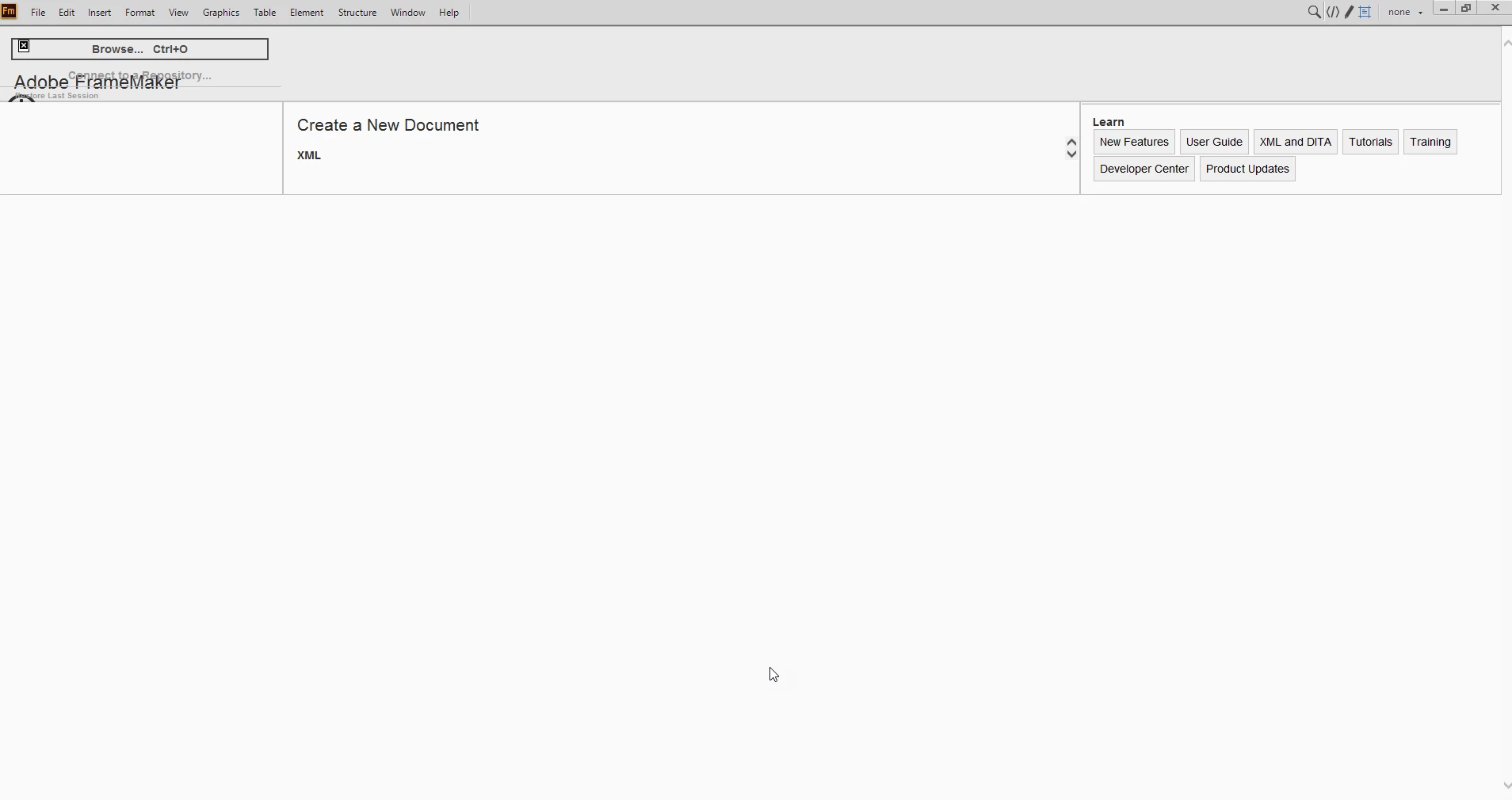
Pre-FrameMaker 2020 Welcome screen not displaying properly

  • April 2, 2019
  • 6 replies
  • 10153 views

Hi everyone,


I am using FrameMaker release 2017 (version 14.0.4.511) and the welcome screen is displaying like this:


I'm using a work computer so I don't know if they have customized any setting. Here are some of my computer specs I do know:

  • Windows 10 Enterprise, version 1803
  • 64-bit operating system, x64-based processor


Any idea on how I can fix this issue?


Thanks!

This topic has been closed for replies.
Correct answer A.Kawa

Hi everyone,

for the reason I am using DITA and up to now have not managed to update FM (15.0.4.701) to the latest version, I had the same overlaying marketing window problem. Right-click "Back" or Shift+Mouswheel worked, but still the "recent documents" list remained empty.

Research in these forums, editing files and testing I found 'my' solution – maybe there are others with similiar setting, so I like to share here:


1. Comment out in

c:\Users\<yourname>\AppData\Roaming\Adobe\FrameMaker\15\resources\welcomeScreen\welcome.html

line 63: <!-- <h5><span id="DITA_Standard">(DITA-1.2)</span> <a id="FM_DITA_OPTIONS" href="http://fm-welcomescreen/?cmd=newxml-dita-options" class="">DITA-Version &auml;ndern</a></h5> -->

(Thanks to K.Daube for the tip!)


2. Comment out in same folder

c:\Users\<yourname>\AppData\Roaming\Adobe\FrameMaker\15\resources\welcomeScreen\script.js

line 28-37:

//function ClearMarketingContent() {
// ClearListEntries("marketing");
//}


//function AddMarketingContent(source) {
// var item = document.createElement("iframe");
// item.src=source;
// item.className = "iframemarketing";
// document.getElementById("marketing").appendChild(item);
//}


Finally I got a normal working startscreen with the "recent documents" populated.

 

6 replies

A.KawaCorrect answer
New Participant
March 10, 2022

Hi everyone,

for the reason I am using DITA and up to now have not managed to update FM (15.0.4.701) to the latest version, I had the same overlaying marketing window problem. Right-click "Back" or Shift+Mouswheel worked, but still the "recent documents" list remained empty.

Research in these forums, editing files and testing I found 'my' solution – maybe there are others with similiar setting, so I like to share here:


1. Comment out in

c:\Users\<yourname>\AppData\Roaming\Adobe\FrameMaker\15\resources\welcomeScreen\welcome.html

line 63: <!-- <h5><span id="DITA_Standard">(DITA-1.2)</span> <a id="FM_DITA_OPTIONS" href="http://fm-welcomescreen/?cmd=newxml-dita-options" class="">DITA-Version &auml;ndern</a></h5> -->

(Thanks to K.Daube for the tip!)


2. Comment out in same folder

c:\Users\<yourname>\AppData\Roaming\Adobe\FrameMaker\15\resources\welcomeScreen\script.js

line 28-37:

//function ClearMarketingContent() {
// ClearListEntries("marketing");
//}


//function AddMarketingContent(source) {
// var item = document.createElement("iframe");
// item.src=source;
// item.className = "iframemarketing";
// document.getElementById("marketing").appendChild(item);
//}


Finally I got a normal working startscreen with the "recent documents" populated.

 

Matt-Tech Comm Tools
Community Expert
February 24, 2022

Repeated from other similar threads...

Shift+Scroll restores the original size to the Welcome screen in Fm 2019.

I noticed I need to do this each time I close all windows and redisplay the Welcome screen.

Annoying, but at least it restores functionality until Adobe provides more insight.


-Matt

-Matt SullivanFrameMaker Course Creator, Author, Trainer, Consultant
Bob_Niland
Community Expert
February 24, 2022

When I started FM2019 a few days ago (for the first time in a while), it had the oversize icons problem.

When I started it today, it was back to normal.

Whether or not it's part of this particular problem, Adobe has got to move off using MSIE. I'm surprised it's still installed on Win10 (is it even provided on Win11?), and MS might be expected to do more and more to "encourage" people to stop relying on MSIE.

Ideally, FM would be browser-agnostic, but needs to provide some way for people to avoid MS & Edge churn wherever possible, esp. if FM is going to have wider platform support at some point.

Be.eM
Inspiring
February 25, 2022

I don't understand the need for an integrated browser application to a) log into FrameMaker/register and b) displaying varying web content within FrameMaker at all. Why rely on a separate application for displaying web content? And why the MS Internet Explorer, which has been outdated, sub-par and flakey for decades? I was totally happy with the browser-free FM versions 3-13…

pulkitn
Adobe Employee
Adobe Employee
February 23, 2022

We are looking into this with reference : 11369 ,

Will get back with more details .


-Pulkit Nagpal

-FM & FMS Engg.

New Participant
February 23, 2022

Is it me or is Adobe framemaker having major issues first you have to use the install file from 2020 to install a latest version of 2019 now the zoomed start screen again. Come on this is not helping!

Have the same problem btw!!!!

All nice to open some files and correcting some script but it should be working from Adobe.

pulkitn
Adobe Employee
Adobe Employee
September 18, 2019

Hi WJAlison,
FrameMaker uses Internet explorer browser support for Welcome screen Html.

Could you please review your security settings in IE?
and are you able to see Welcome screen present at "c:\Program Files\Adobe\Adobe FrameMaker 2019\fminit\dws\resources\welcomeScreen\welcome.html" correctly in IE?


February 5, 2020

I'm experiencing the exact same thing. For me, welcome.html displays fine in IE, Edge, Firefix and Chrome. What I see in FrameMaker, is very similar to the image posted by the OP

Ran_techwriter
Inspiring
May 13, 2020

After FM 2019 update to 15.0.5.838, I'm still experencing this issue. Does anybody help me???


The update to 15.0.5.838 has nothing to do with resolution of this issue. I submitted a Help request to Adobe support this morning, and they are reviewing it as of this writing. 

Barb Binder
Community Expert
April 4, 2019

Did any of the above suggestions work for you, WJAlison?

~Barb

~Barb at Rocky Mountain Training
WJAlisonAuthor
Known Participant
April 4, 2019

Not yet. I'm experiencing some other problems with the software, so it could be a firewall issue at our end. I'll update once we test that.

New Participant
June 28, 2019

having the same issue and wondering if you ever found a resolution?

Jeff_Coatsworth
Community Expert
April 2, 2019

Did it just start doing this? Could be a messed up C:\Users\user_name\AppData\Roaming\Adobe\FrameMaker\version folder - try renaming it to like \2017_old and restart FM. It should recreate it.

WJAlisonAuthor
Known Participant
April 2, 2019

I previously was on a Windows 7 machine and I got the same thing. I assumed the issue would be resolved once I switched to Windows 10 because I have Windows 10 at home and it looks fine on my personal subscription.

I don't even get an option for AppData following the path above.

Jeff_Coatsworth
Community Expert
April 2, 2019

It's a hidden folder, so you'll need to change your File Explorer View settings