


Inspiring
May 4, 2016
Question

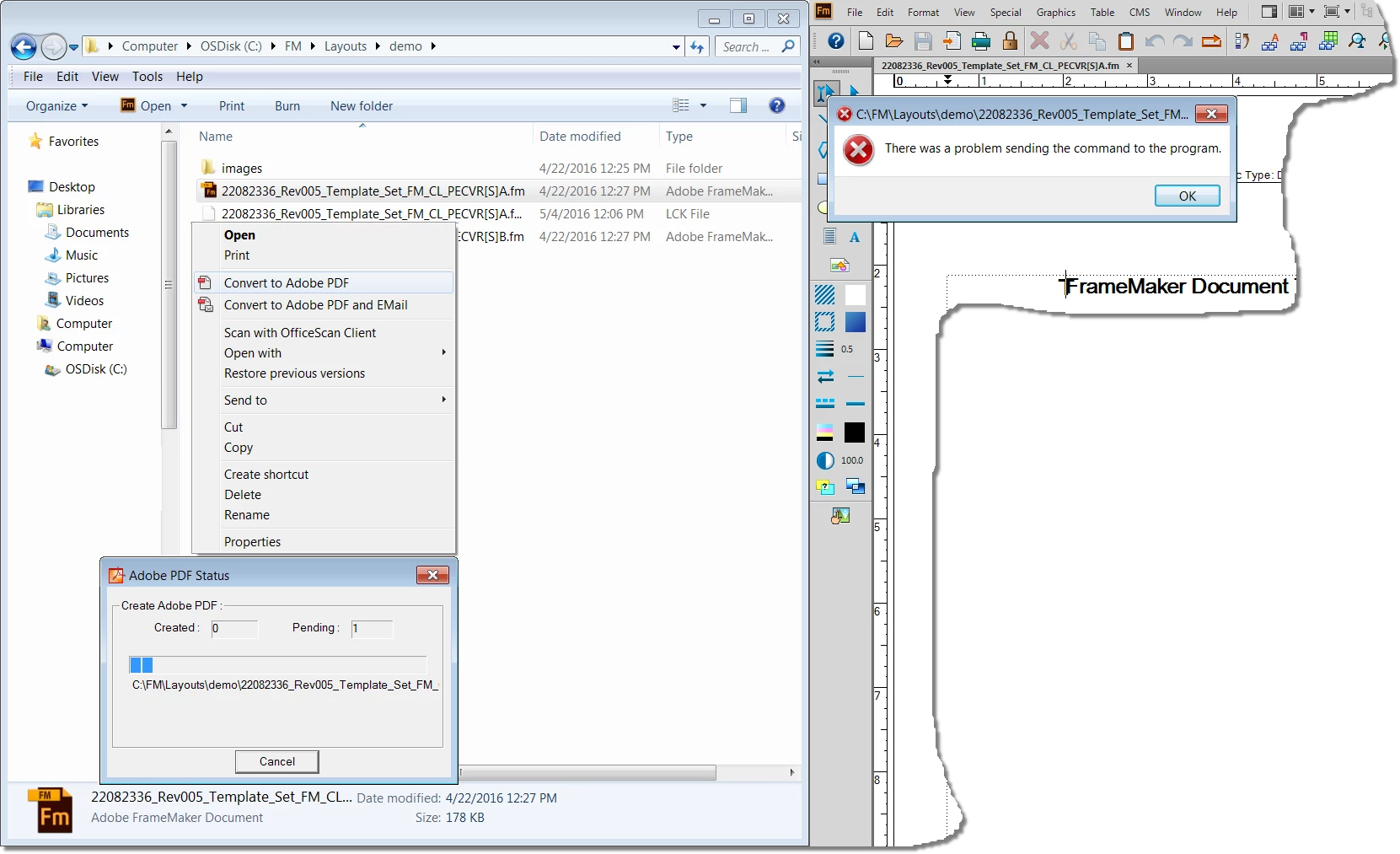
Problem: Acrobat DC: Windows Explorer: right-click/Convert to...: "...problem sending the command..."

  • May 4, 2016
  • 3 replies
  • 3352 views

I am using TCS 2015 on a 64-bit Win 7 box with 32 GB RAM.

My workflow includes using Windows Explorer shortcuts to create PDFs from .fm files using either/or "Convert to Adobe PDF" or "Convert to Adobe PDF and EMail".

Using either of those commands in Windows Explorer results in the error "There was a problem sending the command to the program", "the program" apparently being either/both FrameMaker 2015 and/or Acrobat DC (or Adobe PDF/Adobe Acrobat Distiller DC).

FrameMaker starts as it should, and the file loads as it should, but apparently when FM calls Acrobat, it can't start as it should.

I am a week out from a critical deadline of an internal workflow document discussing that exact functionality.

If anyone knows the answer, it would be of GREAT interest to me...

Thanks!
    This topic has been closed for replies.

    3 replies

    Inspiring
    May 8, 2016

    I am not sure who marked this thread as "Assumed Answered," but that is not correct.

    This question is definitely NOT answered.

    I have confirmed (by testing trial installations) that this functionality is broken. I will log a bug this morning.

    Community Manager
    May 6, 2016

    Hi ,

    Would request you to open the file in Frame maker, then File > Print > under printer list select 'Adobe PDF' Printer .

    then check how it works.

    Regards,

    Yatharth

    Inspiring
    May 6, 2016

    That's not a problem. It works. It's only processing a PDF through Windows Explorer that stopped working (per the screen shot).

    I checked with Adobe Systems, and this functionality is still supported in TCS...

    ...so something is broken...

    I also have double-checked that the related .dll files are registered, so that's not the problem.

    Thanks for trying Yatharth...

    Inspiring
    May 6, 2016

    Hi Burtin,

    You are trying to convert FrameMaker project file and this is not correct workflow to convert FrameMaker file. Project file has other files linked to it, like images and other stuff which are not loaded unless you render the project in FrameMaker.

    So to convert the FrameMaker file to PDF. You have to open the project file in FrameMaker and have to use Save to PDF option or print to pdf.

    Regards,

    Tariq Ahmad. 


    Hello again, Tariq.

    When did this change? This functionality has been around for quite a while.

    I have done it literally hundreds of times.

    Burtin

    Community Manager
    May 6, 2016

    Hi ,

    Would like to inform that this could be due to the compatibility issues of file maker files with Acrobat Program , as they are not supported with Acrobat Program.

    Please refer to this article for the same :- Supported file formats in Acrobat and Reader

    Regards,

    Yatharth 

    Inspiring
    May 6, 2016

    Thank you for responding, Yatharth; however, this answer is completely incorrect.

    The issue has absolutely nothing to do with FileMaker, and nowhere in in my post is that application mentioned.

    The problem is that functionality that has been supported in the past (and according to Adobe, still) in TCS-family applications (like Acrobat and FrameMaker), is broken, and it is a critical part of some peoples' critical workflows (like mine).

    For me, one of those critical workflows is being able to right-click and process a legitimate, current FrameMaker file through the Acrobat-family's applications, which is supposed to call FrameMaker, processes the file, and produce a PDF--and it no longer does that.

    Notice in the relevant screen shot that the identifying markers (icons, text, etc.) are all identified as Adobe Systems products.

    Checking with Adobe Systems

    Please read postings carefully before you respond. Wrong answers do not help anyone.