


Known Participant
November 12, 2025
Question

Punctuation characters are replaced with their Hex equivalents in Responsive HTML5 search result

  • November 12, 2025
  • 4 replies
  • 85 views

I just updated to Frame's version 17.0.8.853 (the latest)..

I'm outputting to Responsive HTML5.

When I specify a term in search that returns instances of Heading1 and Heading2 that contain a comma, colon, pipe, those characters appear as their Hex equivalent. 

For example, the Heading1 paragraph style that reads "Log In | Change Password: Overview" on the page appears as "Log In | Change Password: Overview." 
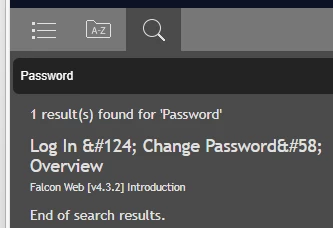
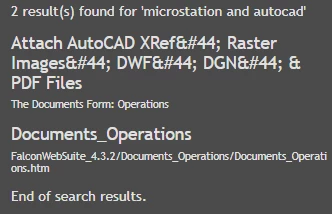
Also related to Search, in some instances a result item includes the file name and its path. In this case, not only does the Header1 entry show Hex equivalents, that entry is followed by the containing file's name and path specification.


    4 replies

    Community Expert
    November 13, 2025

    Hi, 

    I would assume that this is not something which you can fix yourself, but a bug. I remember that there were similar text issues in HTML5.

    If you do not find a solution, report this issue with a link to this thread in the Adobe tracker:

    https://tracker.adobe.com/

    Hopefully Adobe will then fix this sometime.

    Best regards, Winfried 

    Community Expert
    November 13, 2025

    I think we need some more details regarding font use. I made a mini test here:


    Bjørn Smalbro - FrameMaker.dk
    Community Expert
    November 13, 2025

    What do you use in your original document and what font do you use in the HTML5 publishing output? And what characters are being misinterpreted here?

    Bjørn Smalbro - FrameMaker.dk
    Jeff_Coatsworth
    Community Expert
    Community Expert
    November 13, 2025

    Looks like #124 is the vertical bar/pipe symbol - the #58 is the colon. The #44 are all commas.

    Jeff_Coatsworth
    Community Expert
    Community Expert
    November 12, 2025

    I'm presuming that this wasn't happening on the same content with earlier builds? If so, then I think you really need to contact the FM folks - see https://helpx.adobe.com/contact/enterprise-support.other.html#framemaker for your Adobe Support options. I'd recommend using the tcssup@adobe.com e-mail address as it reaches a team dedicated to Technical Communication Suite products including FrameMaker.

    synnottAuthor
    Known Participant
    November 12, 2025

    You're presumption is correct. I'll follow your recommendation. Thanks for the response.

    Jeff_Coatsworth
    Community Expert
    Community Expert
    November 20, 2025

    @synnott did you figure out what was going on?