Inspiring
October 29, 2023
Answered

question about table of contents

  • October 29, 2023
  • 25 replies
  • 2306 views

Hello,

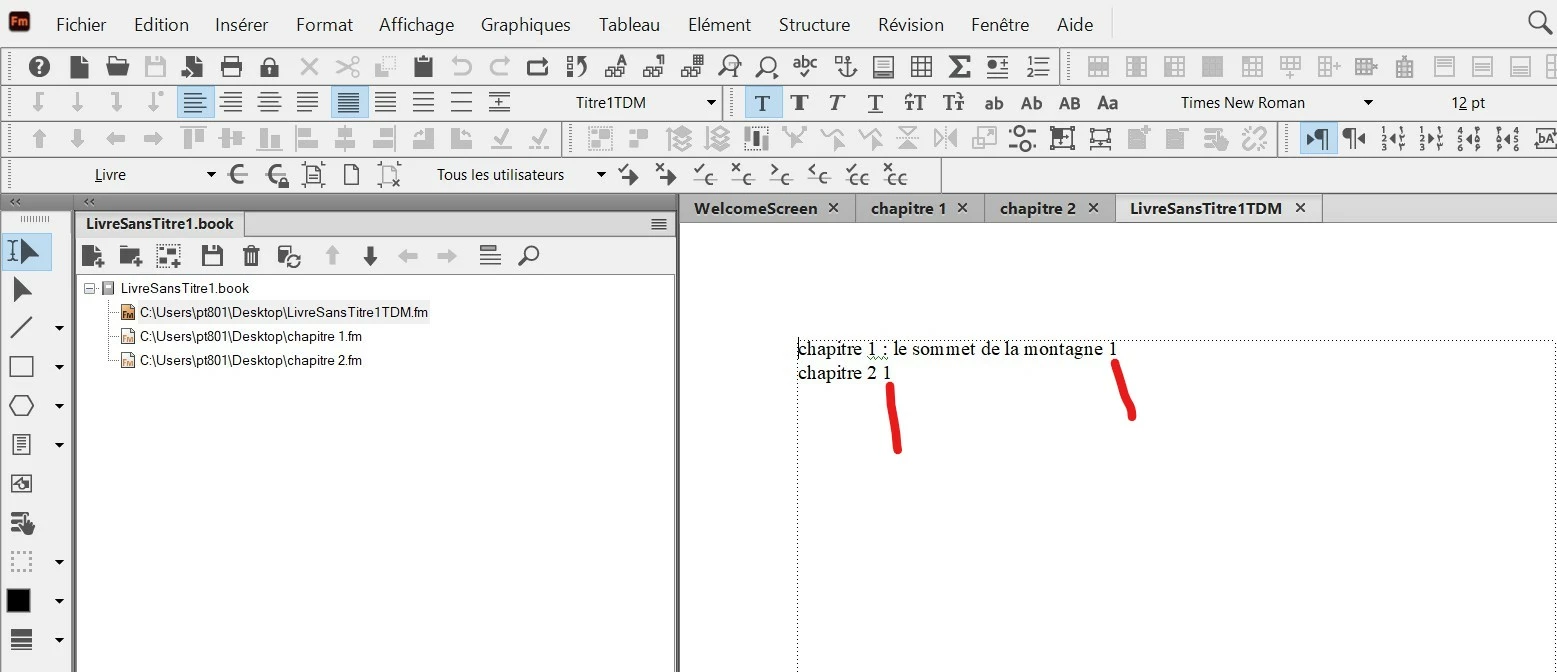
In a FM book I have succeeded to create a Table of Contents, but I see that in the generated TOC the page number (1) is next to the text (see red line in the screenshot).

I would like that FM automatically put the page number like this :

"chapter number .................................................................  page number"

So, I would like FM add automatically the "dots" and put the "page number" at the right. How to do this ?


This topic has been closed for replies.
Correct answer Barb Binder

Hi Pierre:


This is correct.


To add SECTION A above some chapter names, and presumably, SECTION B above others—a perfectly reasonable request—Fm needs to pull the words out of the document. You will need to add the words SECTION A someplace before Chapter 1 (or at the top of Chapter 1) and assign it a unique paragraph style so that Fm can pull the words into the TOC/TDM. If you want to add the section heads to the table of contents, but not to the page, you still have to add them to the page, but you can make them white or very small. Or both. That way they won't be visible to the reader on the page, but they will still be available to FrameMaker to call into the TOC/TDM.


Bob is also correct in his reply of course, but he is referring to something you are going to ask us soon—adding a title to the top of the TDM that likely says Table des Matières. This is also addressed on the list, as number 6.
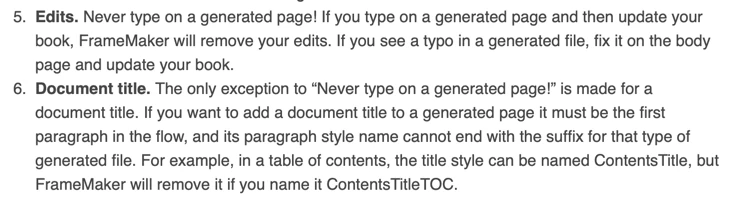
 

When are ready to add the title, you will have add it at the very top of the generated text. To be allowed to keep it after you update your book:

  1. Table des Matières must be the first paragraph in the flow, and
  2. Its style name cannot end in the suffix for that generated file.


For example, you could name it the French equivalent of Contents, as per Bob or ContentsTitle as per my post, but not ContentsTitleTDM because TDM is the suffix for a table of contents in your French version of FrameMaker. If you add TDM to the end of the style name, Fm will remove it when you update your book.


So many rules!


~Barb

25 replies

Inspiring
October 30, 2023

Hi Barb,

First in the TOC/TDM reference page, I deleted the tag I had created myself (Tag Stop TDM).

Then in TOC/TDM reference page I deleted the last line (with paratext/pagenum).

Then in TOC/TDM reference page I used the tag generated by FM (Titre1TDM) on the first line (with paratext/pagenum) and put a tab stop with dots.

Then I updated the paragraph style and the book.


Here is the result in TOC/TDM reference page :


And here is the result in curent page :


You can notice that in the TOC/TDM reference page I have put a space before and after the dots.

It's great, I have succeeded to do it. Thank you Barb for all your help.

Barb Binder
Community Expert
October 30, 2023

Hi Pierre:


The generated files have a list of rules that we must follow, written up here:
https://www.rockymountaintraining.com/adobe-framemaker-what-to-know-about-working-with-generated-files/


When you learn/follow the rules it's great, but when you don't know/don't follow the rules it's a nightmare.


In your book, you did not follow rule number 4: Paragraph styles are assigned automatically to the generated text, and their names will end with the suffix for the generated file. The required name for TOC styles in the French version is the original style name Titre1 plus the suffix TDM. That is the style you need to modify: Titre1TDM.


You created a new style called Tab stop TDM, and set it up correctly, but FrameMaker doesn't see that style. You will want to remove both that line from the TDM reference page and the Paragraph catalog. Then click on Titre1TDM on the TDM reference page and set the tab stop there. Update the style and update the book.


Looking ahead, if you decide to add the Titre2s to your TOC/TDM, you will need to locate the Titre2TDM on the TDM reference page and do the same thing. 


For others reading this thread down the road with a similar issue, Pierre is using the French version of FrameMaker, and the translation of Table of Contents (TOC) is Table des Matières (TDM). The same rules apply for all versions of FrameMaker but on an English version, substitute the letters TOC for each reference to TDM, above. 


~Barb

~Barb at Rocky Mountain Training
Inspiring
October 30, 2023

Hi Barb,

I had created this TOC / TDM  from an entire FM book (see screenshot) :


I will send you my FM files.

Inspiring
October 30, 2023

Hi Barb,

I have just updated the TOC style (for the dots) and also the book, but with no effect. I have always the TOC current page that does not displays the dots.

Barb Binder
Community Expert
October 30, 2023

hi Pierre:


Did you create a book a table of contents (one that lists the headings for an entire book) or a standalone table of contents (that lists the headings for a single chapter)?


Can you share an image of your book window?


At this point it might be easiest to just share the files with me, if that's a possibility.


~Barb

~Barb at Rocky Mountain Training
Barb Binder
Community Expert
October 30, 2023

After your first screen shot, which shows the tab stop and leader dots...

  • Update the style, and then update the book


~Barb

~Barb at Rocky Mountain Training
Inspiring
October 29, 2023

I have noticed that my problem was coming from the lack of tab character between paratex and paranum, so I put this tab character, and I succeeded to do that :


But now, if I go from TOC/Reference to TOC/current, I don't succeed to have the dots like in "Reference" :


Barb Binder
Community Expert
October 29, 2023

Hi Pierre:


In case you are still awake, one more video...


  • Remove the space between <$paratext> and <$pagenum>
  • Add a tab character by pressing the Tab key on the keyboard
  • Set the tab stop (location and leader dots), then 
  • Update the style, and then update the book


~Barb

~Barb at Rocky Mountain Training
Inspiring
October 29, 2023

Here is the screenshot with text symbols :


Barb Binder
Community Expert
October 29, 2023

This screenshot illustrates the issue—you need to remove the space and add a tab character as per my video, below. Then set the tab stop.


~Barb

~Barb at Rocky Mountain Training
Barb Binder
Community Expert
October 29, 2023

Hi Pierre:


Can you share the exact same screen shot with View >  Text Symbols enabled? I can't tell if you have a spaces or a tab between <$paratext> and <$pagenum>.


~Barb

~Barb at Rocky Mountain Training
Inspiring
October 29, 2023

Hi Barb,

I have just succeeded to do that in a new portrait document :


But in the FM TOC file / Reference, I don't succeed to do the same with tab between "paratex" and "pagenum"  :