zornitzad80431241
Inspiring
June 14, 2024
Answered

Structured FM: A table's width of 125 mm not saved after reopening xml file and publishing to pdf

  • June 14, 2024
  • 2 replies
  • 1347 views

Hi there,

we got a new standard to comply with. The layout looks like 
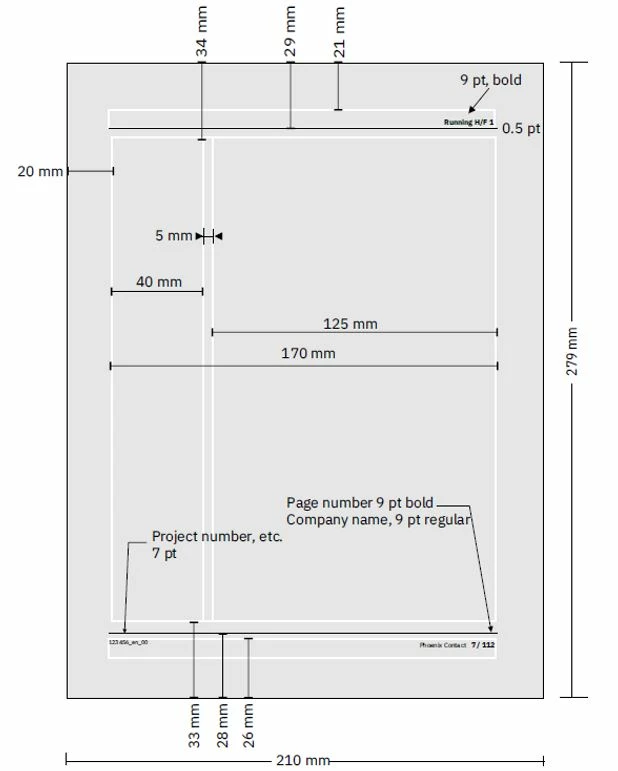
I achieved that with a change in the Structured FM template, in Column Layout with Room for Side Heads checked and width of 40 mm. I also managed to have the images fit in the 125 mm working area of the layout.

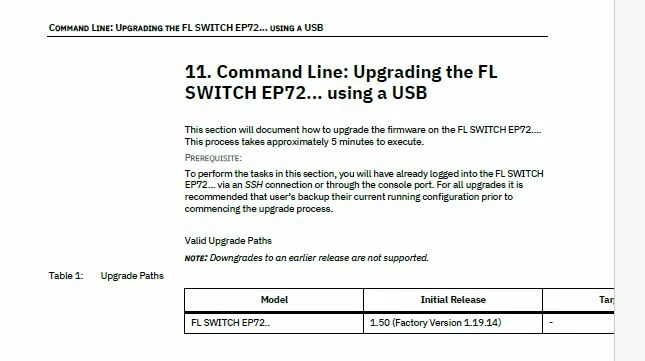
I have problem adjusting the tables, and this is a problem because one of my documents have a lot of tables. It looks as shown below.
I tried a lot of changes:

1. in my structural FM template ChapterOutputTpl, I used Resize Table and the Table Designer (as per https://community.adobe.com/t5/framemaker-discussions/framemaker-dita-tables/m-p/10953831 ), and the table looks correct. 
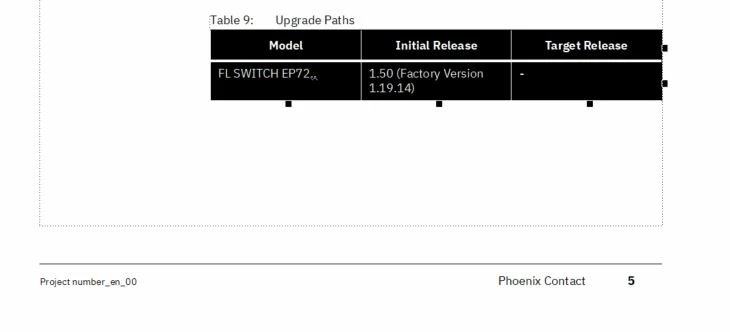
I made sure that the updated template is imported in the DITA Template, in Publish Settings and saved before publishing.

2.  To avoid the width not getting stored on saving and reopening, as per https://community.adobe.com/t5/framemaker-discussions/framemaker-dita-tables/m-p/10953831, 

I also made change to ForceTGroupAlignmentToLeft=0 in my in my ditafm.ini at location <FMInstallationPath>\fminit\ditafm. I looks as shown

;Aligns table to the left
ForceTGroupAlignmentToLeft=0

3. In the xml file, I made changes in colwidth to be fixed:

</tgroup></table><table frame="all" colsep="1" rowsep="1"
product="EP7200"><title>Upgrade Paths</title>
<tgroup cols="3" colsep="1" rowsep="1" outputclass="FormatA">
<colspec colnum="1" colname="1" colwidth="1.64in"/>
<colspec colnum="2" colname="2" colwidth="1.64in"/>
<colspec colnum="3" colname="3" colwidth="1.64in"/>

The width is as needed:
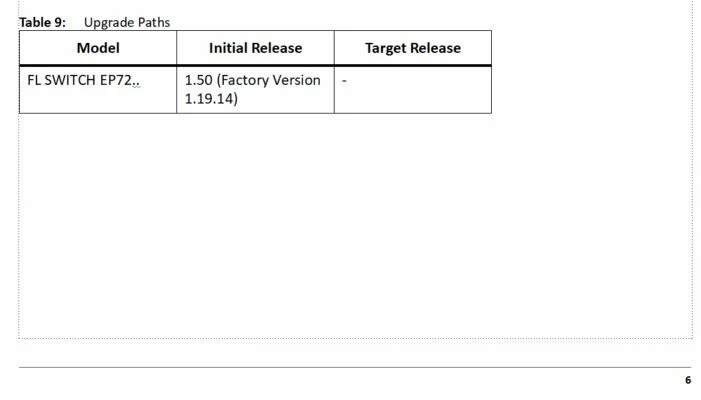
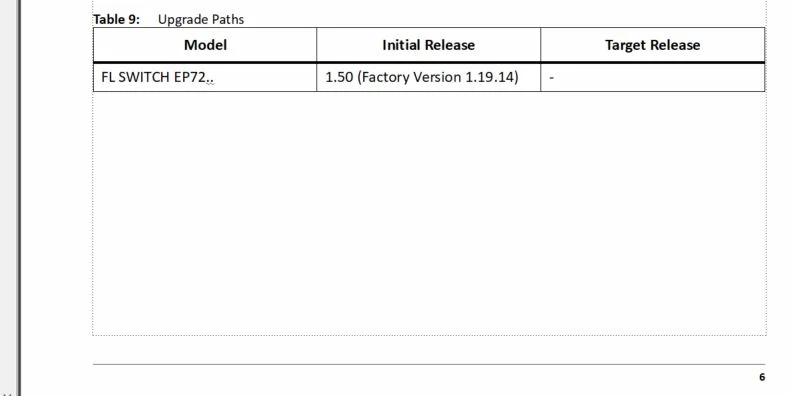
However, after saving and reopening, the width still fits to the page (see below).
 

<table frame="all" colsep="1" rowsep="1"
product="EP7200"><title>Upgrade Paths</title>
<tgroup cols="3" colsep="1" rowsep="1" outputclass="FormatA">
<colspec colnum="1" colname="1" colwidth="33*"/>
<colspec colnum="2" colname="2" colwidth="33*"/>
<colspec colnum="3" colname="3" colwidth="33*"/>
<thead>


I am using <table> </table> not <simple table>.

My Structural FM version is 17.04.628.


Have you experienced not able to change the width of a table in Structural FM?

Any ideas are welcome!


Thanks a lot!


Zornitza Doneva
Correct answer frameexpert

Hi again,


I agree. I fixed that.


Now the full code is:

<task id="id205ODK040HS"
xmlns:ditaarch="http://dita.oasis-open.org/architecture/2005/">
<title>Command Line: Upgrading the
<keyword keyref="product_name"></keyword> using
a USB
</title>
<shortdesc>This section will document how to upgrade the firmware
on the
<keyword keyref="product_name"></keyword>. This process
takes approximately 5 minutes to execute.
</shortdesc>
<taskbody>
<prereq>
<p>To perform the tasks in this section, you will
have already logged into the
<keyword keyref="product_name"></keyword> via
an
<term keyref="SSH_dterm">SSH</term> connection or through the
console port. For all upgrades it is recommended that user’s backup
their current running configuration prior to commencing the upgrade
process.
<indexterm></indexterm>
</p>
<p>
<b>Valid Upgrade Paths</b>
<table
frame="all" colsep="1" rowsep="1">
<title></title>
<tgroup cols="3" colsep="1" rowsep="1" outputclass="FormatA">
<colspec colnum="1" colname="1" colwidth="1.64in"/>
<colspec colnum="2" colname="2" colwidth="1.64in"/>
<colspec colnum="3" colname="3" colwidth="1.64in"/>
<thead>
<row rowsep="1">
<entry colname="1"></entry>
<entry colname="2"></entry>
<entry colname="3"></entry>
</row>
</thead>
<tbody valign="middle">
<row rowsep="0">
<entry colname="1"></entry>
<entry colname="2"></entry>
<entry colname="3"></entry>
</row>
</tbody>
</tgroup>
</table>
</p>
</prereq>
</taskbody>
</task>


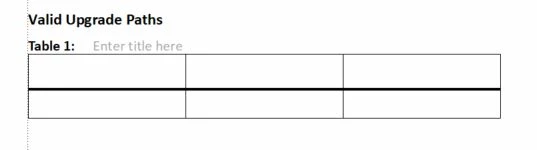
The file in FM shows the table as I want it.

However, after saving I have for the table code:

<table
frame="all" colsep="1" rowsep="1">
<title></title>
<tgroup cols="3" colsep="1" rowsep="1" outputclass="FormatA">
<colspec colnum="1" colname="1" colwidth="33*"/>
<colspec colnum="2" colname="2" colwidth="33*"/>
<colspec colnum="3" colname="3" colwidth="33*"/>
<thead>
<row rowsep="1">
<entry colname="1"></entry>
<entry colname="2"></entry>
<entry colname="3"></entry>
</row>
</thead>
<tbody valign="middle">
<row rowsep="0">
<entry colname="1"></entry>
<entry colname="2"></entry>
<entry colname="3"></entry>
</row>
</tbody>
</tgroup>
</table>


Or my colwidth="33*" or back to relative colwidth.

That is exactly my problem.


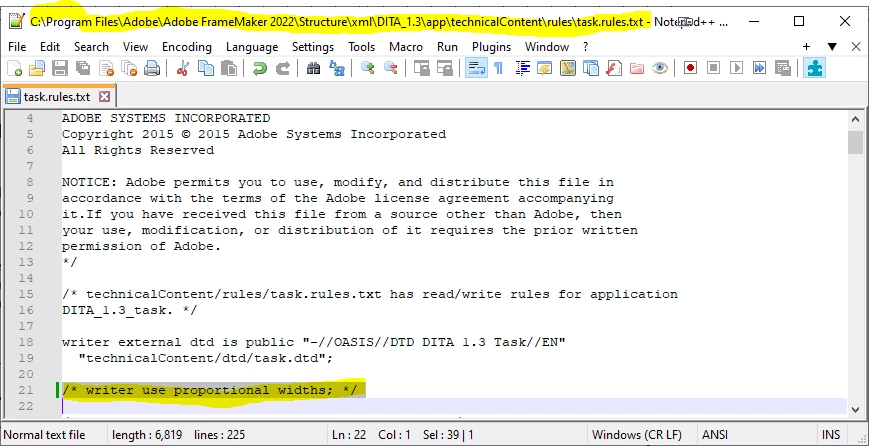
OK, I understand the issue now. You need to modify the Read/Write rules for the topic types that you are using. For example, for tasks, you can see that I have line 21 commented out. Note that you need admin rights to make changes to those files because they are below the Program Files folder.


2 replies

frameexpert
Community Expert
Community Expert
June 17, 2024

Hi Zornita,

Please post the entire table XML. Thank you.

Rick

zornitzad80431241
Inspiring
June 17, 2024

Hi Rick,

Thanks for your response.


The xml file with the table is as follows:

<task id="id205ODK040HS"
xmlns:ditaarch="http://dita.oasis-open.org/architecture/2005/">
<title>Command Line: Upgrading the
<keyword keyref="product_name"></keyword> using
a USB
</title>
<shortdesc>This section will document how to upgrade the firmware
on the
<keyword keyref="product_name"></keyword>. This process
takes approximately 5 minutes to execute.
</shortdesc>
<taskbody>
<prereq>
<p>To perform the tasks in this section, you will
have already logged into the
<keyword keyref="product_name"></keyword> via
an
<term keyref="SSH_dterm">SSH</term> connection or through the
console port. For all upgrades it is recommended that user’s backup
their current running configuration prior to commencing the upgrade
process.
<indexterm></indexterm>
</p>
<p>
<b>Valid Upgrade Paths</b>
<table
frame="all" colsep="1" rowsep="1">
<title></title>
<tgroup cols="3" colsep="1" rowsep="1" outputclass="FormatA">
<colspec colnum="1" colname="1" colwidth="1.64in"/>
<colspec colnum="2" colname="2" colwidth="1.64in"/>
<colspec colnum="3" colname="3" colwidth="1.64in"/>
<thead>
<row rowsep="1">
<entry colname="1"></entry>
<entry colname="2"></entry>
<entry colname="3"></entry>
</row>
</thead>
<tbody valign="middle">
<row rowsep="0">
<entry colname="1"></entry>
<entry colname="2"></entry>
</row>
</tbody>
</tgroup>
</table>
</p>
</prereq>
</taskbody>
</task>


I am publishing it as a part of a ditamap which I can also add to a post.


regards,

Zornitza Doneva

frameexpert
Community Expert
Community Expert
June 17, 2024

It is honoring the column widths for me, but you only have two entry elements in the body row so I had to add a third entry to make it valid.

Community Expert
June 17, 2024

Hi,

I do not use Structure. Therefore I do not know, if my comment applies.

Have you adapted the various table formats in your template and saved all of them?

Then FrameMaker should use this table format with the adapted column widths.

Best regards, Winfried