


Community Expert
March 24, 2020
Answered

SVG files in Mobile App publishing

  • March 24, 2020
  • 1 reply
  • 651 views

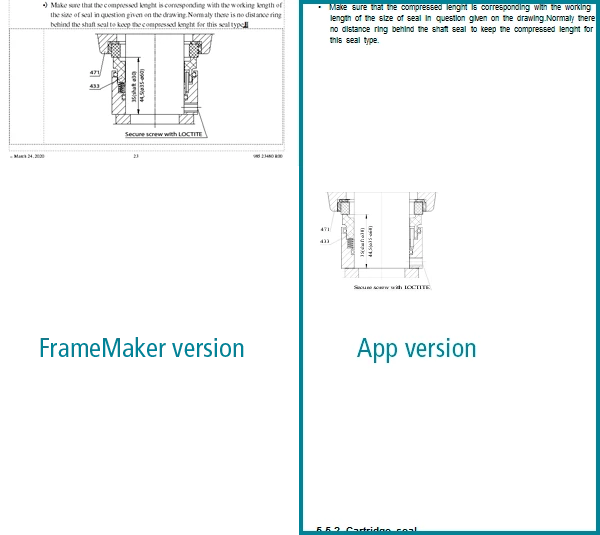
I have a file with a bunch of svg files which have been imported into anchored frames. Print looks good. However, when I publish as Mobile App, it seeems the svg's are interpreted differently. The bounding box around the drawing becomes enormous. My thinking is that, this has something to do with the way Adobe Illustrator exports svg's but I am not sure. Does anybody have experience in these matters?

/bjørn
    This topic has been closed for replies.
    Correct answer FrameMaker-dk

    Found it! I had made the svg files out of pdf files, where I had used Illustrator options for cropping/masking an area.

    It seems the svg files "remembers" the original files area before being masked. So while the masked area is being interpreted, the publishing process also "sees" the area around the masked area and interprets that as the image borders. Strange and probably not entirely ok.

    1 reply

    Community Expert
    March 24, 2020

    Hi bjørn,


    I have not created mobile apps yet. Only HTML5. The SVG files look correctly.

    When you open your SVG files in a browser or when you convert to HTML5, how do they look like?


    Best regards


    Winfried

    FrameMaker-dkAuthorCorrect answer
    Community Expert
    March 24, 2020

    Found it! I had made the svg files out of pdf files, where I had used Illustrator options for cropping/masking an area.

    It seems the svg files "remembers" the original files area before being masked. So while the masked area is being interpreted, the publishing process also "sees" the area around the masked area and interprets that as the image borders. Strange and probably not entirely ok.

    Bjørn Smalbro - FrameMaker.dk