


Inspiring
May 28, 2024
Answered

Table anchor turning body text to Times New Roman instead of Arial in HTML5 output
  • May 28, 2024
  • 2 replies
  • 637 views

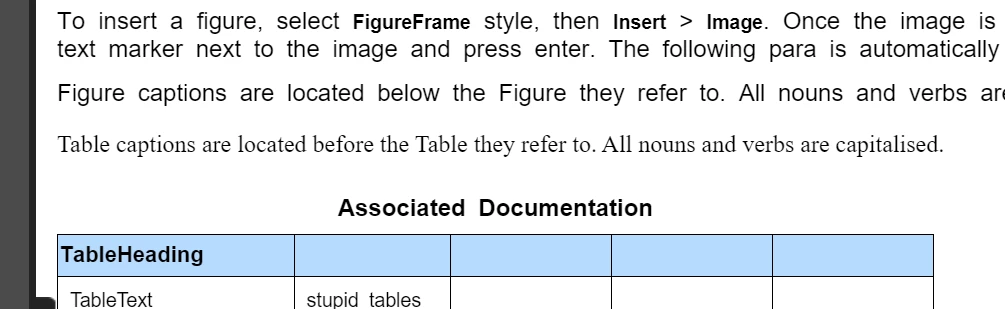
 I'm finding that if i have a table anchor on a line of body text, the text switches to Times New Roman, rather than the specified Arial in the HTML5 output. If I put a return in and have the table anchor on a blank line, the problem goes away. As far as I can tell, everything is assigned Arial so I can't work out what's causing this. Is my only fix to have all table anchors on their own para?

    This topic has been closed for replies.
    Correct answer Winfried Reng

    In the Adobe Tracker this was not yet reported.

    I added a new bug report. You can add a comment and vote for it, when this is important for you.

    https://tracker.adobe.com/#/view/FRMAKER-14936

    2 replies

    Matt-Tech Comm Tools
    Community Expert
    Community Expert
    May 28, 2024

    What's the HTML code that is controlling that content in your output? Seeing how the HTML is formatting the text will help you map it to CSS entries, rather than "forcing" the formatting from your print doc.

    -Matt SullivanFrameMaker Course Creator, Author, Trainer, Consultant
    Inspiring
    May 28, 2024

    At the moment I'm doing some experiments to see if I can make doc HTML friendly straight from the print setup, but I have a HTML expert backup plan if it fails.

    Community Expert
    May 28, 2024

    Hi,

    You say: As far as I can tell, everything is assigned Arial ...

    Can you check, if the paragraph with the table anchor uses Arial?

    When I tested this, the font after the table anchor turns into Times. I would say that this is a bug. I will check, if this is already described in the Adobe Tracker.

    Generally it's best to put table anchors in their own paragraph. This way you will have better control about the pagination and the position of your table.

    As a default you would get an empty paragraph. However, when you format everything this way, the table will move on top of the empty paragraph with the table anchor:

    Paragraph Spacing Below: -x pt (e.g. -10 pt)

    Table Margin Top: -x pt (e.g. -10 pt)

    Both values are the same, and they are negative.

    Best regards, Winfried

    Winfried RengCommunity ExpertCorrect answer
    Community Expert
    May 28, 2024

    In the Adobe Tracker this was not yet reported.

    I added a new bug report. You can add a comment and vote for it, when this is important for you.

    https://tracker.adobe.com/#/view/FRMAKER-14936

    Inspiring
    May 28, 2024

    Thanks Winfried. I appreciate the help. The para with the table anchor has the same style assigned as those above it that are Arial. I'll go with your suggestion of a blank para for all table anchors.