


Known Participant
February 12, 2024
Answered

Table Continuation variable space

  • February 12, 2024
  • 4 replies
  • 1194 views

Hello, looking for a little advice! I understand this is probably a limitation of framemaker but hoping maybe someone else has dealt with something like this or has an idea that I am not thinking of.

Per the customer’s format: 

Table titles end with a period and when a table rolls to another page the period appears at the end of Continued. The inserted variable is showing as a character space which isn’t what we want. Is there another way to close this space (see red arrow below)? 


(And this isn’t something that we can suggest to the customer to change their style and location of the period or to nix it all together, as we are not in control of the publication just providing supplements to their existing manual. I don’t think they are using FrameMaker to author in either. Currently were are splitting the table and handling the formatting manually.)
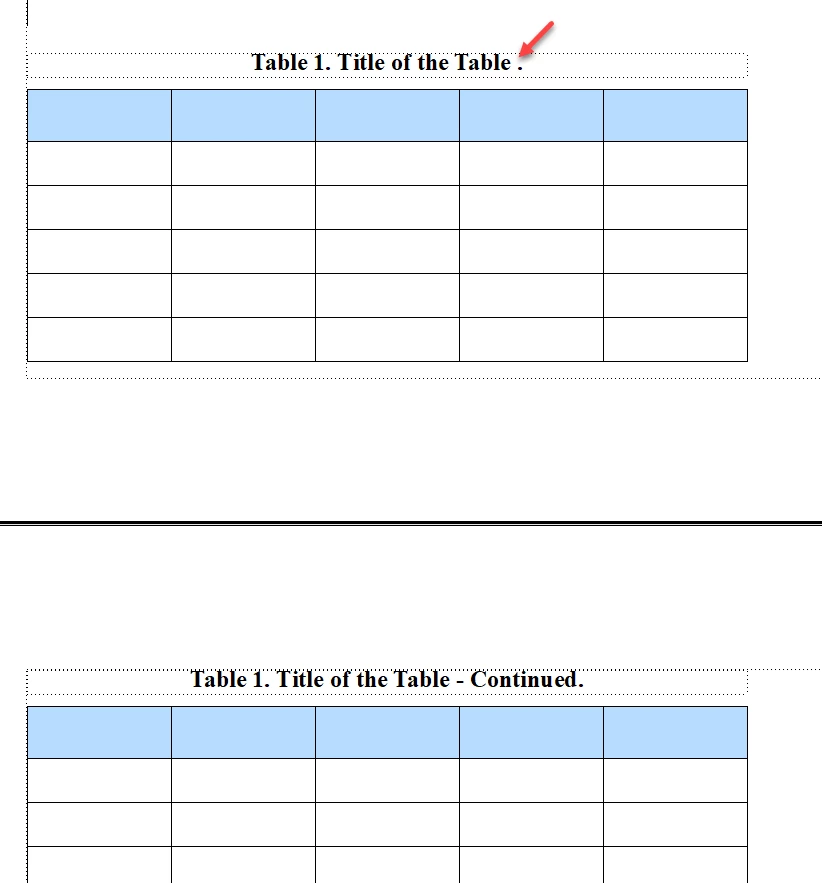
Thank you all!

    This topic has been closed for replies.
    Correct answer frameexpert

    This is a basic limitation of FrameMaker; it puts a non-breaking space on the first page of the Table Continuation variable. I have tried to figure out a workaround over the years, but still haven't been able to.

    4 replies

    Participating Frequently
    March 25, 2024

    There is one way I came up with.


    Create three types of character formats.
    chafmt1, character spacing: -70%
    chafmt2, color: white, character spacing: -12%, character width 200%
    chafmt3, default


    Edit the Table Continuation variable as follows.
    <chafmt1> <chafmt2>.<default>- Continued.
    *There is a space between <chafmt1> and <chafmt2>.


    Insert "Table Continuation" variable at the end of table title
    Example: Title of the Table.[Table Continuation]


    The idea is to just put a white period on top of the previous one to make it look like it's disappearing.
    Hopefully it should look like the screenshot.


    When converting to HTML etc., unnecessary periods will appear, so please be careful in the final output.

    frameexpert
    Braniac
    March 25, 2024

    Brilliant!

    Matt-Tech Comm Tools
    Braniac
    February 15, 2024

    Where is the period coming from...the Table Continuation variable?

    Does your style guide require a period at the end of table titles?


    -Matt SullivanFrameMaker Course Creator, Author, Trainer, Consultant
    Known Participant
    February 23, 2024

    The period is typed in and a requirement of the customer's currect style guide.

    Matt-Tech Comm Tools
    Braniac
    February 23, 2024

    Sorry, only 3 options I can see:

    • Break into separate tables with different title tags to manage first and subsequent table sheets
    • Break into separate tables with manually typed numbering and continuation info
    • Change the style guide

    Ugh, a lot of work for a tiny little punctuation mark!

    -Matt SullivanFrameMaker Course Creator, Author, Trainer, Consultant
    Known Participant
    February 12, 2024

    Framemaker 2020 version 16.0.2.916

    frameexpert
    frameexpertCorrect answer
    Braniac
    February 12, 2024

    This is a basic limitation of FrameMaker; it puts a non-breaking space on the first page of the Table Continuation variable. I have tried to figure out a workaround over the years, but still haven't been able to.

    Known Participant
    February 12, 2024

    ok thank you, glad to know it has messed with someone elses brain too. 🙂

    Jeff_Coatsworth
    Braniac
    February 12, 2024

    What version of FM? Can you turn on the text symbols to give a clearer view of what's in that table title?