Braniac
August 23, 2023
Answered

Tricky formatting of crossreference formats

  • August 23, 2023
  • 5 replies
  • 689 views

I can't figure out why the formatting of my cross references is working unpredictably.

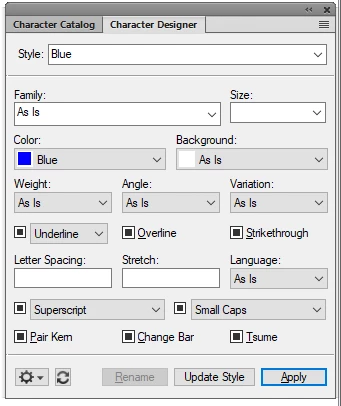
I have two character formats, "Bold" and "Blue"
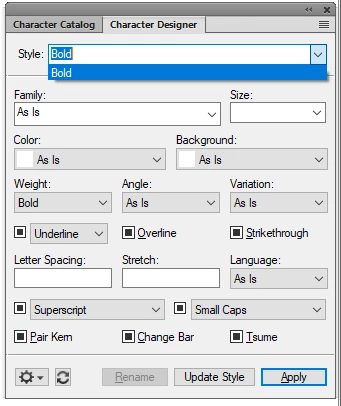
 

I want my cross references to look Bold and Blue when applied, so I am adding this code to the definition:

<Blue> <Bold>Chapter <$chapnum>, Section <$paranum>. <$paratext>

This code will produce this cross reference:

While it works, I am consternated about the code applying Bold and Blue.

I want to get rid of the space between <Blue> <Bold> because it adds an unwanted empty space in front of the cross reference. But if I remove that space, this is what's happening:

But why? Should the bracket not be enough to separate the two formats? And it is not even consistent behaviour. Some cross reference formats do NOT have the empty space, but works nevertheless!


    This topic has been closed for replies.
    Correct answer frameexpert

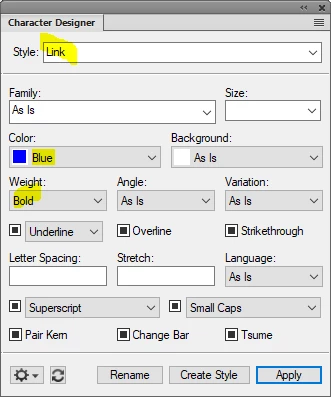
    I would define a single character format, maybe called "Link" that has both Blue and Bold properties. That way, you are only dealing with a single character format building block in the Cross-Reference.

    5 replies

    Dave Creamer of IDEAS
    Braniac
    March 8, 2024

    I came across an inconsistent bug (?) with x-refs--if you have to sequential character styles, it can sometimes not read them properly after updating the book. (I've gone for 40 years without running into this bug until today!!)


    I found that if you use ONE style that combines the settings, it works. So basically, do what @frameexpert suggested. 

    David Creamer: Community Expert (ACI and ACE 1995-2023)
    frameexpert
    frameexpertCorrect answer
    Braniac
    August 23, 2023

    I would define a single character format, maybe called "Link" that has both Blue and Bold properties. That way, you are only dealing with a single character format building block in the Cross-Reference.

    Braniac
    August 25, 2023

    Thanks @frameexpert This is where finally gave up on making them combo of formats work. The behaviour of two character formats beside each other is highly erratic, so a new character style became the solution. Which works!

    Bjørn Smalbro - FrameMaker.dk
    Braniac
    August 23, 2023

    I always heard that two character formats on top of each other do not work reliably.

    Therefore I would recommend a format which is blue and bold.

    Bob_Niland
    Braniac
    August 23, 2023

    WR: I always heard that two character formats on top of each other do not work reliably.

    Interesting. I've not heard that (until now), but it is often a problem, where people are creating a new Character Format without taking care to set the whole thing to
    ⦿As-Is
    before specifying only what needs to be changed. That doesn't seem to be an issue here. Failing to do this often results in ChrFmt1 being stomped by ChrFmt2.

    Applying multiple ChrFmts by select-and-click can be iffy because it's hard to know what ordering is being used (if that matters).

    The ⦿As-Is attribute aspect was likely mainly intended to protect the PgfFmt. It may well be that ChfFmt stacking was not contemplated.

    Braniac
    August 23, 2023

    Unicode to the rescue, again! 😂


    I was going to just say make a new character format that includes both attributes but you knew that, so Bob's second suggestion looks like the way to go. Did you give it a shot, Bjørn?


    ~Barb

    Bob_Niland
    Braniac
    August 23, 2023

    Be mindful that I haven't tried this, and there are a couple of caveats:
    1. FM is apt to collapse >\u200c< to >< in the dialog, making it invisible to future stewards
    2. FM frequently does not honor Unicode semantics This would be a problem for \u200d (ZWJ), but for ZWNJ, perhaps not a problem.

    Braniac
    August 23, 2023

    That WAS an interesting trick you suggested. The font is Roboto, but it seems "\u200c" won't work. I get a "?" for the "invisible" character.  And same goes for "\u200d", unfortunately


    Bjørn Smalbro - FrameMaker.dk
    Bob_Niland
    Braniac
    August 23, 2023

    A look at the MIF for both cases might turn up something.

    If a fix-now understand-later solution is needed, a new Character Format of Bold+Blue would do, but you could also try:
    <Blue>\u200c<Bold>Chapter <$chapnum>, Section <$paranum>. <$paratext>
    U+200C being ZERO WIDTH NON-JOINER