


Known Participant
November 12, 2024
Question

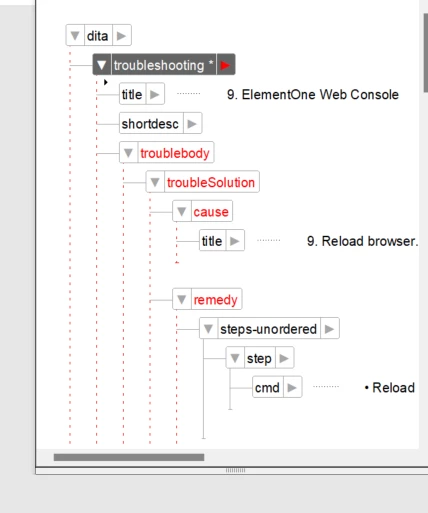
troubleshooting topic validation error after saved as book with FM component

  • November 12, 2024
  • 1 reply
  • 1365 views

The troubleshooting topic alone passed validation check, but it fails after I saved it as a book. Is there something I can do to fix this? 


Moreover, the [title] of [cause] tag gets the proper subheading format, but after saved as a book that [title] would be formatted as title.0 instead.


Are these two problems related somehow?
 

FM 17 on Windows 11.


This topic has been closed for replies.

1 reply

Matt-Tech Comm Tools
Adobe Expert
November 19, 2024

I believe troubleshooting is a DITA 2.0 topic type.

What version of DITA are set up to use right now?


-Matt SullivanFrameMaker Course Creator, Author, Trainer, Consultant
Known Participant
November 20, 2024

Hi Matt,


thank you for the response.


I was very excited when I resumed to work with FrameMaker, mostly because of DITA 1.3 and the new troubleshooting topic.


I am currently composing and migrating the documentation into XML DITA 1.3, FM 17.

The console error mentioned something about missing ID, even though the topic has been assigned a random unique ID.


As for DITA 2.0, from what I read it's still quite a while before we could work with it.

Getting Out of Trouble: DITA 1.3 Troubleshooting – DITA Writer

Matt-Tech Comm Tools
Adobe Expert
November 20, 2024

Ah, I didn't recall the troubleshooting being DITA 1.3.

Check your setup...I'm betting you are using DITA 1.2.

Set it to DITA 1.3 and you should be in business. If that doesn't work, reach out to Adobe directly at tcssup@adobe.com


-Matt SullivanFrameMaker Course Creator, Author, Trainer, Consultant