Inspiring
November 18, 2019
Answered

Trying to match figure numbers with chapter numbers in document.

  • November 18, 2019
  • 5 replies
  • 2661 views

Please forgive me as this is something covered in several places but I have not found an exact scenario I am trying to map out, I have been using FrameMaker for a week so I am feeling a little overwhelmed. I am trying to create a document structure that allows me to number Chapters, Sections, Subsections, and Figures all in series. I am having the most trouble with getting the figures to number properly. I would like them to follow the following pattern if the document is set up as:

1. Chapter Name (H: \t <n+>. \t)

1.1 Section Name (H:\t <n>.<n+> \t \t)

1.1.1 Sub Section (H:\t <n>.<n>.<n+>\t \t)

Roman Numerals (H:\t <r>< =0>.\t \t) these should resel each time they are used  regardless of where Chapter, Section, Sub Section etc. 

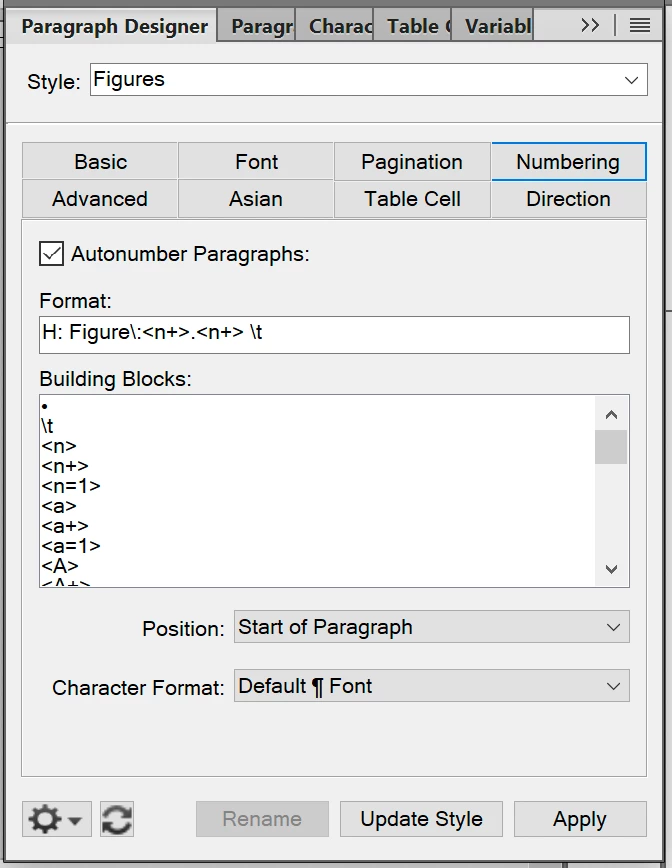
Figure (H: Figure: <n>.<n+> \t)

I have also tried using <$chapnum>, <$sectionnum>, <$subsectionnum> but the above format has worked better so far but I am open to suggestions to get the desired outcome. 


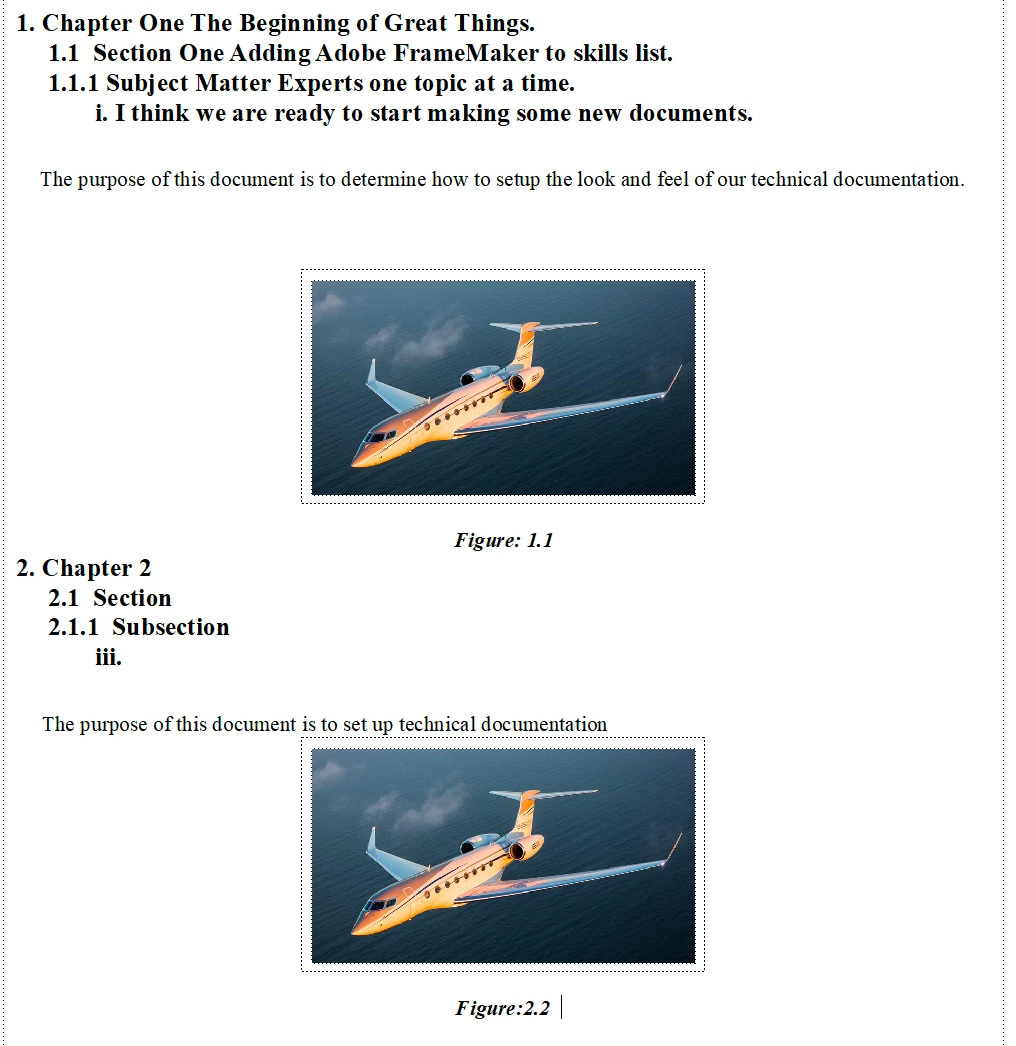
In the images below on the right text, numbering is mostly correct except the roman numeral should be i.

The figures are close to what I am looking for as well 1st figure is correct figures in "Chapter 1" should go as follows Figure 1.1, Figure 1.2, Figure 1.3, etc. They should follow the same pattern after "Chapter 2" Figure 2.1, Figure 2.2, Figure 2.3, etc.   


Any help in the right direction would be so appreciated as I have been scouring youtube, adobe forums, user guides, and anything I can find to learn FrameMaker. Thank you in advance for your help!

This topic has been closed for replies.
Correct answer frameexpert

There would most likely be multiple chapters in the same document. When writing procedures the roman numerals may appear as follows

1. Format Hard Drive

1.1 Pull up disk map 

i. right click primary partition

ii. click delete primary partition

iii. confirm

1.2 Create New Disk Partition

1.2.1 Pull up Disk Map

i. right click unallocated space

ii. click create partition

iii. confirm


that is a brief example of how roman numerals are used


there are several sections and subsections in each chapter

currently each chapter is an individual document so we are going to use chapters to combine them into a single document so:

Chapters= Subject

Section = Descriptions of Sub Sections

SubSections = Steps in SubSections

Roman Numerals = steps in a SubSection

Tables = list tables of data 

Figures = pictorial representation of Sections/SubSections


Does this help clarify? Again thank you for all of your help. I was able to apply most of the feedback but there were just a few things that need a little tweaking to get exactly what I am looking for.  


OK, you can name your formats however you want, and you will need to add the appropriate punctuation, etc. Here is the basic setup:


H:Chapter <n+>< =0>< =0>< =0>< =0>

H:Section <n>.<n+>< =0>< >< >

H:SubSection <n>.<n>.<n+>< >< >

H:Figure <n>-< >< ><n+>< >

H:Table <n>-< >< >< ><n+>


Since you may have multiple chapters in a single FrameMaker document, you can't use the <$chapnum> building block because this can only have a single value per file.


It is still not clear to me if you can have more than one Roman numeral list in a Section or Subsection, etc. so I am proposing a separate series for these:


Step_1st:
R:<r=1>

Step:
R:<r+>


Since these can appear anywhere, you need two formats; one for the first step and one for the rest of the steps in a procedure. There is a way around this in some circumstances, but I don't want to suggest it because I am not familiar with your documents.

5 replies

Jeff_Coatsworth
Community Expert
November 19, 2019

I would recommend you invest in a copy of the FM bible written by Matt R. Sullivan (@techcommtools around here). It will help you immensely in dealing with FM's oddities. 

Inspiring
November 19, 2019

I plan on getting reference material along those lines we found a FM10 book but have only read a little of it so far. 

Barb Binder
Community Expert
November 19, 2019

Hi Dustin:


Having never used FrameMaker before this and it certainly is a steep learning curve and kind of frustrating coming from using Word for as long as I can remember it's like learning a second language! 

It isn't that FrameMaker is hard to use, but it is not an intuitive program, by any means. Coming in with strong Word skills is no guarantee of success, but attending a training class will make the transition much easier. All of the students in my Intro to FrameMaker class today are self-taught, have been using the program from between six weeks and 18 months, and all are taking the class because they shared your frustration with trying to figure it out on their own. 


Anyway, please continue to ask questions here—we are always happy to help.


~Barb

~Barb at Rocky Mountain Training
Barb Binder
Community Expert
November 18, 2019

Hi Dustin:


You are close! Two quick answers before my class starts this morning:

  1. Do use <$chapnum> for the chapter numbers, and 
  2. use <r+> for lowercase roman but be sure there isn't a character style forcing the number to all caps


You might find these two blog posts helpful with logic (there is a link in this one to the first one)—I wrote them for my students when they got stuck:
https://www.rockymountaintraining.com/adobe-framemaker-numbered-headings-continued/


Please ask us if you need more help.


~Barb

~Barb at Rocky Mountain Training
Inspiring
November 18, 2019

Hi Barb, Thank you for the links they were helpful as well I was wondering if you could give me an example of how that would look in the Format window for the following layout 
Chapter or 1, 2, 3, 4, etc

Section 1.1, 1.2, 1.3, etc., 2.1, 2.2, 2.3, etc., 3.1, 3.2, 3.3, etc., 4.1, 4.2, 4.3, etc. 

Sub Section 1.1.1, 1.1.2, 1.1.3, etc., 2.1.1, 2.1.2, 2.1.3, 2.2.1, 2.2.2 etc. 

Sub Section with Roman Numeral  i, ii, iii with roman numerals restarting each time they are used so if I have roman numerals in section 1.1.1 and 1.1.2 they start at i each time they are used


With figures I am trying to include the Chapter, Section, and figure number so the 1 Figure in Chapter 1 Section 1 would show as Figure: 1.1-1 figure 2 in the Same section would be Figure 1.1-2 then in subsequent Chapters and Sections show the current Chapter and Section ie Figure 2.1-1 or Figure 3.2-1 (Chapter 3, Section 2, Figure 3) 

With the Complexity of this the <$chapnum. <$sectionnum> <$subsectionnum> seems like a cleaner alternative to <n+>< =0>< =0>< =0>< =0> format. Thank you again for your help I am already closer to the goal than I was with the info you already provided. 


Inspiring
November 18, 2019

OK, two questions:

1) Can there be more than one "Chapter" in a single FrameMaker document? I thought I saw that in one of your posts.

2) Where can your Roman numeral lists appear? Can there be more than one list in a given Section, Subsection, etc.?


There would most likely be multiple chapters in the same document. When writing procedures the roman numerals may appear as follows

1. Format Hard Drive

1.1 Pull up disk map 

i. right click primary partition

ii. click delete primary partition

iii. confirm

1.2 Create New Disk Partition

1.2.1 Pull up Disk Map

i. right click unallocated space

ii. click create partition

iii. confirm


that is a brief example of how roman numerals are used


there are several sections and subsections in each chapter

currently each chapter is an individual document so we are going to use chapters to combine them into a single document so:

Chapters= Subject

Section = Descriptions of Sub Sections

SubSections = Steps in SubSections

Roman Numerals = steps in a SubSection

Tables = list tables of data 

Figures = pictorial representation of Sections/SubSections


Does this help clarify? Again thank you for all of your help. I was able to apply most of the feedback but there were just a few things that need a little tweaking to get exactly what I am looking for.  

frameexpert
Community Expert
November 18, 2019

If your figures number consecutively within a chapter and aren't dependent on the sections, etc., you can put them in their own series.

F:Figure <@chapnum>.<n+>

frameexpert
Community Expert
November 18, 2019
Inspiring
November 18, 2019

Thank you the second video was helpful and got me closer to where I am trying to get to the "1st chapter" is numbering correctly but does not start a :"Chapter 2" it starts over at 1 

frameexpert
Community Expert
November 18, 2019

What building block are you using for the chapter number? If you are using <$chapnum>, you set this at the book level. Right-click on the first chapter in the book window and choose Numbering. Set the Chapter number to start at 1. Then shift-click the rest of the chapter components and choose Number. Set the Chapter to Continue from previous (or whatever it says). Then when you update the book, you will get the correct chapter numbers.

If you happen to be using <n+> building blocks for the Chapter number, then you have to go to the Paragraph tab in the Numbering Properties dialog box and set it to Continue Numbering from Previous Paragraph in Book. I don't recommend this though; using <$chapnum> is better because it is self-documenting and easier to control at the book level.