


Known Participant
July 1, 2023
Answered

Unwanted space between paragraph lines

  • July 1, 2023
  • 3 replies
  • 3116 views

How can I remove unwanted space between paragraph lines in adobe frame maker? I am sharing the screenshot, The paragraph line automatically going to the next page.


    This topic has been closed for replies.
    Correct answer Barb Binder

    Hi Amit:


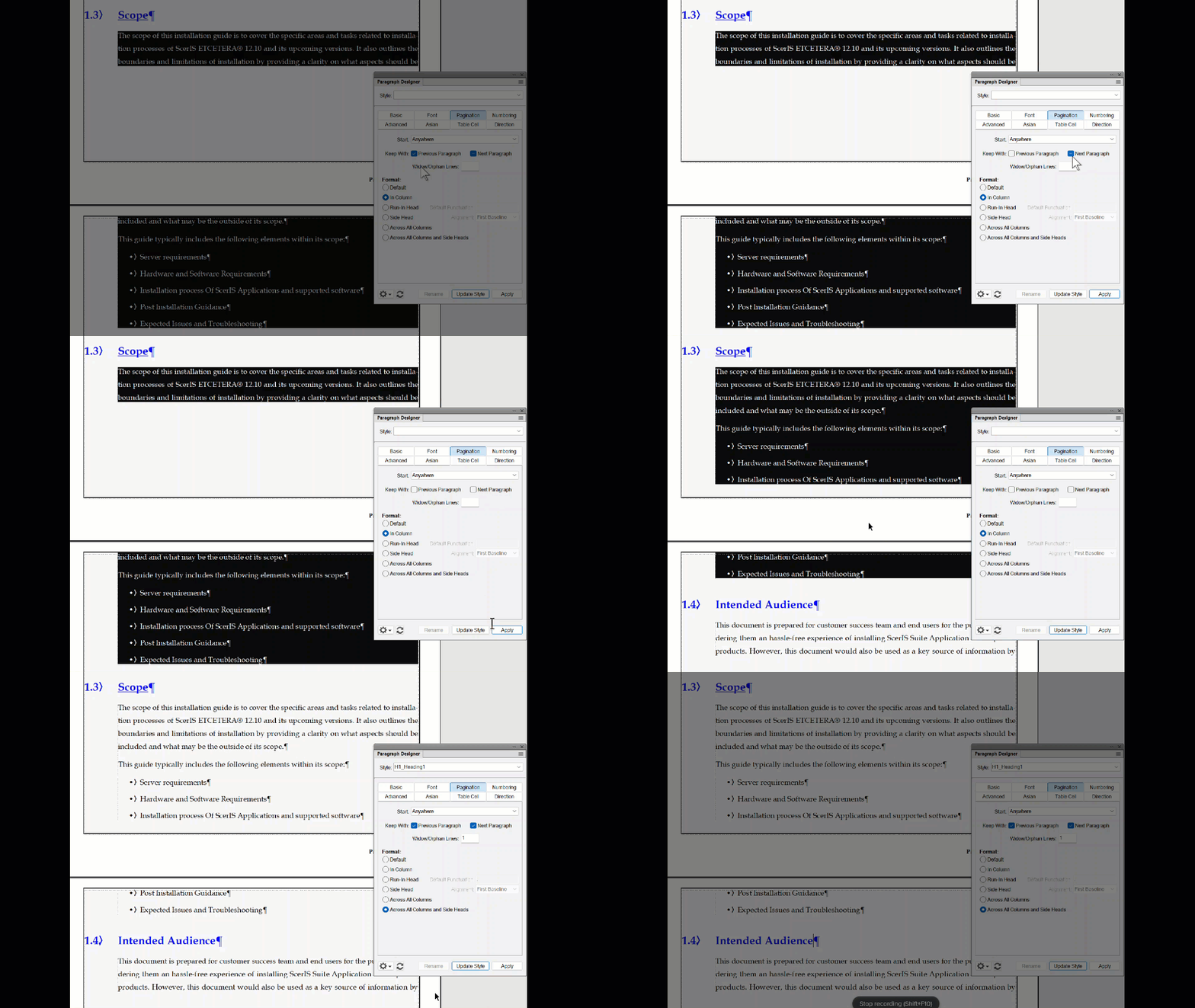
    The issue is overuse of the Keep with settings in Paragraph Designer > Pagination. Most of your paragraphs are set to either keep with the previous paragraph or keep with the next paragraph or both, and that's giving very unusual breaks. Typically we enable Keep with: Next on our headings, so that they don't break from the paragraphs that they modify, but not for our body paragraphs or for our lists. You also have random empty paragraphs (¶) and those have them too.


    There are exceptions to every rule, but I would recommend turning off all Keep withs (expect on the headings) and then review the document. You can always either add manual a page breaks, or overrides after the final round of edits if you feel it is necessary.


    ~Barb
     

    3 replies

    Barb Binder
    Barb BinderCorrect answer
    Community Expert
    July 5, 2023

    Hi Amit:


    The issue is overuse of the Keep with settings in Paragraph Designer > Pagination. Most of your paragraphs are set to either keep with the previous paragraph or keep with the next paragraph or both, and that's giving very unusual breaks. Typically we enable Keep with: Next on our headings, so that they don't break from the paragraphs that they modify, but not for our body paragraphs or for our lists. You also have random empty paragraphs (¶) and those have them too.


    There are exceptions to every rule, but I would recommend turning off all Keep withs (expect on the headings) and then review the document. You can always either add manual a page breaks, or overrides after the final round of edits if you feel it is necessary.


    ~Barb


    ~Barb at Rocky Mountain Training
    Known Participant
    July 5, 2023

    Thank you very much Barb! This had really irritated me for the weeks, but u saved me. Thank u! Your solution worked! 

    Barb Binder
    Community Expert
    July 5, 2023

    That's great news, Amit. Please come back here and ask us questions anytime you are stumped. We are always happy to help.


    ~Barb

    ~Barb at Rocky Mountain Training
    Barb Binder
    Community Expert
    July 1, 2023

    Hi @Amit Mani30445109n307:


    My guess is that you are encountering a keeps issue. It would help us if you could click in the paragraph at the bottom of that screen shot, open Paragraph Designer > Pagination and post a screen shot of the settings. Please do the same thing on the next page with your cursor in the following paragraph and as much of the next page visible as possible so that we can see what is happening.


    ~Barb

    ~Barb at Rocky Mountain Training
    Known Participant
    July 3, 2023

    Yes, pls find the screenshot and check.


    Known Participant
    July 3, 2023


    I have gone through your solutions that u have provided for the same issue. I have tried all that, but nothing is working. Please check and revert.


    Community Expert
    July 1, 2023

    Hi,

    I am not sure what your issue is. You give only very little info. Please correct me.

    Do you think that the line spacing between the lines of your Body paragraph is too wide?

    Then decrease the Line Space value in the Paragraph Designer.

    If you think that the spacing between paragraphs is too wide, then that's different. The spacing above and below the Body paragraph is 0. FrameMaker takes the higher value of the space below of the first paragraph and the space above of the second paragraph. This will be the space between the paragraphs.

    And you can set that a paragraph starts at the top of a page.

    Best regards, Winfried