


mulsambe
Participating Frequently
February 13, 2017
Question

Update book does not work, no file appear in "Generate" frame

  • February 13, 2017
  • 2 replies
  • 1305 views

This is probably a silly question.

I have moved my Framemaker 2015 license from a previous machine running Windows 8 to a new one running Windows 10.

I am trying to update a book for the first time since this move occurred.

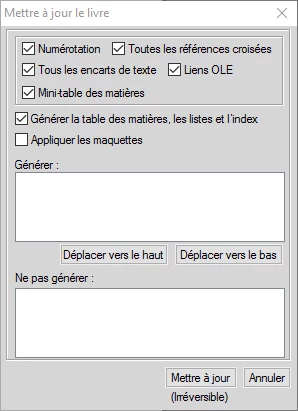
When I choose Update Book, I get the "Update Book" window with "Generate Table of Contents, Lists and Indexes" checked.

However, no file appear in the "Generate" frame where I should see the Table of Contents and Index names.

See screen copy below. Sorry it is a french license 😉

I have no idea why these disappeared.

How can I tell Framemaker to generate the files ?

Thank you for your help.

Patrick
    This topic has been closed for replies.

    2 replies

    Barb Binder
    Community Expert
    Community Expert
    February 13, 2017

    One quick note: Fm differentiates the generated files from user files with the orange/black icons in the book window. Your screen shot validates the suspicions above that Fm is not recognizing your TOC and IX files as generated. Once you correct this following the earlier instructions, you will see the difference.

    ~Barb at Rocky Mountain Training
    Jeff_Coatsworth
    Community Expert
    Community Expert
    February 13, 2017

    I hope you remembered to deactivate your copy of FM on the old machine before installing it on the new one.

    As far as the Generate issue - sounds like FM doesn't think there's any generated .fm docs in play. What happens if you tell it to create a TOC and IX first? Do they then show up in the Generate section?

    mulsambe
    mulsambeAuthor
    Participating Frequently
    February 13, 2017

    Thank you for your answer. Yes, I did manage the old machine license.

    Yes, I discover that FM no longer thinks my TOC and Index are generated files : their icons are no longer the correct ones.

    As these files have complex setup, I wish I could rebuild them easily.

    Do you think there is a way to recover ? Or will I have to re-create them, and re-format the whole stuff ?

    An additional question is : why do I get this situation after moving from my older machine ?

    mulsambe
    mulsambeAuthor
    Participating Frequently
    February 13, 2017

    My issue seems very tricky.

    I just tried the following :

    - deleted the TOC and IX files from the book

    - recreated a TOC file with new name

    - re-added the file to the book

    - closed everything

    - re-opened the book

    - the TOC file still do not appear as generated.