

Known Participant
November 28, 2023
Answered

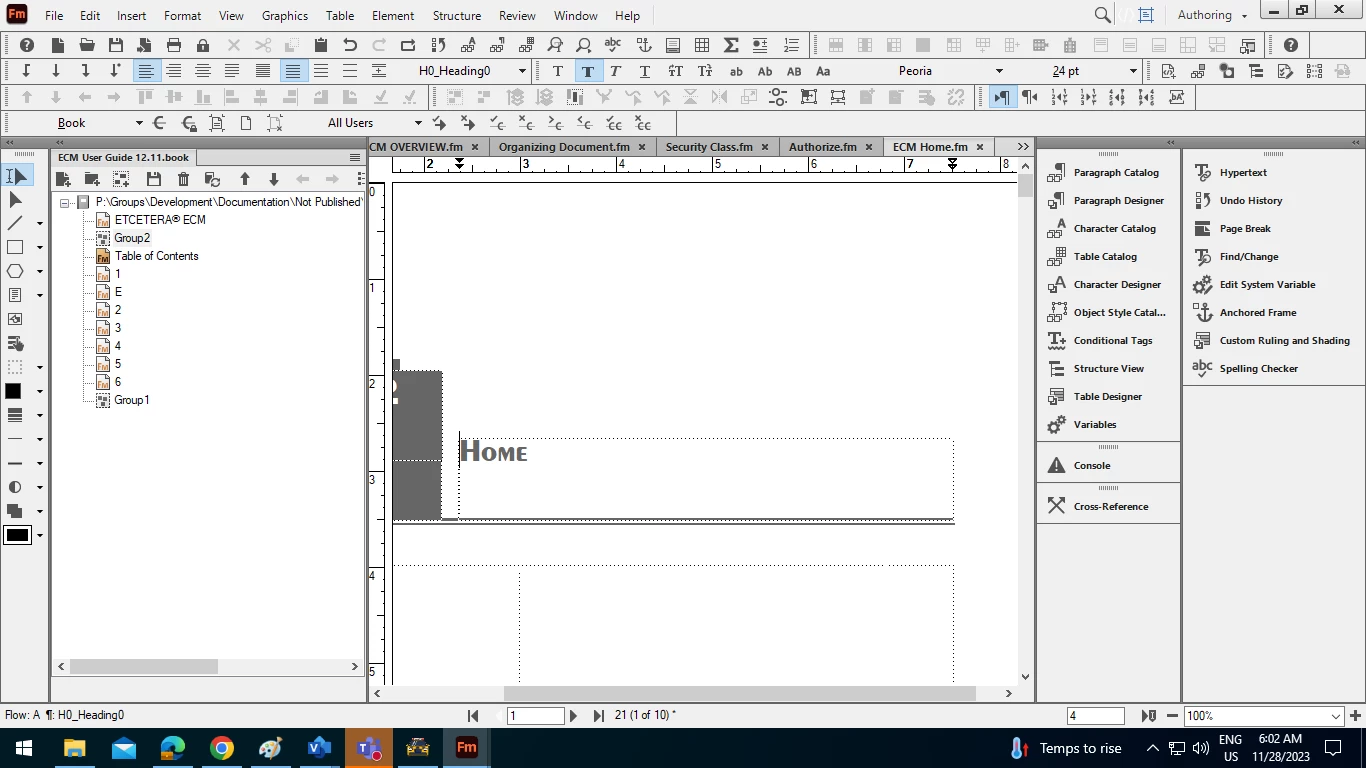
What is group 1 or 2 in Adobe Frame Maker book?

  • November 28, 2023
  • 2 replies
  • 268 views

What is group 1 or 2 here?  Can I delete this from my book. Please someone exaplain.
 

    This topic has been closed for replies.
    Correct answer Barb Binder

    Hi Amit:


    Unless you added the groups intentionally, I'm guessing you inadvertently clicked the button next to add files which adds groups. In that case, you can safely remove them.


    If you had content in the group and you remove the group, you would not delete the content, you would just remove it from the list. If you ever do this by accident, it's good to know that you can always add it back in when you realize it. 


    ~Barb

    2 replies

    Barb Binder
    Barb BinderCorrect answer
    Community Expert
    November 28, 2023

    Hi Amit:


    Unless you added the groups intentionally, I'm guessing you inadvertently clicked the button next to add files which adds groups. In that case, you can safely remove them.


    If you had content in the group and you remove the group, you would not delete the content, you would just remove it from the list. If you ever do this by accident, it's good to know that you can always add it back in when you realize it. 


    ~Barb

    ~Barb at Rocky Mountain Training
    Known Participant
    November 29, 2023

    Thank you Barb for the explanation.

    Jeff_Coatsworth
    Community Expert
    November 28, 2023

    According to this - https://help.adobe.com/en_US/framemaker/using/using-framemaker/user-guide/frm_books_bk-book-groups-and-folders.html#topic_book-groups-and-folders__section_book-groups - groups contain a number of document files within them. Can you right-click and check the Properties of the groups?
