


Participating Frequently
May 16, 2016
Answered

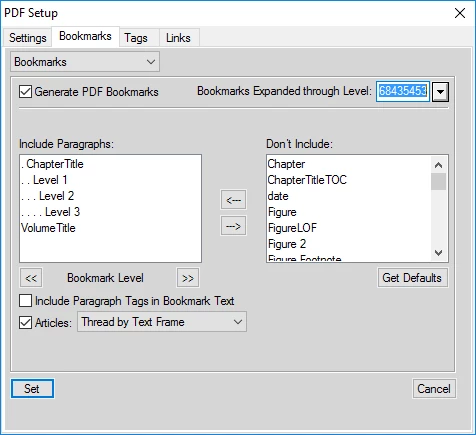
When I print a framemaker document to pdf the option in pdf Setup > Bookmarks > Bookmarks expanded through level will not allow me to select "none"

  • May 16, 2016
  • 2 replies
  • 1022 views

When I print a framemaker document to pdf the option in pdf Setup > Bookmarks > Bookmarks expanded through level will not allow me to select "none" or "default" etc. I can only select the number that is showing.
    This topic has been closed for replies.
    Correct answer Arnis Gubins

    This dialogue entry also allows you to directly enter a value. So type 1, 2 or 3 as required.

    2 replies

    Community Manager
    December 17, 2017

    Thanks for reporting this. We can reproduce it and it is already filed under ticket FRMAKER-2396. We will look into a fix for a future update.

    Arnis Gubins
    Arnis GubinsCorrect answer
    Inspiring
    May 16, 2016

    This dialogue entry also allows you to directly enter a value. So type 1, 2 or 3 as required.

    kevin9432Author
    Participating Frequently
    May 19, 2016

    Typing in None or 1, 2, or 3 worked. I just find it strange that you cannot select from the drop down menu.

    Thanks for the help and answer.

    December 17, 2017

    I just find it strange that you cannot select from the drop down menu.

    It's not a bug - it's a feature.

    Btw:

    It's not the only "feature" in the mentioned dialog.

    Deselect Articles.

    • How will the articles be threaded now in a PDF?
    • The Articles drop down list is still active. Why?
    • When you select an option of the drop down list, FM selects Include Paragraph Tags in Bookmark Text?!

    What's going on here?