


February 3, 2016
Answered

When using my laptop remotely, some dialog boxes do not display completely.

  • February 3, 2016
  • 1 reply
  • 371 views

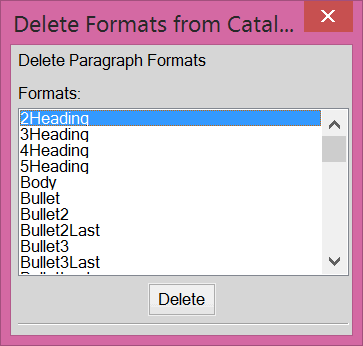
I'm using my HP ZBook running FrameMaker 12. I've set my monitor to default. FrameMaker does not display all dialog boxes completely. Most of the pods are complete, but some are missing buttons completely or only showing partial buttons. When the buttons are missing, sometimes you can use the Enter key for OK, sometimes not. Attached is an examples of what I see.
    This topic has been closed for replies.
    Correct answer Arnis Gubins

    It looks like your system settings for the fonts is set to a larger value (150% ??). Try changing this to a smaller value. Some of FM's pods and windows are fixed sizes, so they won't expand to accommodate large font settings.

    1 reply

    Arnis Gubins
    Arnis GubinsCorrect answer
    Inspiring
    February 3, 2016

    It looks like your system settings for the fonts is set to a larger value (150% ??). Try changing this to a smaller value. Some of FM's pods and windows are fixed sizes, so they won't expand to accommodate large font settings.

    February 3, 2016

    This worked perfectly! Thank you so much for your quick response.

    Jeff_Coatsworth
    Adobe Expert
    February 3, 2016

    You can also tinker with the properties of the FM12 shortcut to “Disable display scaling on high DPI settings” (Compatibility tab)