


Inspiring
October 26, 2017
Question

Why can't I add a page to this file? Anchored frame

  • October 26, 2017
  • 2 replies
  • 879 views

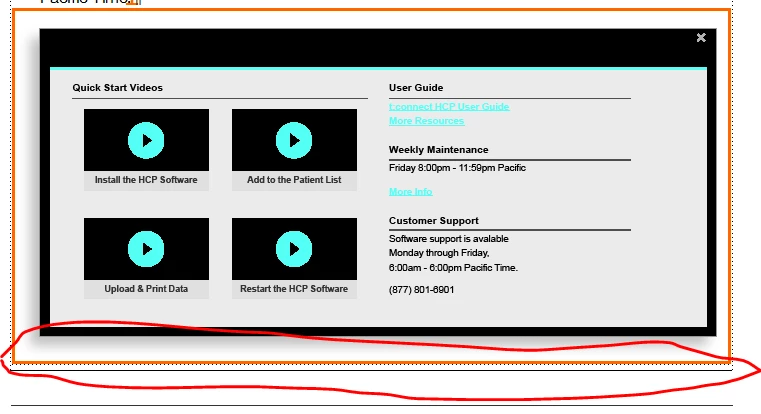
Happy Thursday everyone - I'm having trouble with a FrameMaker file not automatically adding pages, for either added paragraphs or graphic frames. I can't even add a page break. (The information is in the file, but appears to be buried beneath the text frame.)

I'm adding an image that seems to offer a clue. The anchored frame in the image included (orange because it is conditional) has a black line drawn underneath it. The second black line is the ruler that is drawn in the footer of every page.

I've checked pagination, and that doesn't appear to be the problem.

Thanks in advance,
This topic has been closed for replies.

2 replies

Matt-Tech Comm Tools
Community Expert
Community Expert
October 26, 2017

To follow onto Bob's reply, the black line indicates a text frame overflow. Select the frame (Ctrl+Click, or use the "other" selection tool in the Graphics>Tools palette) and view the object properties. Enable the Autoflow option and you should be fine.

-Matt SullivanFrameMaker Course Creator, Author, Trainer, Consultant
Inspiring
October 26, 2017

Bob and Matt - I think you're getting me closer. It HAS to be something with the setup of the page, but I just checked and the page tag is A and autoconnect is on. It isn't disconnected if autoconnect is on, right?  I checked the master pages, and all is well. All of my other files are working.

Anything else you can think of?

Matt-Tech Comm Tools
Community Expert
Community Expert
October 26, 2017

Do your master pages contain frames with the A flow tag?

-Matt SullivanFrameMaker Course Creator, Author, Trainer, Consultant
Inspiring
October 26, 2017

I also tried deselecting the crop anchor setting, which makes the image extend beyond the bottom of the page, but does not (as it should) add a new page and move the anchor to that page.

Bob_Niland
Community Expert
Community Expert
October 26, 2017

Usually this is because the page is disconnected or someone has turned off auto-connect for the Flow A text frame on it (which may be the same thing).