Participant
October 28, 2016
Question

Why is FrameMaker 2015 Structured cropping top and bottom of images in PDF?

  • October 28, 2016
  • 3 replies
  • 1459 views

I opened an existing book file today to update and print a new PDF. When the PDF was done, many of the imported artwork images were cut off at the top and bottom of the image.

To check if my copy of FM was corrupted or settings were wrong, I had another person attempt creating the same PDF. His copy also cut the tops and bottoms of the images.

These are functioned correctly a couple of months ago. Only a few editing changes were made to the book. I have even attempted creating a PDF of the single chapter file with the same cut-off results.

Has anyone run into this or know of a solution?  We obviously can't send these to the customer.

This is FM version 13.0.3.495.

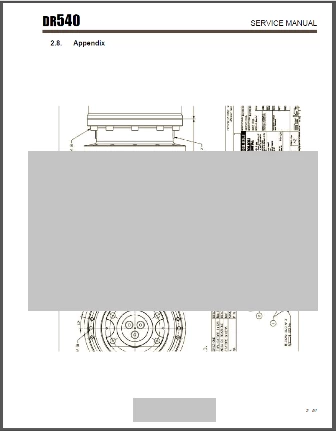
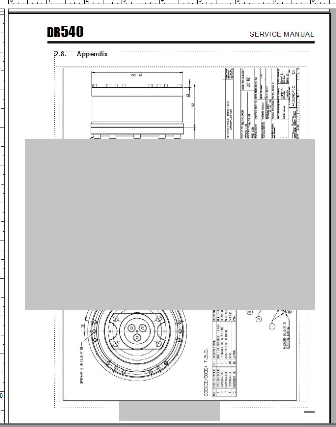
First image is screen shot of FM file. It appeared like this in the old PDF also (gray square is mine to cover company info). The second image shows the top and bottom cut off in the PDF. This is occurring in several files and books and on other people's computers, not just mine.

Thanks.
This topic has been closed for replies.

3 replies

TSKG
Participant
February 6, 2017

Greetings,

I am having a similar issue in Framemaker 2015 (latest patch) with graphics being "chopped" at the bottom.

The issue is inconsistent, but something definitely happens to the graphics imported by reference.

I am using Save as PDF option and Acrobat.

Using hard drive  (no network drives).

If anyone finds a resolution to the issue, please, share.

Thank you.

Arnis Gubins
Inspiring
February 6, 2017

Are you rotating the graphics that get chopped in FM?

TSKG
Participant
February 6, 2017

I am not rotating anything.

Participant
January 24, 2017

I'm seeing the same issue with unstructured FM 2015 and imported PDFs. It does not happen in FM 12 (which is not being used for production).

Thoughts?

Arnis Gubins
Inspiring
October 30, 2016

How did you create the PDF from FM and which joboptions file was used?

Does the imported graphic convert properly to a PDF on its own, i.e. use Acrobat to turn the graphic file into a PDF?

Are there any spurious objects on the FM page? Try a ctrl+A to select all objects on the page.

Note: there are two additional patch levels available for your version of FM. Install these and see if the issue persists.

Participant
October 31, 2016

I used the File > Save as PDF ... command as always. The job option was left at Standard as always. This document has been created as a PDF several times before without this issue, the latest being in August with FM 11. All images were imported and created in the PDF correctly. However, this time is with Adobe FM 2015.

This is happening on several other machines with FM 2015, as they were just installed in the last couple of months.

I downloaded AdobeFramemaker_13_0_4_upd and AdobeFramemaker_13_0_5_upd from Adobe's support page, which was not an easy path to find, and tried to install, but they will not install. I checked with my IT support as to why they would not, but using administrator rights still doesn't let these install.

Since FM 2015 is supposedly through the Cloud, why aren't updates announced or installed through there? This version of FM was just installed in September and should have updated to the latest.

I started over with the patch download and install to clear out anything wrong with before. I am now getting an error that Adobe Application Manager may be damaged and to download a new copy. However, the link in the error message doesn't take me to download AAM. It goes to download Creative Cloud.

Arnis Gubins
Inspiring
November 1, 2016

If you get an error message about not having sufficient rights to install the update or if the "Updates..." option is greyed out in your FM's Help menu, you may have to edit the following permissions file:

C:\Program Files (x86)\Common Files\Adobe\AAMUpdaterInventory\1.0\AdobeUpdaterAdminPrefs.dat

It's an XML file and you can use any text editor.

The following line should have a value of "0", so that updating is NOT suppressed.

    <Suppressed>0</Suppressed>   

You should then use the Updates... option in FM to get the AAM updater to run (instead of the CC version).