


New Participant
January 4, 2019
Answered

Wrong indentation of Tabstop in ToC - FrameMaker 15

  • January 4, 2019
  • 1 reply
  • 522 views

Hello,

I have generated TOC for my manual in FrameMaker 2015.  I formatted the TOC paragraph styles as per our style guide.

Added a tab stop as displayed.
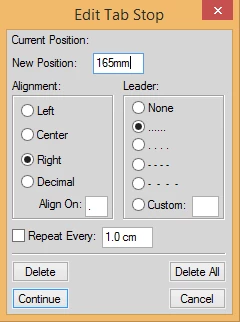
In the TOC paragraph style, when I select the tab stop and apply to TOC as displayed below:
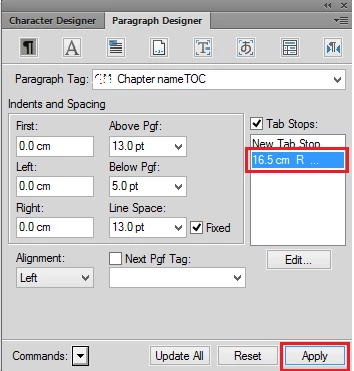
I am facing an issue in adding a Tab stop to the TOC paragraph styles. When I select the Tab stop and Click Apply. The indentation is as displayed below:
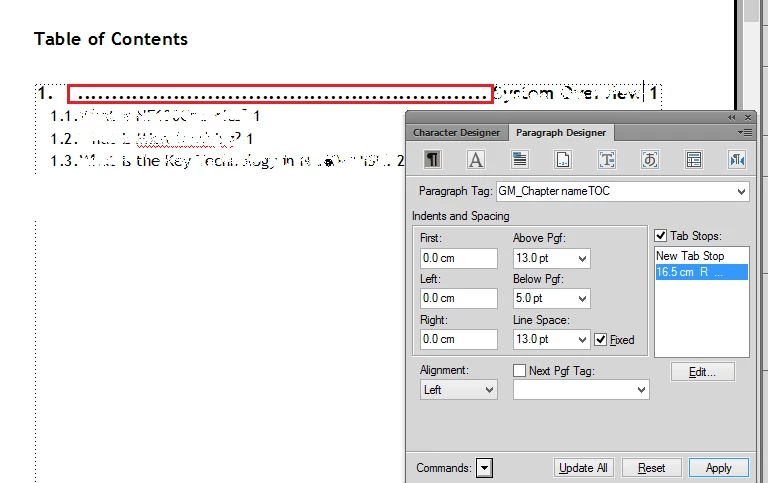
Please let me know the reason for this indentation.

Regards,

Manasi.

    This topic has been closed for replies.
    Correct answer Ian Proudfoot

    Hello Manasi,

    You need to add another tab stop to handle the tab character between the paragraph number and the chapter title text. If you add (for example) a 15mm left aligned tab stop everything will align as you require. The exact position of the additional tab stop is up to you of course.

    Ian

    1 reply

    Ian Proudfoot
    Ian ProudfootCorrect answer
    Legend
    January 4, 2019

    Hello Manasi,

    You need to add another tab stop to handle the tab character between the paragraph number and the chapter title text. If you add (for example) a 15mm left aligned tab stop everything will align as you require. The exact position of the additional tab stop is up to you of course.

    Ian