



smathers
Known Participant
August 25, 2017
Question

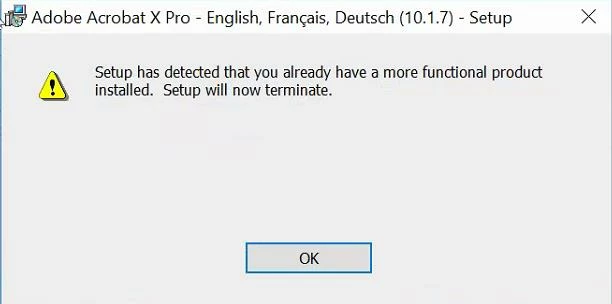
Trying to install Acrobat Pro 10.1.7 & get error: "Setup has detected that you already have a more functional product installed. Setup will now terminate."?

  • August 25, 2017
  • 5 replies
  • 5524 views

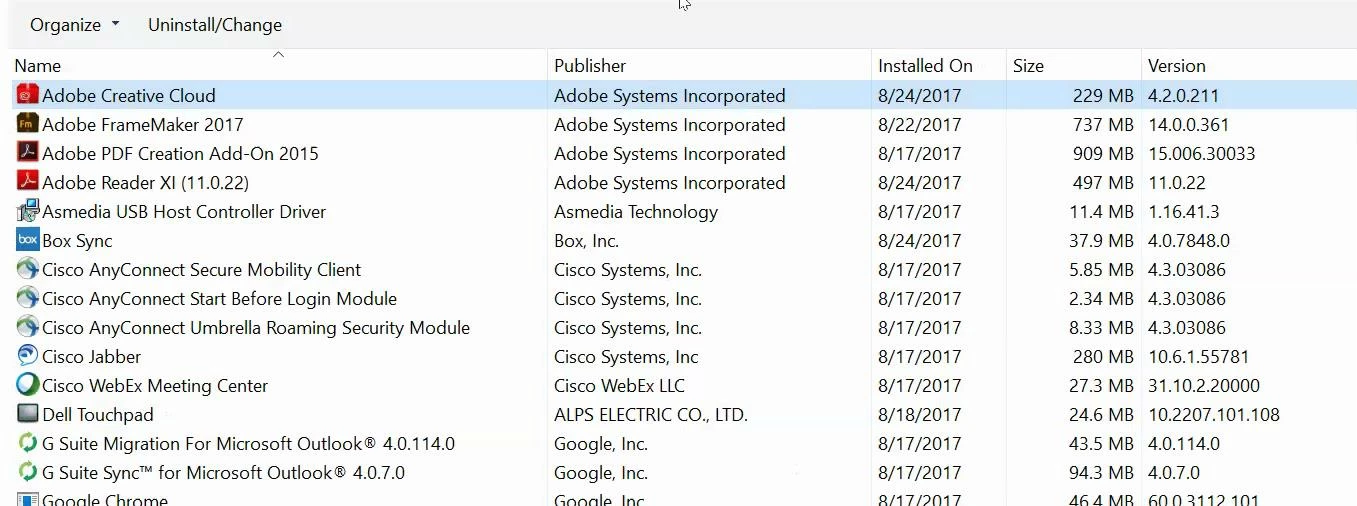
IT is trying to install Acrobat Pro 10.1.7 & we're getting this error: "Setup has detected that you already have a more functional product installed. Setup will now terminate." I've put the screenshots from IT below that show the error & all the Adobe products I have installed on my system & they have confirmed that the install works with Adobe Reader XI. I cannot uninstall FM as we don't have the CD and I already have all the scripts and Patches downloaded. Can someone help us get this working? Thx.
This topic has been closed for replies.

5 replies

Participant
October 28, 2021

 I had this problem.   Before I installed  adobe reader. After, I want Adobe Acrobat PRO. But I don't install acrobat Pro.

I deleted adobe reader and after installed Adobe Acrobat PRO. I solved my problem. And AFTER installed adobe reader.

Known Participant
August 29, 2017

I recently had this VERY SAME merry-go-round on my new work machine. It came with wussy little Reader pre-installed as part of the standard SW rollout package; and I need Pro to do my job.

Go into your Control Panel, Programs and Features, and then select Acrobat from there, right-click and choose UNINSTALL . The Windows uninstaller actually works pretty good at this. You will likely have to reboot to complete the action. Double-check by going through these steps again to make sure the Uninstall worked.

After this, Acrobat Pro will install and license correctly.

Hope that helps you.

smathers
smathersAuthor
Known Participant
August 25, 2017

If anyone with Adobe can please reply to this and have any advice? Thx so much!

Bob_Niland
Community Expert
Community Expert
August 25, 2017

re: I cannot uninstall FM as we don't have the CD...

If you can't get Adobe to direct you to a download, FM media, going back an impressive number of releases, is available at very low prices from cdw dot com (because it doesn't include the license).

Now if your IT has lost the license details as well, your enterprise needs to hire some staff competent at basic stewardship.

Jeff_Coatsworth
Community Expert
Community Expert
August 25, 2017

Best practices has always said that you shouldn't have both the Reader & Distiller on the same machine - that might be the problem. Your other issue is that you've got the "headless" version of Acrobat installed as part of FM, and now you want to swap it out for the "full" version. That may also be your blocker. I would find those installation files for FM & try to do a repair - uninstall, install Acrobat first & reinstall FM making sure that the "custom" option is turned off so that the headless creator isn't installed over your full version.

smathers
smathersAuthor
Known Participant
August 25, 2017

Thx, Jeff! Well, for the past 20+ years, every company I have ever worked for always has had both Reader & Distiller on the same machine and I've never encountered any issues, so this is the 1st time I've heard of that. I will pass on your advice, thank you!

Bob---I want to keep this all as positive as the IT people I work with are very competent and can only work within the company parameters. The CD is with another person, but will try and get it, thx.

smathers
smathersAuthor
Known Participant
August 29, 2017

LOL - I was taking it as "pass it along" not "take a pass on it" ;>)

Isn't English wonderful!


Eric---unfortunately that didn't work for me, dang!!! Maybe someone who works at Adobe will respond & have a solution... Thx anyway!

Jeff---LOL!