


New Participant
February 11, 2023
Answered

Fill Issue with Shapes

  • February 11, 2023
  • 1 reply
  • 1462 views

Hello,


I would appreciate you advise please. I have created some work which has a large number of shapes that have I have filled different colours but after completing a lot of work and decided to tweak some shape colours for some reason all shapes are connected.
As you can see from the pictures originally when I filled the shapes, they were complete distinguishable from each other but now changing one shape colour changes everything even the line colour. (Attached picture just to show issue)


 

This is really frustrating as I need to be able to develop the colour scheme over time. 


Any support really welcome


Thanks

Francis
Correct answer Imaginerie

Hi Francis,

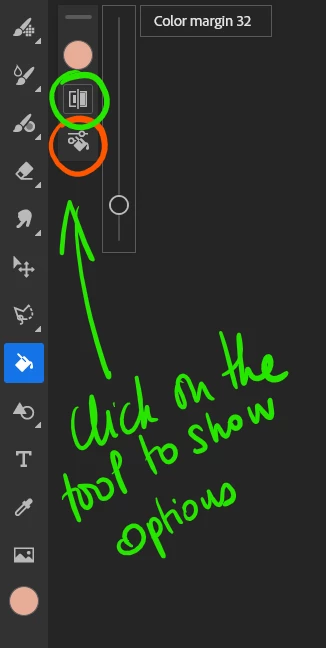
The settings for the fill aren't in the app seetings (which are where the settings for the whole file would be, not the tool) but under the tool itself as I have shown in my screenshot


https://helpx.adobe.com/uk/fresco/using/colors.html

1 reply

Imaginerie
Community Expert
February 12, 2023

HI,

Maybe I don't really understand your question, but the before (pink) and after (teal) images seems very similar to me in how the colours are distributed.

But I'll wander some hints:
The fill has some settings available


So sometimes if you push the slider to the max, it fills shapes even if they're not really open.
It's a trial and error thing, see which one works and as soon as it fills more than it should do, then go back one point.

You might want to check the transparency settings: Maybe you need it off.

last thing would be to check if you have really closed all shapes. If you get unwanted fills even at very low settings for the margin, it's likely that some paths/shapes are really open.

New Participant
February 13, 2023
Hi,

Thank you for the response really appreciate your feedback.

When I created the shapes and then used fill for colour and context each shape filled individually but later when I went back to change the fill colour of some shapes all shape are filled, so not sure why it has changed

Unfortunately I cannot see any setting for fill under App setting, not sure where else I can change this

Again thanks for responding

Cheers Francis

Sent from Mail<> for Windows
Imaginerie
ImaginerieCorrect answer
Community Expert
February 13, 2023

Hi Francis,

The settings for the fill aren't in the app seetings (which are where the settings for the whole file would be, not the tool) but under the tool itself as I have shown in my screenshot


https://helpx.adobe.com/uk/fresco/using/colors.html