

New Participant
July 25, 2020
Answered

Hand tool for Fresco

  • July 25, 2020
  • 6 replies
  • 4440 views

I have been using Fresco on my PC with a drawing tablet and love it! Only problem is I can't figure out how to move/pan the canvas. Is there a hand tool of Fresco?

This topic has been closed for replies.
Correct answer Imaginerie

No worries!
You won't be able to use the space bar on an Ipad, you must use the touch gestures. Check the basic help (touch gestures) as per the screenshot below... (via the cog wheel)
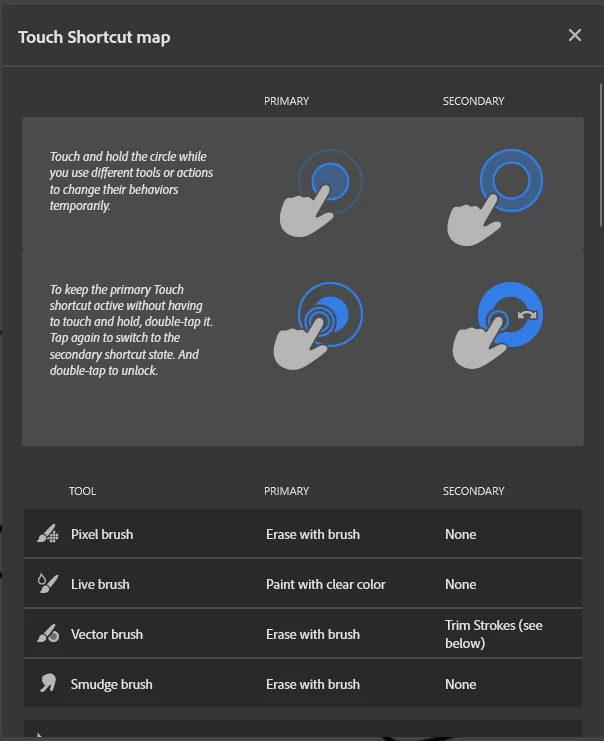
My answer for the space bar is only for Windows on Desktop that don't have a touch feature...

6 replies

Community Expert
January 15, 2023

It is because it was designed for tablets such as surface pro, iPad pro etc. 

Imaginerie
Community Expert
January 14, 2023

Hello!

When  you work on  a desktop with Fresco all the tablet gestures (zoom, pan, etc...) are replaced by keyboard shortcuts.

You can find them by going to the cog wheel at the top right of the screen>app settings>help>keyboard shortcuts


or I made a handy cheat-sheet for you 😉
https://bit.ly/FreeFrescoShortcuts
don't forget that - if you have a tablet with express keys - you can assign those shortcuts to the keys on the tablet, for an even better experience.
(shortcut for pan is the spacebar BTW!)

Hope it helps!

Community Expert
January 14, 2023

Forgive me for asking, since Iuse Fresco on the iPad and not a Windows device, but does holding the space bar not allow you to pretty much act like you have a hand tool like it does in Photoshop or pretty much every other graphic app? Just curious 

Imaginerie
ImaginerieCorrect answer
Community Expert
January 14, 2023

No worries!
You won't be able to use the space bar on an Ipad, you must use the touch gestures. Check the basic help (touch gestures) as per the screenshot below... (via the cog wheel)

My answer for the space bar is only for Windows on Desktop that don't have a touch feature...

New Participant
January 14, 2023

i have the same problem today. Hand tool is not added ? This tool would facilitate drawing detail.

Thank you for your listening.

New Participant
October 18, 2020

I have the same problem too. I hope it will be added soon, I like using Fresco and I hope it can work fully on my pc.

New Participant
September 23, 2020

I just saw this because I just learned that Fresco was now compatible with my PC & diaplay tablet. I did notice that the hand tool I had set on my hot keys does not work. I tried using spacebar that also didn't work. However, I zoomed in to my artwork and the spacebar then allowed me to move around the artboard. That being said it doesn't work every time. I hope Adobe can upgrade this and will have an option for moving around the artboard.

Rohit Guglani
Adobe Employee
Adobe Employee
July 25, 2020

Hello afifah,


Currently there is no easy way to move/pan Canvas. We are working on adding the support in upcoming releases. 


Thanks,

Rohit