


Participant
January 4, 2021
Answered

[How To] Stroke stabilizer/correction in fresco?

  • January 4, 2021
  • 2 replies
  • 30913 views

1. is there a setting which stabilises the stroke?

for instance it would help if you have shaky hands it as it would make the drawing much smoother as you draw it

--

2. is there a setting which makes the brushes predictive?

so for example, if you attempt to draw a perfect circle, it automatically corrects it to a perfect looking circle

--

please let me know if doesn't make sense - it's hard to explain!


[Renamed by Mod]


This topic has been closed for replies.
Correct answer Kenneth Kawamoto

Hope this works for you!

2 replies

Participant
November 2, 2021

Select vector

Select Basic shape tool (round)

(go to brush settings lower left)

select MAX desired size

(select brush dynamics)

adjust MIN diameter slider to 100%


this will give you a consistent diameter round line regardless of hand angle or stylus pressure


Participant
November 2, 2021

Apologies, I meant not vector.


Sjaani
Community Expert
Community Expert
January 5, 2021

1. Yes, when in Vector you have a snaky line at the bottom of the tools this allows you to alter smoothing giving a much smoother path for shaky hands. Not available under Live or Pixel brushes.


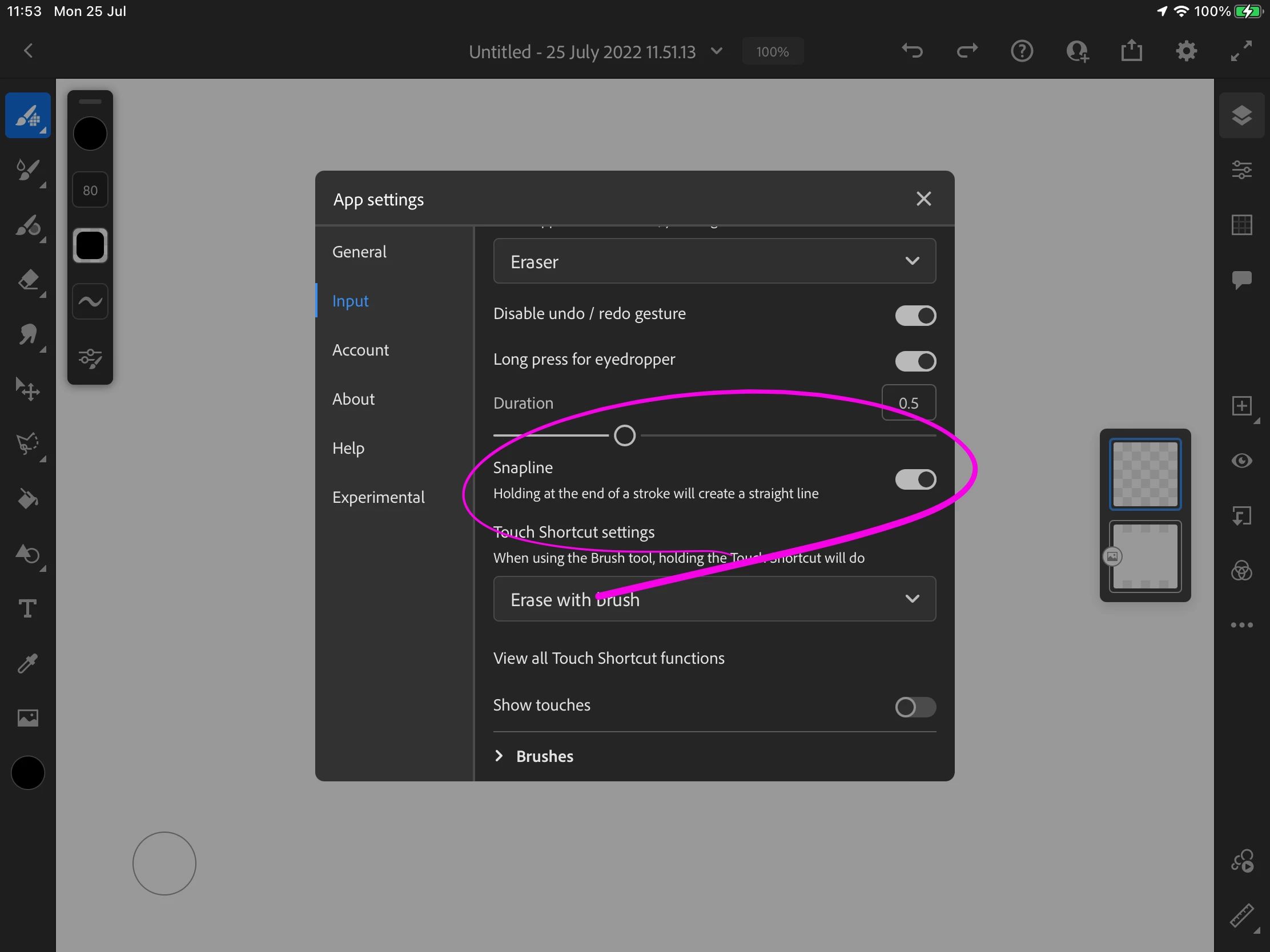
2. There was an experimental feature which allowed for the creation of straight lines if you held the pencil at the end of a stroke. I'm not sure where that feature is at. I thought it was added, but for me my lines are not straightening. There is a shape tool which you can use now but it seems to mainly be for filling shapes rather than drawing a stroke.

Participant
July 24, 2022

Can you please show an image? I cannot find it. Thanks 🙏

Kenneth KawamotoCommunity ExpertCorrect answer
Community Expert
July 25, 2022

Hope this works for you!