


Inspiring
October 4, 2020
Answered

Save to Files Dropbox option is disabled

  • October 4, 2020
  • 2 replies
  • 5951 views

I used to export my illustrations to Dropbox using the following steps:

Share icon > Quick export > Save to Files > Dropbox.

Then I would be able to pick which folder in Dropbox I want to save the illustration to.


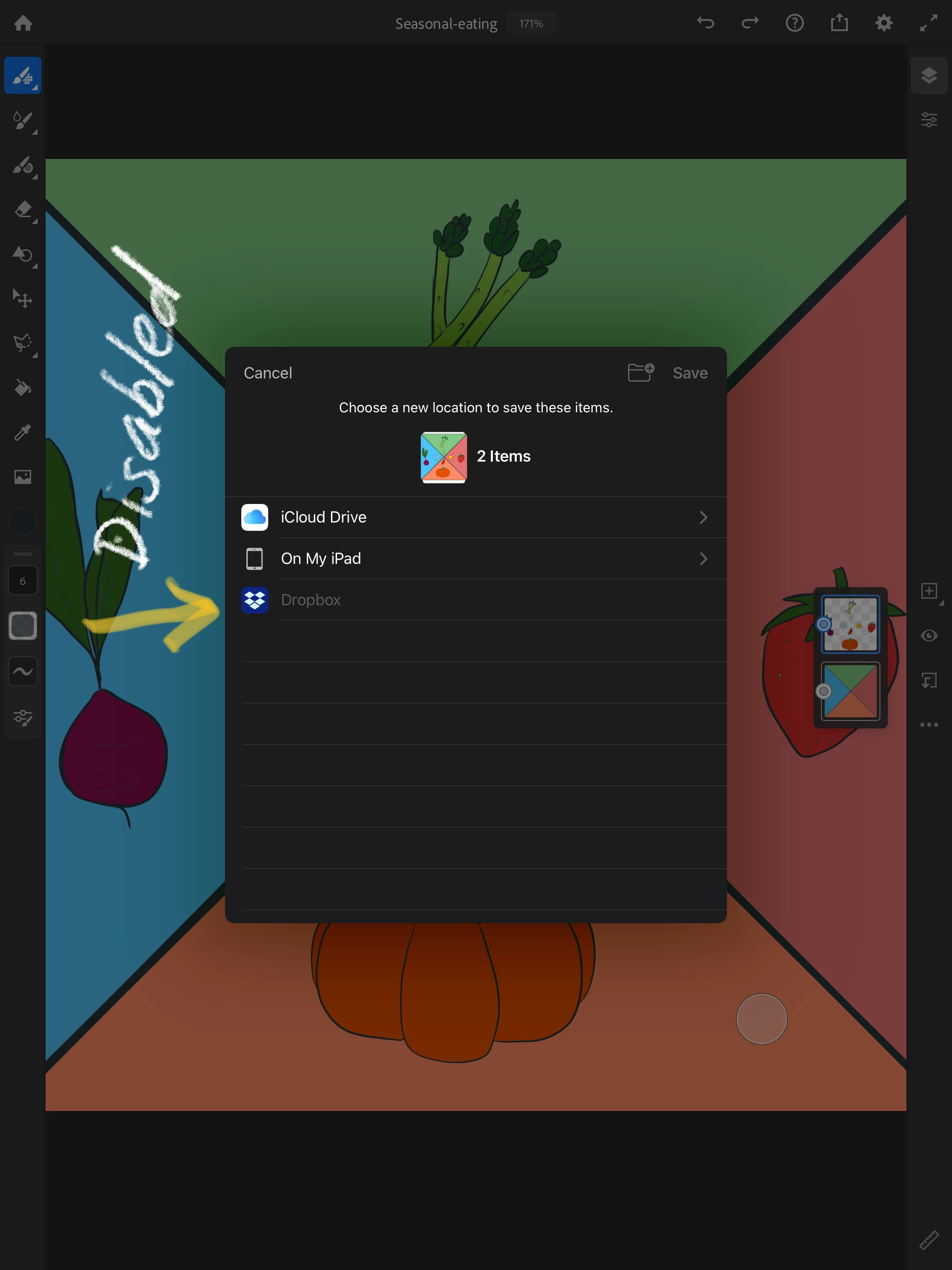
Since about July, I have not been able to export to Dropbox. The option is greyed out (disabled). See screenshot below.

My workaround is to use Airdrop to save it to my laptop and then move it from my laptop to my desktop where I can do final image processing before I upload it to my website. However, these extra steps are getting tedious and I don't always have my laptop available. My desktop cannot do Airdrop because it's too old.


How can I fix this problem so I can export to Dropbox again?

Here are my specs: iPad Pro 12.9 inch 2nd generation running software version 14.0.1. Adobe Fresco is running version 1.9.0.


I turned on Allow for all the Adobe Fresco permissions. I also turned on Allow for all the Dropbox permissions. I am able to export to Dropbox from my Photos app and Paper app so I know Dropbox is correctly logged in and there's no integration problem with other functioning apps. I am able to reproduce this behavior on the Adobe Sketch app.


I've spent 45 minutes on the live chat with an Adobe support person and he's of no help, unfortunately. Hoping someone in the community has hit this problem and can give me guidance on what I need to do so I can streamline my workflow again. Thank you in advance for any help.


This topic has been closed for replies.
Correct answer kiwiana

Kiwiana. 


OK. Thanks for checking. It's not iOS 14 and because I'm not hearing it from a lot of people, I don't think it's a bug in Fresco (at least not a widespread bug). I'm going to keep working on it. 


In the meantime.... go ahead and set-up the Creative Cloud Mobile app with iOS Files (like you did with the Dropbox app). Once it's there, you'll see it as an available location to export to.


Once you've exported, that work will save to the Creative Cloud Mobile App in Your work > Files.


Let me know how it goes. 


Sue.


Hi Sue,


Thanks for your help. I'll start using the Creative Cloud app for my cloud storage. It's a good enough solution for my workflow. Thanks for guiding me through how to set it up.

I really appreciate your help.

2 replies

Sue Garibaldi
Community Manager
Community Manager
October 5, 2020

Hi Kiwiana. 


Make sure that Dropbox is toggled on in iOS Files. Tap on Files on your device Home screen. Then Browse. Dropbox, if it's activated in Files should show up in the Locations list. 


Sue.

kiwianaAuthor
Inspiring
October 6, 2020

Hi Sue,


Thank you very much for your help and guidance. I confirm that Dropbox is toggled in the Files app. See this screenshot. You can see Dropbox is activated and I can see my Dropbox files in the Files app under Locations list: 


Furthermore, I am able to Save to Files > Dropbox in other apps. Here's an example. I took a screenshot and then I used the Share option. You can see Save to Files > Dropbox is available and I have a number of different folders to choose from (I blurred out the folders with an opaque black box to protect my privacy). I am able to save to Dropbox on multiple iOS apps including saving screenshots and the Paper app.


On the Adobe apps, the Dropbox option is completely disabled (greyed out).

Can you give me another suggestion on how to fix this? Or is the problem a bug and Adobe needs to fix it?


Thanks for your help.

kiwianaAuthor
Inspiring
October 6, 2020

By the way, I forgot to attach my other screenshot that shows I am able to save files using Save to Files > Dropbox from other apps that are not Adobe apps.

Inspiring
October 5, 2020

Hello, I have just made the test - record in a new file Drpbox and Import since this file Dropbox without any worries. A lane, depending on whether we are customer with free access to Dropbox or profitable customer, the number of apparatuses allowed to achieve the same count Dropbox is more or less restricted, to see conditions Dropbox.

Yves Crausaz, Suisse, retraité actif dans le monde de la photo et des arts graphiques.