Known Participant
September 30, 2021
Resuelto

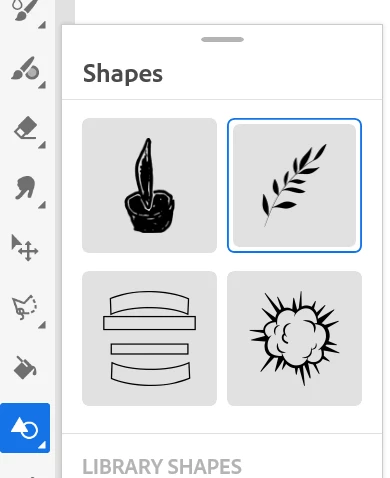
There is no circle/square shapes in my library

  • September 30, 2021
  • 2 respuestas
  • 3628 visualizaciones

I am trying to insert a circle in my painting but there is no standard shapes. Where do I find these shapes? Thanks

Este tema ha sido cerrado para respuestas.
Mejor respuesta de Printmesomecolor

It's under ruler icon. Click and hold to get the shapes. 

2 respuestas

Known Participant
May 6, 2022

This is so frustrating - how can drawing basic shapes like rectangles and circles be so counterintuitive?! I can't get the ruler shapes to work. Why do i need to search the web for tutorials that explains how i make a filled rectangle? It should be the easiest thing ever

Participant
July 20, 2023

personally I  am cancelling adobe subscription. I don't have time to be frustrated by figuring the simplest of tasks. I have no idea what they are thinking at Adobe, but it totally misses the mark for me and my daughter. Its very dissapointing as I have been a huge Adobe fan for so many years, and they used to have the most impressive software. Now it just constantly face plants and makes me want to throw my drawing tablet away - wich is unfair, its not the drawing tablets fault. I just can't understand why it's missing so many basic features. I mean out on the market for four years and haven't even added symmetry, but you managed a confusing animation feature? and no basic shapes?!? yeah, it's beyond dumb. Canceling today. 

El Yoth
Participant
July 20, 2023

Thing is, they had the shape feature and it worked great. I think they have some copyright issues with procreate maybe? Would also explain the missing but basic symetry feature

Printmesomecolor
Participant
September 30, 2021

It's under ruler icon. Click and hold to get the shapes. 

Known Participant
September 30, 2021

Hi 


Thank you so much. Yes I can find them under ruler but these are not shapes. There is a difference. When I insert a shape I get options at the bottom (Fill, Erase, Mask, Select) where as objects under ruler are just guidelines.


If I use circle and then use the select/lassoo tool, the circle depends on how well I can trace (I have arthritic hands). Sometime ago (2020) these were shapes and we could do lot more with them.

Inspiring
September 30, 2021

Salut, il n'y a pas de solution directe pour enregistrer une forme dessinée dans Fresco comme une "forme" dans la bibliothèque CreativeCloud.
Ma solution : Dessiner la forme sur Fresco et depuis Ca (Capture) sur un smartphone, photographier cette forme et l'enregistrer, La forme apparaitra alors dans les formes dans Fresco !

Yves Crausaz, Suisse, retraité actif dans le monde de la photo et des arts graphiques.