


New Participant
October 19, 2019
Answered

eraser in ADOBE FRESCO

  • October 19, 2019
  • 5 replies
  • 8773 views

it would be good to be able to manage the eraser, or better as in ADOBE DRAW, to be able to modify it. Like the rest of the brushes, make it become thinner (and not just big or small) in few words like the conical brush.

we hope fresh Adobe will update this solution.
This topic has been closed for replies.
Correct answer Michael J. Hoffman

I've moved this post to the Fresco board. 

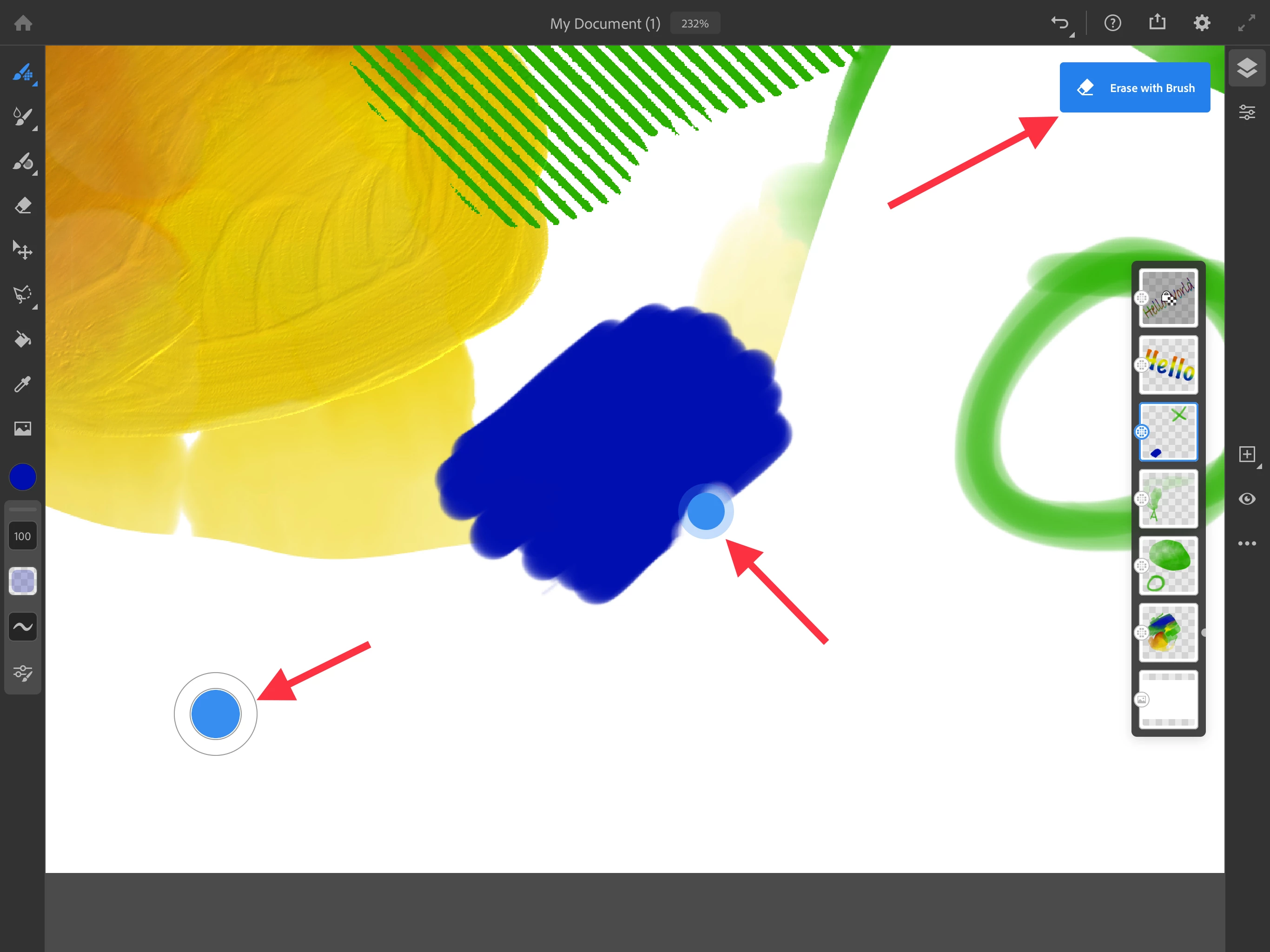
In Fresco, if you use the Eraser tool, you can control size and flow. However, you can turn any brush you're currently using into an eraser temporarily by pressing your finger on the touch control button (circle in the lower left of the screen). This is the shortcut for "Erase with brush."


You can also double-tap the touch control to toggle between erase and brush mode, if you prefer not to hold your finger on the control as you erase. 

5 replies

New Participant
February 16, 2022

Hi

i really miss the eraser function in ADOBE DRAW where you could use the eraser like the fill function, erase full color filled areas or whole lines.

Can I just not figure out how to use this function or did it not carry over from draw?

Participating Frequently
February 14, 2021

But how do you modify the behavior of the "Eraser" as opposed to erase with brush.   If you select "Eraser" for your top button or touch control, it defaults to a hard edge circle that erases 100%.  Is there a way to modify that, I would like a softer edge with erasing 50% or so with each pass.  So more like a paper eraser works.

Participating Frequently
February 14, 2021

Okay, figured it out: the "Eraser" defaults to the tool "Hard Round Variable" in the eraser palette.  So you can modify that.

New Participant
October 31, 2020

Hi, I find it annoying that if I paused for a second, my brush turns into erasure. Is there any way not to have this automatically.

Sue Garibaldi
Community Manager
Community Manager
November 2, 2020

Hi Ragvy. 


Your brush should not be turning into an eraser when drawing is pause. A couple of questions:

* Are you by any chance using an Apple Pencil 2? If you are, could you be activating the double-tap function?

* Or is it possible you're activating the Touch Shortcut?


Please let me know what you find.


Sue.

New Participant
November 2, 2020

Thanks for your help. I am using finger tips so it might be the shortcut issue. Do you know how to disable Touch shortcut please. Thanks in advance.

Richards Gallery
Known Participant
November 28, 2019

I'm afraid to say I can't get this to work for me - much like the lady in another post.  Whether I press & hold the control button or double press the brush continues to paint rather than erase.  I've checked to see whether touch shortcut and erase are selected in settings

Richards Gallery
Known Participant
November 28, 2019

If in doubt - keep trying.  After many attempts to make this work for me I shut down the app and then re-launched it and in so doing the app defaulted to a pixel brush rather than the flow brush that I had been using.  Lo and behold the touch control worked with the pixel brush as advertised, i.e. erase with brush.


I still can't get either erase or erase with brush to work when using a flow brush but maybe my expectations are wrong?

Richards Gallery
Known Participant
November 30, 2019

Ok, hands up, my expectations were wrong and Fresco is doing what it says on the tin.  For pixel & vector brushes touch control can be set to erase with brush but for flow brushes touch control enables a 'clear' brush.  If in doubt RTFM

Michael J. Hoffman
Michael J. HoffmanCorrect answer
Community Expert
October 19, 2019

I've moved this post to the Fresco board. 

In Fresco, if you use the Eraser tool, you can control size and flow. However, you can turn any brush you're currently using into an eraser temporarily by pressing your finger on the touch control button (circle in the lower left of the screen). This is the shortcut for "Erase with brush."


You can also double-tap the touch control to toggle between erase and brush mode, if you prefer not to hold your finger on the control as you erase. 

New Participant
October 21, 2019

perfect ... I understand

Community Expert
October 24, 2019

I actually prefer the puck turing the brush into an eraser option.  It also makes things great to draw in a reductive manner