
Inspiring
June 11, 2013
Answered

Application Manager shows 'Install' next to apps already installed

  • June 11, 2013
  • 2 replies
  • 6004 views

I have been using CS6 apps as part of a Creative Cloud subscription since not long after CC was released. I have only installed the apps as part of CC.

However my AAM window shows a blue Install link next to apps (eg ID, PS, AI, Acrobat) which I use every day. (You can see ID CS6 in the background of the screengrab below.)

The only two apps which show up as installed are AE (which I downloaded a month or two ago) & LR5 (which I downloaded yesterday) and even that shows a grey 'Installation complete Launch app' message when I've already been using it.
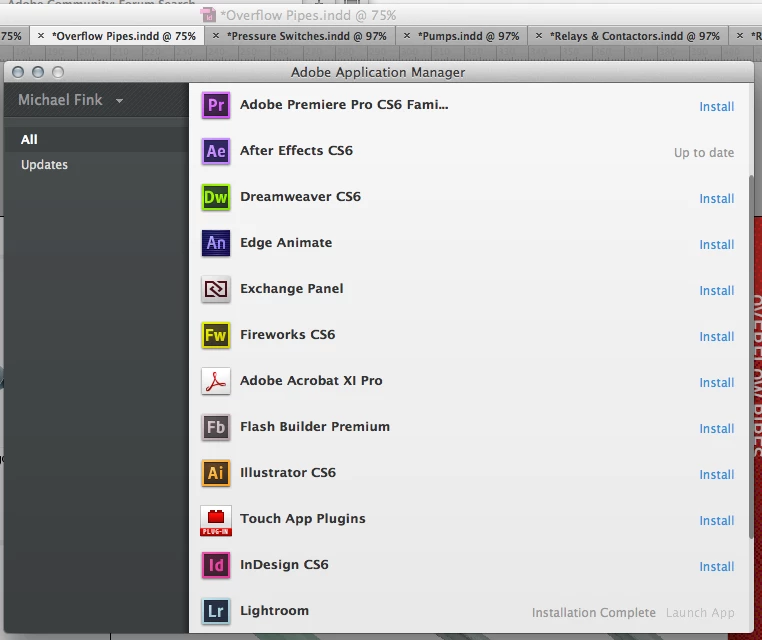
Does this suggest that AAM isnt properly monitoring the update status of my apps?

How can I fix this?

This topic has been closed for replies.
Correct answer Jeffrey_A_Wright

Puffmokie please see Creative Cloud AAM lists Applications as "Up to Date" when not installed - http://helpx.adobe.com/creative-cloud/kb/aam-lists-removed-apps-date.html for a solution to your current difficulties.

2 replies

puffmoikeAuthor
Inspiring
April 7, 2015

Bringing my old thread out of retirement…

I bought an iMac Retina 5K in late 2014 and decided to build it from scratch (rather than use Apple's Migration Assistant). In doing so I hoped to avoid copying across preference files that had intentionally or inadvertently been changed over the course of the 8-odd years I have been a Mac user. In short I thought it might help me avoid issues like the one detailed in this thread.

So with that in mind (and given I have no recollection of changing any preferences in Creative Cloud account) why when I open up CC does it now ask me if I want to install Lightroom 5, despite having downloaded it along with ID, AI, PS, Acrobat and Edge Inspect when I set up my computer?

And should I bother trying to get to the bottom of this, or should I just ignore it?

(Ping Jeff A Wright‌)

Jeffrey_A_Wright
Community Manager
Jeffrey_A_WrightCommunity ManagerCorrect answer
Community Manager
June 11, 2013

Puffmokie please see Creative Cloud AAM lists Applications as "Up to Date" when not installed - http://helpx.adobe.com/creative-cloud/kb/aam-lists-removed-apps-date.html for a solution to your current difficulties.

puffmoikeAuthor
Inspiring
June 11, 2013

Hi Jeff,

Tried Solution 2 (as it seemed to be the quickest and simplest) and it sort of had the desired effect:

Apps such as PS, ID, AI and Acrobat (which were missing in AAM before) now show up correctly but AE and LR (which were displayed correctly before) have now gone missing.

What should I do now? Can I just ignore it (what happens if I do)? Should I reinstall those two apps? Will the LR database be affected, or will a fresh install recognise it?

Jeffrey_A_Wright
Community Manager
Community Manager
June 11, 2013

If they are missing then please double check the system requirements to make sure you meet and exceed the current system requirements.  Lightroom 5 just became available for example so if you were using Windows Vista it would no longer be available.

If you do meet the minimum system requirements then I would recommend you complete the remaining steps in the previously offered document.