
Inspiring
April 5, 2018
Question

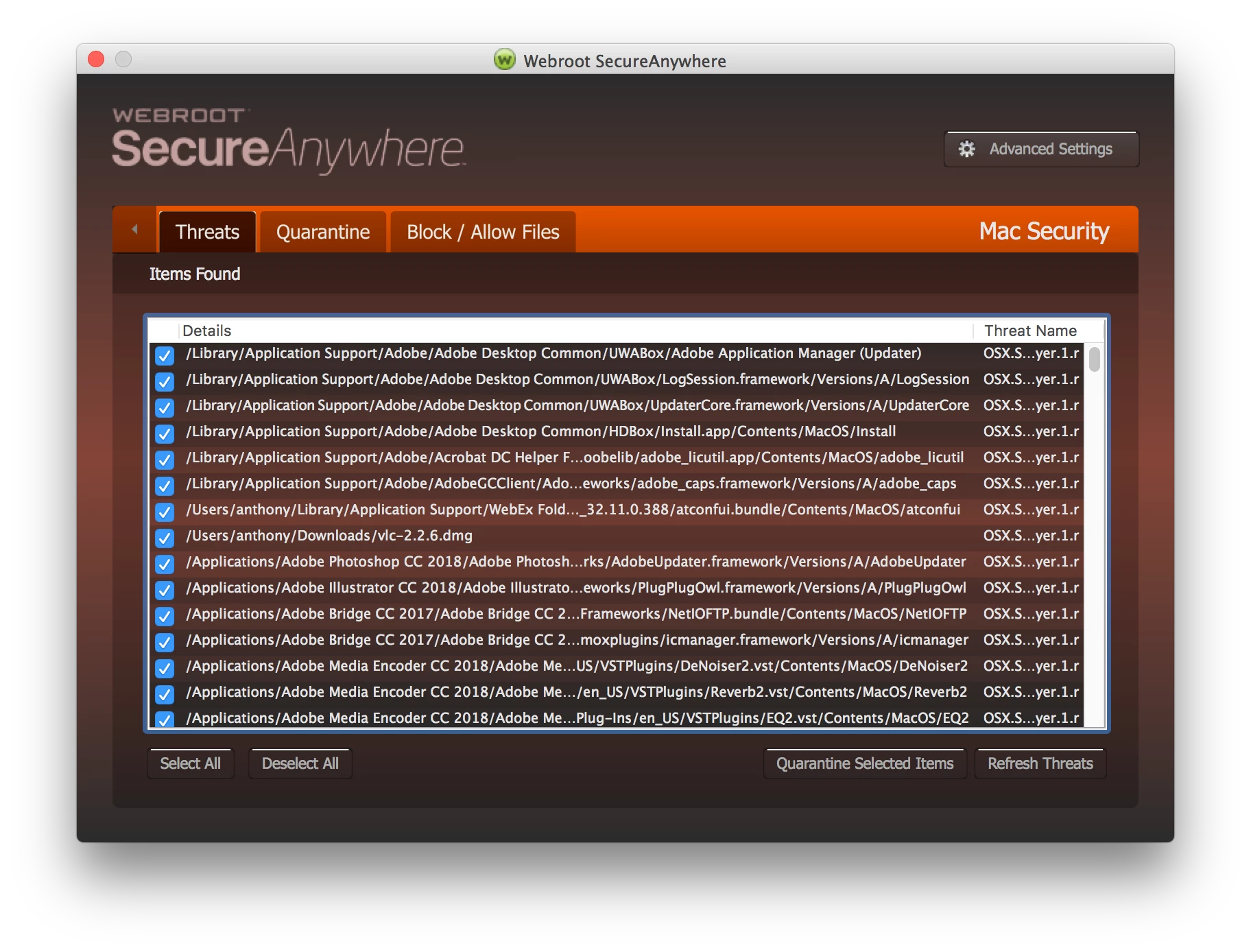
Webroot SecureAnywhere found osx.surfbuyer.1.r in TONS Adobe files

  • April 5, 2018
  • 15 replies
  • 4822 views

I'm pretty sure it's a false finding, but on a scan today on my Mac, Webroot came back with a huge list of Adobe files it thinks is infected with osx.surfbuyer.1.r. I at least hope this is false. See the image below.

Any ideas on this??
This topic has been closed for replies.

15 replies

Participating Frequently
June 18, 2019

I'm having the same problem. I made the mistake of letting Webroot destroy the supposedly infected files, and then many of the applications on my computer would run. If you go back and look at the threats log, its listings  start with Adobe applications, but then goes on to many others as well. I didn't check everything, but quickly went back to a TimeMachine Backup. Everything seems to be okay, but Webroot still reports that I have over 100 files infected with OSX.Surf.Buyer.1.r.

Btw, as I remember it, the company has never made it easy to remove their Webroot products .

Abambo
Community Expert
Community Expert
June 18, 2019

129384426  wrote

Btw, as I remember it, the company has never made it easy to remove their Webroot products .

That's a feature ...

ABAMBO | Hard- and Software Engineer | Photographer
Legend
June 15, 2018

I suggest you describe in full your difficulties with getting CC working again. We can't make suggestions when we have no idea what is wrong.

Legend
June 15, 2018

Did it quarantine a bunch of files, and if so did you bring them back from quarantine? One post, post 16, may describe a similar difficulty reinstalling but we never heard the solution.


So I suggest you describe in full your difficulties with getting CC working again. Messages in full, screen shots etc. may narrow it down. Unfortunately few people will read what you post because of the message subject.

janjohnsonHouston
Participating Frequently
June 15, 2018

I did not bring them back form quarantine. I was unaware it was a false positive until illustrator and indesign began crashing and now will not work at all. Do I need to uninstall all of creative suite apps run scrubber and then reinstall? I have already done the uninstall/reinstall for illustrator with no success

=============================

Warm Regards,

Jan Johnson

jan.johnson.photo@me.com

Legend
June 15, 2018

Well... people in the original position will have updated their antivirus, which - according to the makers of the antivirus - would have made the problem go away. So this does sound new OR your antivirus is out of date. My recommendation is to check your antivirus version carefully. If you are up to date, you should contact Webroot and report these false positives. Perhaps the problem that they fixed has come back. Adobe never changed anything, they didn't need to.

janjohnsonHouston
Participating Frequently
June 15, 2018

I have uninstalled the virus software.. I am still unable to download and install working versions of illustrator and indesign. Can you offer any insight that might help with that?

=============================

Warm Regards,

Jan Johnson

jan.johnson.photo@me.com

acurcioneAuthor
Inspiring
April 9, 2018

This morning I checked again and it looks like Webroot fixed it. I had submitted a report and log after quarantining everything. Then I promptly put everything back!

So make sure you're up to date on Webroot and hopefully this won't happen again any time soon.

freydrew
Participant
April 6, 2018

Hey everyone,

I'm Drew, the Community Manager, at Webroot. I found this thread and wanted to provide you all with an update on the issue that you've reported.

Webroot incorrectly identified some Adobe files as malware. Actual malicious files were identified and blocked as normal. The Webroot team is aware of this issue and has released a fix. To find the solution, please go to our community for more info.

Victory Life Church
Participant
April 5, 2018

So even with Webroot uninstalled/deactivated I cant uninstall creative cloud or reinstall/repair it either. I might have to wipe my whole mac....

Participant
April 5, 2018

You shouldn't have to uninstall it.  Webroot just gave a false warning...it didn't "break" anything.

Victory Life Church
Participant
April 5, 2018

Well unfortunately it "Quarrantined" those Adobe files....

Participant
April 5, 2018

Unfortunately, Webroot often gives me false positives in Mac system files, but usually just in Apple's own.  This time, on one Mac (running the 10.13.5 beta), I got a "ton" of Adobe "threats" like you said.  On my main machine with 10.13.4, I got fewer, but they also included an Epson and a Java file.  All were the osx.surfbuyer.1 message.

All of mine, on both machines, were in /Library.  I crosschecked with ClamXAV, and it found nothing amiss.

Participant
April 5, 2018

We've been getting a bunch of popups from at least 6 Macs with similar warnings - submitted a Webroot ticket, here's their response after submitting a scan log:

"Thank you for providing the logs.

We can confirm this is a false positive. We are working with our Mac Threat team to correct this.

We appreciate your patience and assistance with this issue."

Just an FYI.

Participant
April 5, 2018

Same here! I cannot reinstall Creative Cloud, nor repair the installation. I am stuck without being bale to use Adobe products. Please help to resolve this, Adobe!