


David__B
Adobe Employee
Adobe Employee
April 17, 2019
Question

What is the difference between Lightroom and Lightroom Classic?

  • April 17, 2019
  • 5 replies
  • 3936 views
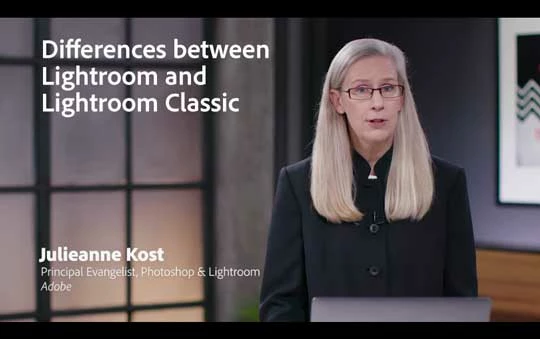
Check out this video that explains the differences
This table shows some key differences as well
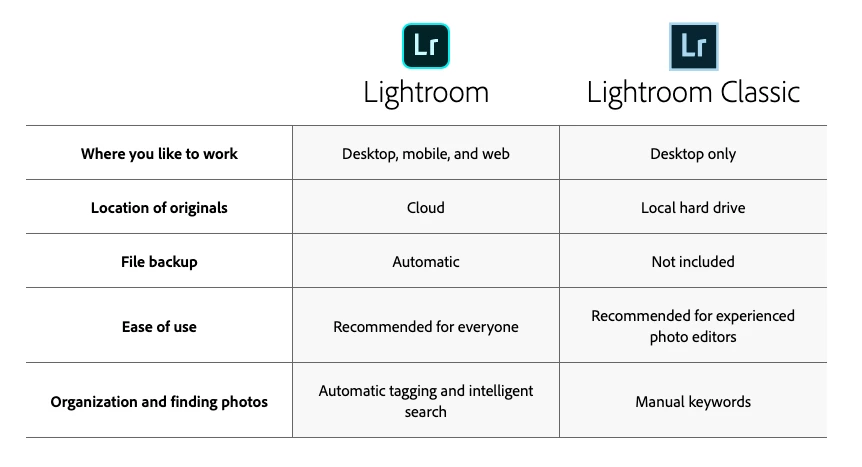
While Lightroom and Lightroom Classic differ in several ways, there are three main things that separate them:

  • Lightroom on Mac and Windows share a similar and consistent experience with other Lightroom apps on mobile and web.
  • Lightroom uploads all your full resolution original photos to the cloud. This means that all your photos are safely backed up. It also means that Lightroom can do various things that Lightroom Classic can't. For example, you can use Lightroom to access all your photos on multiple computers such as a laptop and a desktop, or a home computer, and a work computer.
  • Lightroom also provides features that are based in the cloud, such as the ability to search for photos based on what's in the photo — without having to add any keywords manually. For example, you can search for 'dog' to find photos of dogs in Lightroom CC without having to manually assign the keyword 'dog' to any photos.


Which Lightroom is right for you?

For related information, see Go from Lightroom Classic to Lightroom.

This topic has been closed for replies.

5 replies

Participant
June 29, 2019

I'd also add to this that the chart is misleading: you can back-up your files upon import with Classic as it allows you to import a second copy. You can even make the second copy your own cloud-storage solution at no extra cost.

Victoria Bampton LR Queen
Community Expert
Community Expert
June 30, 2019

channonp4602134  wrote

I'd also add to this that the chart is misleading: you can back-up your files upon import with Classic as it allows you to import a second copy. You can even make the second copy your own cloud-storage solution at no extra cost.

Be careful considering the second copy as a backup, as it would be a nightmare to restore from. Only use it as a temporary backup, while the photos get into your proper backup system.

Victoria - The Lightroom Queen
cmgap
Community Expert
Community Expert
May 20, 2019

Another resource that clearly explains the difference between versions: Learning the Lightroom Ecosystem | LinkedIn Learning, formerly Lynda.com

Ussnorway7605025
Legend
May 17, 2019

Classic is very nice for trying out different styles without committing to anything yet... once you have the 'look' you want then upload it by all means

Community Expert
May 5, 2019

This is highly informative for me. I don’t have a ton of experience with Lightroom in general, because most of my Photoshop work is for illustration. I’m glad this resource is here

john beardsworth
Community Expert
Community Expert
May 7, 2019

Please don't pay too much attention to the text in the original post though. It is unbalanced and misleading, describing the few things "Lightroom" (the cloud-dependent new app) can do, but omitting the many more things possible with real Lightroom or "Lightroom Classic". Julieanne's video is much more informative.

F. McLion
Community Expert
Community Expert
April 26, 2019

To be fair, we should also list what Lightroom cant do that is in turn part of the feature set of Lightroom Classic:

  • no third-party plug-in support
  • inferior integration with Photoshop (compared to Classic)
  • requires all photos must be uploaded to cloud (which is a non-starter for many people)
  • no good way to extract oneself from using the Lightroom ecosystem without losing all of the organizational effort a customer may invest in Folders/albums
  • cost prohibitive for customers with multiple terabytes of data
  • no way to print
  • no virtual copies
  • no way to compare photos against each other for making selects
  • limited functionality for working with large numbers of photos at once
  • no way to recover deleted files yet
  • limited export options

[source: Rob Sylvan]

--- Got your issue resolved? Please label the response as 'Correct Answer' to help your fellow community members find a solution to similar problems. ---
Community Expert
April 30, 2019

Hoping to add to this discussion....

The interconnection between the two is growing stronger since the first release of the cloud version.   The initial, and maybe traditional, approach is to pick one and ignore the other.  Yet we may want certain features for our cell phone shooting that are different than our "real' camera shooting. 

With synchronization many features of the two Lightroom can be blended.  You can shoot with a DSLR, load to Lightroom Classic and have the image synced to the other Lightroom for the mobile advantages.  You can also shoot with your phone into Lightroom mobile and have that image on your office computer inside of Classic by the time you return to your desk. 

The subscription provides both Lightrooms and enough storage to have a chosen group of favorites synced across the system that takes advantage of the unique capabilities of either.  

99jon
Legend
May 1, 2019

To add to the above, only the photography plans include Classic. The Lightroom plan includes mobile, web and desktop versions without the need to pay extra for 1TB of storage.

Compare plans | Adobe Creative Cloud Photography plan