


Participating Frequently
October 21, 2023
Open for Voting

Audio Track Names in Timeline (iXML Metadata)

  • October 21, 2023
  • 3 replies
  • 974 views

Multichannel sound is hard to navigate. Fortunately, Sound Mixers label tracks with actor name/microphone information. Unfortunately, Premiere hides this data behind a wall of dropdown menus:
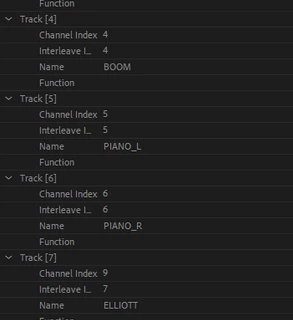
Simply, we need this simple metadata in the timeline. This is a basic necessity for professional editing software which I am really hoping Adobe will be able to implement soon!


When we finally have these labels in our timeline, it is going to save us so so much time and headache.


For a visual reference, DaVinci Resolve does this perfectly:
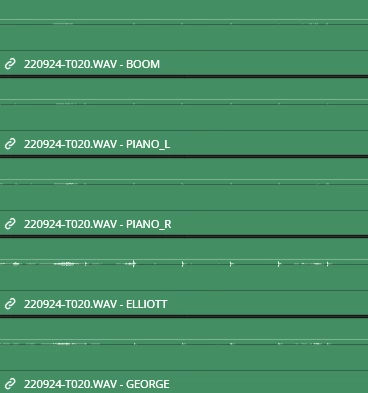
 

Thank you for your time!


3 replies

RecremacAuthor
Participating Frequently
November 5, 2025

Two years on and sadly no movement on this... Would really be nice to have this basic metadata feature....

Known Participant
November 14, 2024

Premiere really, really, really needs this built in. But for people stumbling on this from Google - for now I recommend this pay-what-you-want plug-in (which has a few limitations): 


Plug-in here: https://editingprep.gumroad.com/l/ixml?layout=profile

More details on usage here: https://www.provideocoalition.com/a-new-extension-finally-makes-ixml-metadata-useful-in-adobe-premiere-pro/

Participating Frequently
October 23, 2023

Could you adobe have a look at this please?? I'm pretty sure it is an easy fix and we are loosing a precious amount of time because of this. It is getting very upseting because we can't focus on the creative site while we try to search for different mics inside the unnamed multichannel .wav's files. 

We need to be able to see those audio track names displaying in the project window aswell as in the source monitor. There is no reason for you to loose information and hard work done by sound recordists on set. Thanks!