


Inspiring
February 27, 2023
Answered

• Add clickable URL into a javascript created palette

  • February 27, 2023
  • 3 replies
  • 2330 views

Hello -


I would like to add an URL (clickable)

into a small javascript created palette (script is located into the 'Startup Scripts" foler).

The text appears but it isn't clickable.

I (of course) missed something here any idea what?


Thank you  🙂


#target Illustrator
#targetengine main

var myWindow = new Window ("palette");
var myMessage = myWindow.add ("statictext");
	myText = "EAN";
	myMessage.text = "<a href='https://www.free-barcode-generator.net/ean-13/'>" + myText + "</a>";	// Was "Hello, world!";
	myWindow.show();
 

This topic has been closed for replies.
Correct answer jduncan

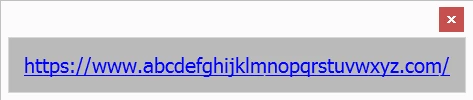
@Larry G. Schneider  I'm not quite sure what you meant by "noting the text", but I tried using Unicode to do the underlining.  The results vary between fonts and, I suspect, between AI versions.  This is what I get with the default ScriptUI font in CS6 (you can see gaps after m's):


var s1 = "https://www.abcdefghijklmnopqrstuvwxyz.com/", s2 = "";
for (var i = 0; i < s1.length; i++) s2 += "\u035F" + s1[i];
var w = new Window("dialog");
var st = w.add("statictext");
	  st.text = s2;
    st.graphics.foregroundColor = st.graphics.newPen (
        w.graphics.PenType.SOLID_COLOR, [0, 0, 1], 1);
    st.graphics.font = ScriptUI.newFont ("dialog", "Regular", 20);
    st.helpTip = "Click"
w.show();


Ha, this is exactly what I was going to suggest... When I tried this in the past the results were inconsistent at best (due to fonts and system type) as you mention. So, I typically just use blue coloring (HTML default for links) or buttons as most people notice those as being clickable.

3 replies

femkeblanco
Brainiac
February 28, 2023

Does anyone know how (if it is possible) to make the static text underlined, so as to resemble a hyperlink? 

Larry G. Schneider
Community Expert
February 28, 2023

Did you try using underlined text when noting the text?

femkeblanco
Brainiac
February 28, 2023

@Larry G. Schneider  I'm not quite sure what you meant by "noting the text", but I tried using Unicode to do the underlining.  The results vary between fonts and, I suspect, between AI versions.  This is what I get with the default ScriptUI font in CS6 (you can see gaps after m's):


var s1 = "https://www.abcdefghijklmnopqrstuvwxyz.com/", s2 = "";
for (var i = 0; i < s1.length; i++) s2 += "\u035F" + s1[i];
var w = new Window("dialog");
var st = w.add("statictext");
	  st.text = s2;
    st.graphics.foregroundColor = st.graphics.newPen (
        w.graphics.PenType.SOLID_COLOR, [0, 0, 1], 1);
    st.graphics.font = ScriptUI.newFont ("dialog", "Regular", 20);
    st.helpTip = "Click"
w.show();


jduncan
Community Expert
February 27, 2023

@Sergey Osokin has a great little function he created called `openURL()`. You can just add it at the bottom of your script and then activate it with an event listener on your `myMessage` element.


// ...
myMessage.addEventListener('mousedown', function () {
    openURL('https://github.com/creold');
  })

/**
* Open link in browser - Sergey Osokin
* https://community.adobe.com/t5/user/viewprofilepage/user-id/11040189
* @param {string} url - Website adress
*/
function openURL(url) {
  var html = new File(Folder.temp.absoluteURI + '/aisLink.html');
  html.open('w');
  var htmlBody = '<html><head><META HTTP-EQUIV=Refresh CONTENT="0; URL=' + url + '"></head><body> <p></body></html>';
  html.write(htmlBody);
  html.close();
  html.execute();
}


femkeblanco
Brainiac
February 27, 2023

@jduncan Thanks for sharing. 

Mylenium
Brainiac
February 27, 2023

You need to initialize a socket connection. URLs get not converted automatically for security reasons.


Mylenium

Inspiring
February 27, 2023

Hi Mylenium -


Thx for your reply.

I'm not familiar with "socket connection".

Any example that could really helpin this context?


Thank you.