

New Participant
June 7, 2018
Answered

Add pages to a multiple page layout in Illustrator

  • June 7, 2018
  • 5 replies
  • 24596 views

Hi. I am trying to edit a PDF file in Adobe Illustrator. It has 64 pages but I would like to add severall pages in the middle. How do I do that?

This topic has been closed for replies.
Correct answer Luke Jennings

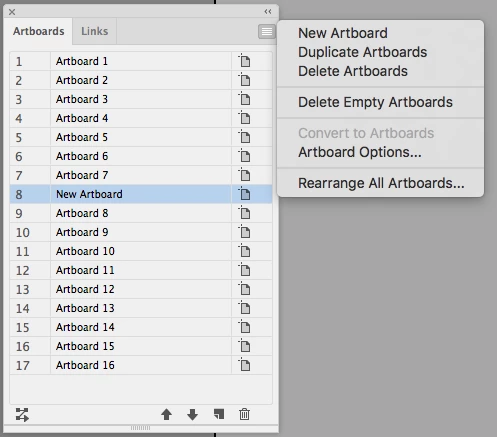
Go to Window> Artboards, and open the fly-out menu, create a new artboard or duplicate an existing one, drag it into the desired position in the Artboards panel, then click on Rearrange All Artboards. If you go to Artboard Options and set them to view as a single column, the artboards will appear a bit more like InDesign pages.

Personally, I would place the PDF into InDesign using the place multipage PDF script and add new pages there, then export to a new PDF.
5 replies

jane-e
Community Expert
August 6, 2018

antónioj65797935  wrote

Hi. I am trying to edit a PDF file in Adobe Illustrator. It has 64 pages but I would like to add severall pages in the middle. How do I do that?

Illustrator does not have pages. It only has artboards.

Srishti Bali
Community Manager
Community Manager
August 6, 2018

Hi António,

I would like to know if the steps suggested above worked for you, or the issue still persists.

Kindly update the discussion if you need further assistance with it.

Thanks,

Srishti

Luke Jennings
Luke JenningsCorrect answer
Inspiring
June 7, 2018

Go to Window> Artboards, and open the fly-out menu, create a new artboard or duplicate an existing one, drag it into the desired position in the Artboards panel, then click on Rearrange All Artboards. If you go to Artboard Options and set them to view as a single column, the artboards will appear a bit more like InDesign pages.

Personally, I would place the PDF into InDesign using the place multipage PDF script and add new pages there, then export to a new PDF.

Amartoni
Participating Frequently
March 31, 2021

Great tip! Save me a lot of work! Thank you.

Willi Adelberger
Community Expert
June 7, 2018

Illustrator is not a valid PDF editor.

Illustrator can only edit those PDFs which were created in Illustrator with Illustrator's edit cpabilities.

With all other PDFs you will cause damage.

Go back to the original application and do there the changes.

New Participant
June 7, 2018

Yes, I said PDF because I have the habit to call PDF files do everything that is done in Adobe files. The file I am talking about was created in Adobe Illustrator but not by me. Since I am new in Illustrator, that's way I'm asking this.

Willi Adelberger
Community Expert
June 7, 2018

Are the Illustrator editing capabilities saved with this file? Yes?, then open in Illustrator (check if the version is NOT newer than your's). No?, ask for a new PDF or the original AI file.

Monika Gause
Community Expert
June 7, 2018

You do that in Acrobat.

New Participant
June 7, 2018

But If do that in Acrobat it makes some deformations in the document. That's why I don't want to do it there..

Willi Adelberger
Community Expert
June 7, 2018

What kind of deformations?

In what application it was created?

Which PDF viewer do you use?