


Inspiring
June 29, 2023
Answered

Adding stops to a gradient based on bounding box

  • June 29, 2023
  • 2 replies
  • 2387 views

So, I'm not a script writer but am able to build what I need from various sources. This time I tried to have openai write a script for me and I have a feeling this is close based on my middling knowledge of Illustrator's JS.


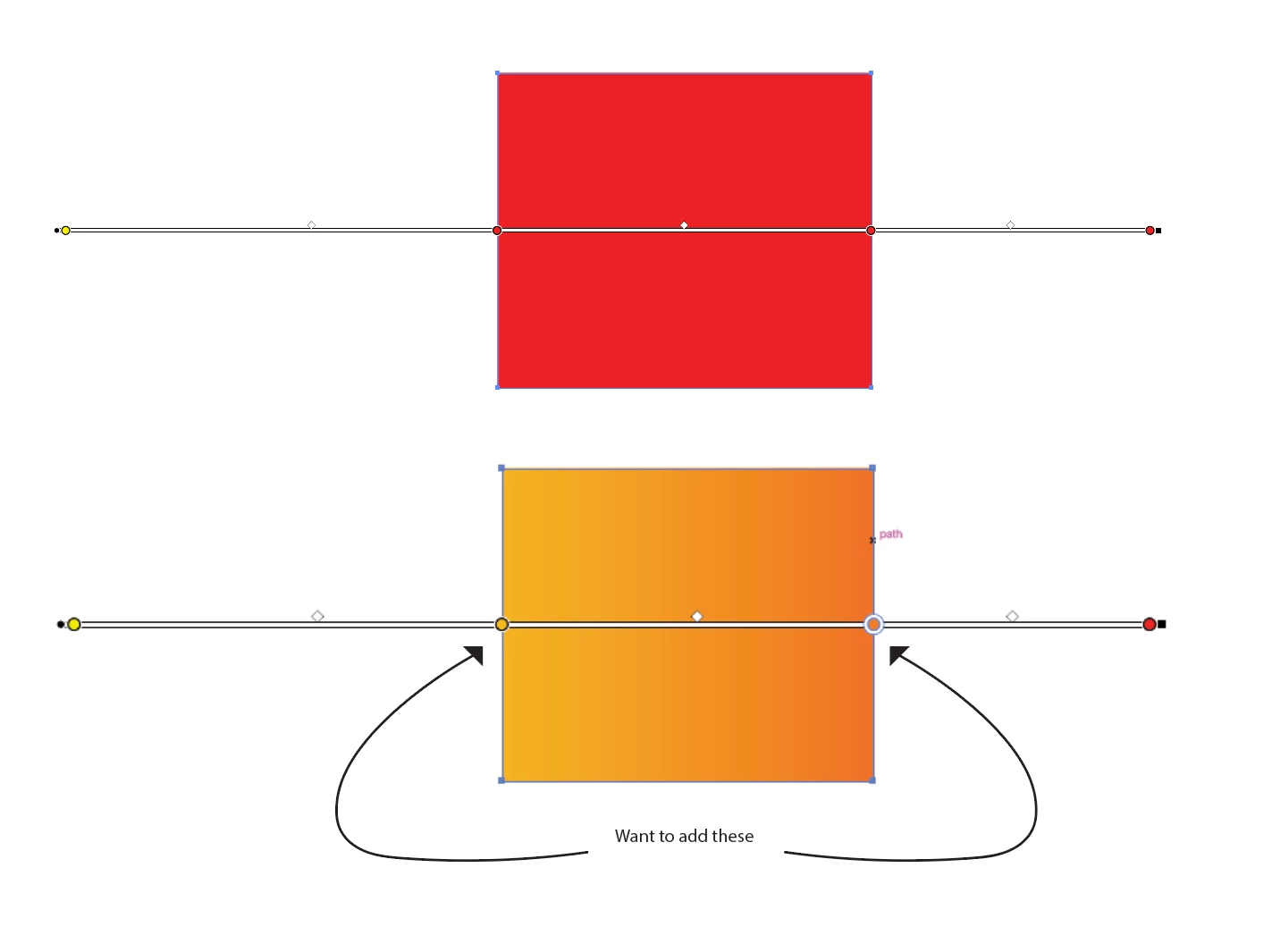
Essentially what I'd like is to add gradient stops to an object where the gradient starts and ends way beyond the object. I want to add a stop at the left and right bounding box edges. This works easily manually by just clicking on the gradient band, but I have dozens that need to be updated.


This is what i was able to get openai to output from a couple of revised inputs, it runs up to CREATE NEW GRADIENT STOPS AT THE BOX EDGES. Any thoughts would be greatly appreciated.


// Get a reference to the current document
var doc = app.activeDocument;

// Iterate through all selected objects
var selectedItems = doc.selection;
for (var i = 0; i < selectedItems.length; i++) {
  var item = selectedItems[i];

  // Check if the item is a path or compound path
  if (item.typename === "PathItem" || item.typename === "CompoundPathItem") {
    // Check if the item has a fill gradient and it is CMYK
    if (item.fillColor && item.fillColor.gradient && item.fillColor.gradient instanceof Gradient && item.fillColor.gradient.type === GradientType.LINEAR && item.fillColor.gradient.gradientStops.length > 1 && item.fillColor.gradient.gradientStops[0].color instanceof CMYKColor) {
      var gradient = item.fillColor.gradient;

      // Get the bounding box of the item
      var bounds = item.geometricBounds;

      // Calculate the coordinates of the bounding box edges
      var leftEdge = bounds[0];
      var topEdge = bounds[1];
      var rightEdge = bounds[2];
      var bottomEdge = bounds[3];

      // Create new gradient stops at the bounding box edges
      var colorStopLeft = new GradientStop();
      colorStopLeft.color = new CMYKColor();
      colorStopLeft.color.cyan = gradient.gradientStops[0].color.cyan;
      colorStopLeft.color.magenta = gradient.gradientStops[0].color.magenta;
      colorStopLeft.color.yellow = gradient.gradientStops[0].color.yellow;
      colorStopLeft.color.black = gradient.gradientStops[0].color.black;
      colorStopLeft.opacity = gradient.gradientStops[0].opacity;
      colorStopLeft.location = 0;

      var colorStopRight = new GradientStop();
      colorStopRight.color = new CMYKColor();
      colorStopRight.color.cyan = gradient.gradientStops[gradient.gradientStops.length - 1].color.cyan;
      colorStopRight.color.magenta = gradient.gradientStops[gradient.gradientStops.length - 1].color.magenta;
      colorStopRight.color.yellow = gradient.gradientStops[gradient.gradientStops.length - 1].color.yellow;
      colorStopRight.color.black = gradient.gradientStops[gradient.gradientStops.length - 1].color.black;
      colorStopRight.opacity = gradient.gradientStops[gradient.gradientStops.length - 1].opacity;
      colorStopRight.location = 100;

      // Add the new gradient stops to the existing gradient
      gradient.gradientStops = [colorStopLeft].concat(gradient.gradientStops).concat(colorStopRight);

      // Apply the modified gradient to the item's fill
      item.fillColor = gradient;
    }
  }
}
 

This topic has been closed for replies.
Correct answer Sergey Osokin

This is fantastic and so close, thank you for taking the time to help. I have one last question, the script as shared adds the stop exactly where I expect them, but the fill isn't the value that exists at that point, its adding a stop with the end point color. Is this possible?


Knowing the color of the start and end gradient stops and the distance to the new stops, we can use linear interpolation to calculate the color at those points. This is what Adobe itself does with rounding. wrote about this "Get SpotColor tint color".


main();

function main() {
  var item = app.selection[0]; // select item

  var origin = item.fillColor.origin[0];
  var length = item.fillColor.length;
  var bounds = item.geometricBounds;
  var bound1 = bounds[0];
  var bound2 = bounds[0] + (bounds[2] - bounds[0]);

  var gradient1 = item.fillColor.gradient;
  var start = gradient1.gradientStops[0].color;
  var end = gradient1.gradientStops[gradient1.gradientStops.length - 1].color;

  var stop1 = gradient1.gradientStops.add();
  stop1.rampPoint = (bound1 - origin) / length * 100;
  stop1.color = setLerpColor(start, end, stop1.rampPoint);
  
  var stop2 = gradient1.gradientStops.add();
  stop2.rampPoint = (bound2 - origin) / length * 100;
  stop2.color = setLerpColor(start, end, stop2.rampPoint);
}

function setLerpColor(start, end, dist) {
  var t = dist / 100;
  var arr = [];
  var newColor;

  for (var key in end) {
    if (typeof end[key] === 'number') {
      arr.push( Math.round( lerp(start[key], end[key], t) ) );
    }
  }

  if (/rgb/i.test(activeDocument.documentColorSpace)) {
    newColor = new RGBColor();
    newColor.red = arr[0];
    newColor.green = arr[1];
    newColor.blue = arr[2];
  } else {
    newColor = new CMYKColor();
    newColor.cyan = arr[0];
    newColor.magenta = arr[1];
    newColor.yellow = arr[2];
    newColor.black = arr[3];
  }

  return newColor;
}

function lerp(start, end, t) {
  return start + (end - start) * t;
}


2 replies

Egor Chistyakov
Inspiring
July 1, 2023

I have my own agenda on using this script (and thank you for trying to build a solution for this and posting it here, so others could help you), but I wonder still — what is the task you are having that requires this function? Please tell the story!

Inspiring
July 5, 2023

To recreate artwork consistently. Essentially, the gradient was built using two swatches but stretched way far out and beyond the bounding box of the object. So while the endpoints could be recreated, positioning them to match the values would have proven just guesswork. Now, using the master artwork(s) it will mathematically place markers exactly at those points and now I'd be able to create two new swatches that will now serve as gradient end points added as a swatch to any new object with the perceptual value of the original gradient.

femkeblanco
Brainiac
June 29, 2023

A gradientColor has an origin property and a length property, which should allow you to control where a gradient annotator starts and ends.  But the last time I tried them, neither of them worked.  So you may be out of luck. 

Inspiring
June 29, 2023

I dont want to change where it starts or ends (at least not as part of this script) just add a point along the gradient so I can get the color value at the edge of the object bounds.

femkeblanco
Brainiac
June 29, 2023

So the gradient and object already exist, so the script doesn't need to create the gradient. Yes, I do want to add stops in between, but not at chosen or specific percentages. I wanted to know if I could script it to determine bounding box of object and add a two new stops at points equivelent to that object's bounding box. See picture.


// select item
var item = app.selection[0];
var origin = item.fillColor.origin[0];
var length = item.fillColor.length;
var bounds = item.geometricBounds;
var bound1 = bounds[0];
var bound2 = bounds[0] + (bounds[2] - bounds[0]);
var gradient1 = item.fillColor.gradient;
stop1 = gradient1.gradientStops.add();
stop1.rampPoint = (bound1 - origin) / length * 100;
stop2 = gradient1.gradientStops.add();
stop2.rampPoint = (bound2 - origin) / length * 100;