Participant
February 24, 2023
Answered

Adobe Illustrator 2023 Error When Opening

  • February 24, 2023
  • 5 replies
  • 3670 views

Each time I open one particular file in Adobe AI 2023 (none of my other files do this), I get an error message that says: "An unknown error occured. Click MORE INFO and try some of the solutions to fix issue."


Clicking more info leads me here: I click the first section to make sure my computer meets the Mac system requirements. My computer specs are as follows:


  • Macbook Pro, 15", 2019
  • MacOS Ventura 13.2.1 
  • 2.3 GHz 8-Core Intel Core 19 Processor
  • 16 GB 2400 MHz DDR4 Memory
  • 75 GB of storage available out of 500 GB
  • Radeon Pro 560X 4 GB Intel UHD Graphics 630 1536 MB


In the requirements link it says I need this type of processor:

Multicore Intel processor (with 64-bit support) with SSE 4.2 or later.

ARM-based Apple silicon processor


The requirements also list these operating systems:

  • macOS version 12.0 (Monterey)
  • macOS version 11 (Big Sur)
  • macOS version 10.15 (Catalina)


Could one of these two be the issue? Is my 2019 Macbook already too old for 2023 products? Ah!


Otherwise:


Thanks in advance for any assistance!

This topic has been closed for replies.
Correct answer Brent-Doodleandcolour

I think I solved this issue where an AI file does not open or states its corrupt.


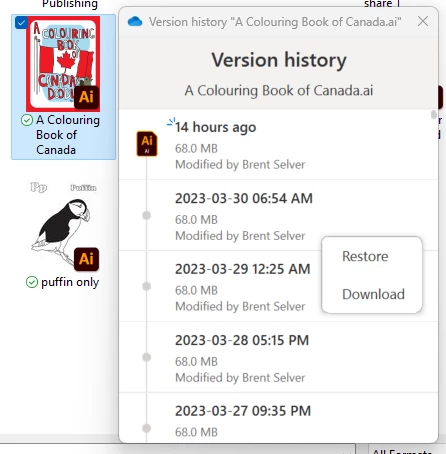
Find you AI file in explorer, then right click to VIEW VERSION HISTORY, pick a previous version. VOila SAVE AS. And Saved  whew!!!


5 replies

Participant
May 18, 2023

I have the similar problem. I tried every version of available AI in Creative Cloud, but still cannot open them all. I don't have any AI file, I just want to open AI and start creating my figures. And I also followed the instruction to fix the problem, but still in vain.
My computer specs are:
Macbook Pro, 13-inch, 2019
MacOS Ventura 13.3.1 (a)
2.4 GHz Quad-Core Intel Core i5
Intel Iris Plus Graphics 655 1536 MB
8 GB 2133 MHz LPDDR3
14.46 GB storage available out of 500GB
I don't think my computer is too old for all AI products. It's so strange. Could you please give me some ideas to fix this problem? Thank you!

Community Manager
May 19, 2023

Hello @Zhijie28394458o7jc,


We understand that encountering technical issues can be frustrating. Would you mind trying to run Illustrator under a different administrator account (macOS) and checking if it helps?


Looking forward to hearing from you.


Thanks,

Anubhav

Participant
May 20, 2023

Thank you!
I tried, but still in vain. So what else can I do?

Participant
April 3, 2023

hi there, 


I have the same issue with an ai file and need help to correct it. It is work for a client. Today I also updated my Adobe illustrator.


please contact me [personal information removed by moderator]

Brent-DoodleandcolourCorrect answer
Participant
April 3, 2023

I think I solved this issue where an AI file does not open or states its corrupt.


Find you AI file in explorer, then right click to VIEW VERSION HISTORY, pick a previous version. VOila SAVE AS. And Saved  whew!!!


abbyswainAuthor
Participant
March 8, 2023

Hi all, thanks so much for your help. I'm not experiencing the issue any more but the file size was 13.5MB. Thank you.

Participant
April 3, 2023

what chnaged that you do not have the problem...?

Anshul_Saini
Community Manager
Community Manager
April 27, 2023

Hi @Brent-Doodleandcolour,


We are sorry for the inconvenience this issue has caused. After investigating this issue, our product team has identified that (An unknown error occurred. Click MORE INFO and try some of the solutions to fix the issue) this error only occurs on macOS Catalina while using image trace. A workaround for this issue is updating your operating system to a later version or using images larger than 400x400 pixels.


If this is not the case, then please share the reproducible steps and file, and I will forward it to the product team for further investigation.


If you have any further questions or concerns, please don't hesitate to reach out to us. We are here to help. Thank you for your understanding.


Best,

Anshul Saini

Community Manager
February 24, 2023

Hello @abbyswain,


We understand how frustrating it can be to experience crashes. It could be possible that the file you have trouble opening is corrupted. Would you mind sharing the file here (https://community.adobe.com/t5/illustrator-discussions/share-your-files-in-6-simple-steps/td-p/12967531) so we can check it on our end? We appreciate your time and efforts in resolving this issue.


Looking forward to your response.


Thanks,

Anubhav

Monika Gause
Community Expert
Community Expert
February 24, 2023

What's in your file?

How large is it?

From where do you open it? If from a network, please try and first download in to your local drive, then open it.