Exit
  • Global community
    • Language:
      • Deutsch
      • English
      • Español
      • Français
      • Português
  • 日本語コミュニティ
  • 한국 커뮤니티
0

Adobe Illustrator blend tool greyed out

Community Beginner ,
Oct 25, 2020 Oct 25, 2020

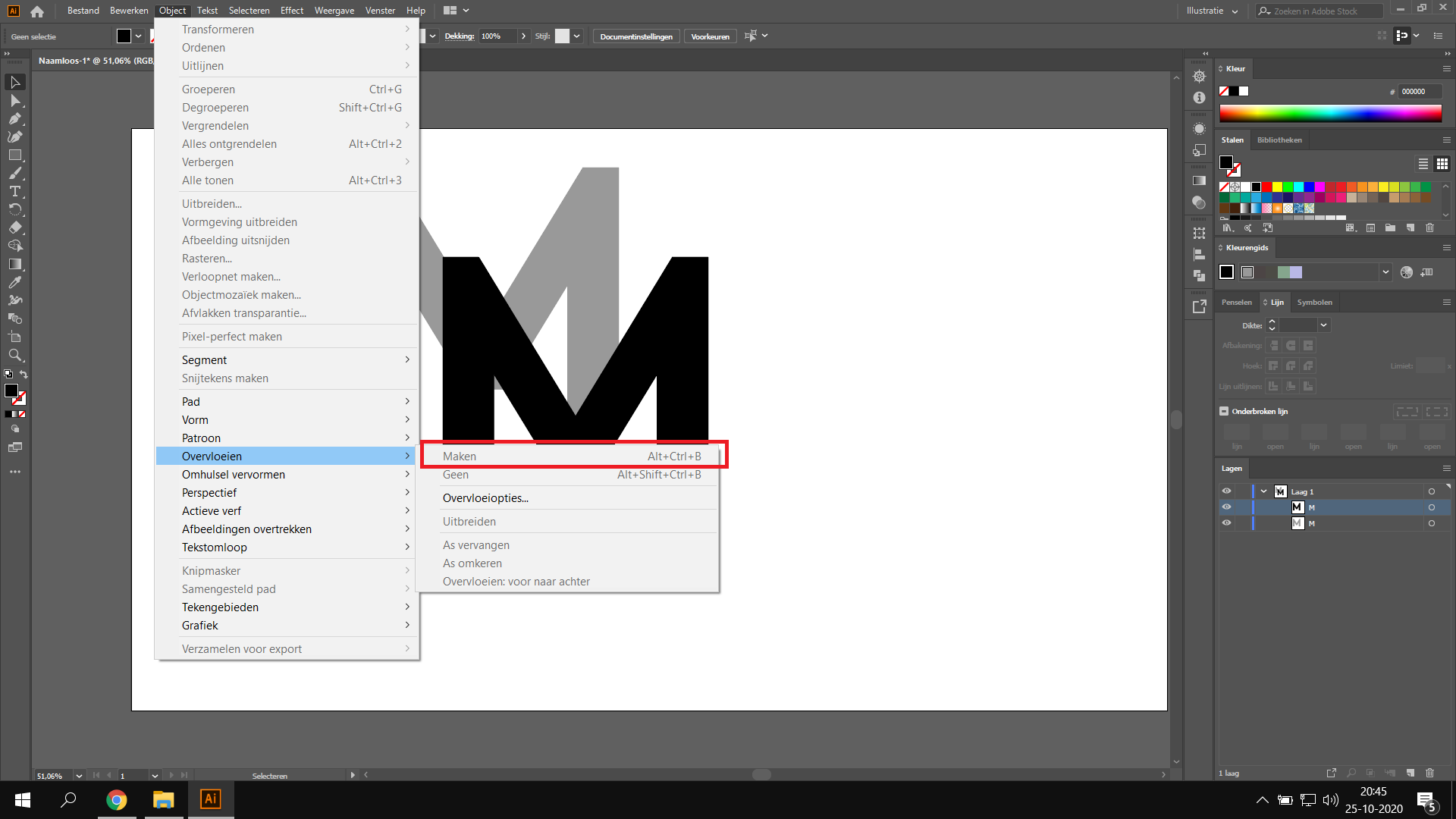
I am not able to click on "make'', I maked text, duplicated them and select them both but still not able to use the option.


TOPICS
Bug
14.7K
Translate
Report
Community guidelines
Be kind and respectful, give credit to the original source of content, and search for duplicates before posting. Learn more
community guidelines

correct answers 1 Correct answer

New Here , Jun 29, 2021 Jun 29, 2021

I just had this same issue. Was able to solve this by "expanding" the text to make them objects. Then the "blend" function will become available when both are selected. 

Translate
Adobe
Community Expert ,
Oct 25, 2020 Oct 25, 2020

akmed,


Your Ms seem to be unselected. What happens if you select both (you can just ClickDrag over them, or click the circles to the right in the Layers palette), then try again?


Translate
Report
Community guidelines
Be kind and respectful, give credit to the original source of content, and search for duplicates before posting. Learn more
community guidelines
Community Beginner ,
Oct 27, 2020 Oct 27, 2020

I already tried that, for some reason in the picture its not selected. It keeps greyed out...

Translate
Report
Community guidelines
Be kind and respectful, give credit to the original source of content, and search for duplicates before posting. Learn more
community guidelines
Community Expert ,
Oct 27, 2020 Oct 27, 2020

Are any layers or objects locked?

As Ton suggested, your next best step would be to reset references. 

https://community.adobe.com/t5/illustrator/how-to-reset-illustrator-preferences/td-p/10602277#:~:tex...


If that doesn't work, try uninstall/reinstall with the Adobe CC Cleaner Tool. https://helpx.adobe.com/creative-cloud/kb/cc-cleaner-tool-installation-problems.html


Translate
Report
Community guidelines
Be kind and respectful, give credit to the original source of content, and search for duplicates before posting. Learn more
community guidelines
Community Expert ,
Oct 25, 2020 Oct 25, 2020

In the screen capture, the two objects do not seem to be selected. I don't see a bounding box around them, but maybe you turned off the visibility (View > Show Edges or Hide Edges). 

If the objects are selected and the Blend tool is still grayed out, try choosing Object > Blend > Make.


Translate
Report
Community guidelines
Be kind and respectful, give credit to the original source of content, and search for duplicates before posting. Learn more
community guidelines
Community Beginner ,
Oct 27, 2020 Oct 27, 2020

Problem is that I am unable to select Object > Blend > Make

Translate
Report
Community guidelines
Be kind and respectful, give credit to the original source of content, and search for duplicates before posting. Learn more
community guidelines
Community Expert ,
Oct 25, 2020 Oct 25, 2020

Jacob and Barbara are right, your control panel says "Geen selectie".

No selection > nothing to blend.

Translate
Report
Community guidelines
Be kind and respectful, give credit to the original source of content, and search for duplicates before posting. Learn more
community guidelines
Community Beginner ,
Oct 27, 2020 Oct 27, 2020

My bad for some reason its not selected on the picture. I did select them.

Translate
Report
Community guidelines
Be kind and respectful, give credit to the original source of content, and search for duplicates before posting. Learn more
community guidelines
Community Expert ,
Oct 27, 2020 Oct 27, 2020

Which version?

Did you try to reset preferences?


Translate
Report
Community guidelines
Be kind and respectful, give credit to the original source of content, and search for duplicates before posting. Learn more
community guidelines
New Here ,
Jun 29, 2021 Jun 29, 2021

I just had this same issue. Was able to solve this by "expanding" the text to make them objects. Then the "blend" function will become available when both are selected. 

Translate
Report
Community guidelines
Be kind and respectful, give credit to the original source of content, and search for duplicates before posting. Learn more
community guidelines
New Here ,
Oct 16, 2021 Oct 16, 2021

^^ this is the reply that saved me. Spent ages trying to blend text. Thank YOU LEGEND 

Translate
Report
Community guidelines
Be kind and respectful, give credit to the original source of content, and search for duplicates before posting. Learn more
community guidelines
Explorer ,
Sep 26, 2022 Sep 26, 2022
LATEST

In case anyone else happens onto this issue - I also found I was unable to blend my text layers if they were grouped together. When I ungrouped them, the "Make" option became available again in Text (without converting text to object). 

Translate
Report
Community guidelines
Be kind and respectful, give credit to the original source of content, and search for duplicates before posting. Learn more
community guidelines