


Adobe Illustrator CC 2018 does not save data to AI 8.0 format via VB .NET script?
Create following design using Adobe Illustrator CC 2018. Red ellipse with transparency Difference.
Both yellow and red ellipses do function in RGB mode, hence the overlap becomes green.
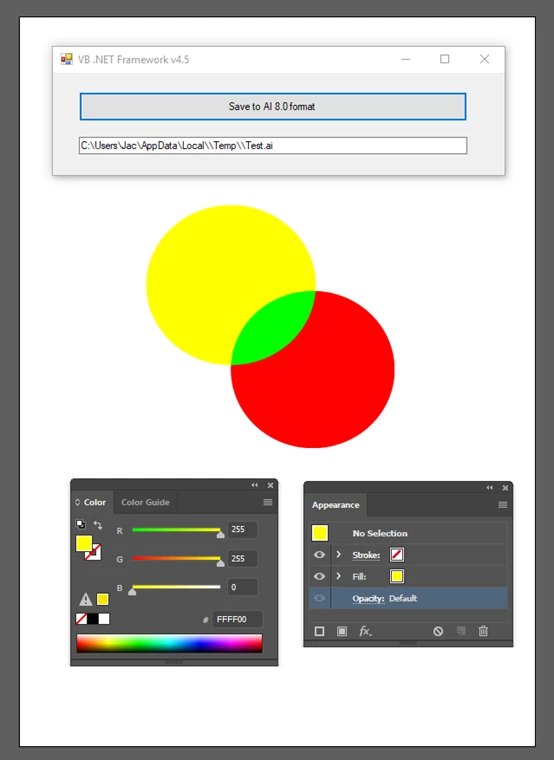
Once the working area has been filled with the required content, a VB program will be started, and its pushbutton clicked. Generated file Test.ai (saved in AI 8.0 format) does not contain flatten transparencies, but, quite contrary, to what has been documented by Adobe, transparencies are automatically removed!
Source code applied in Visual Basic .NET:
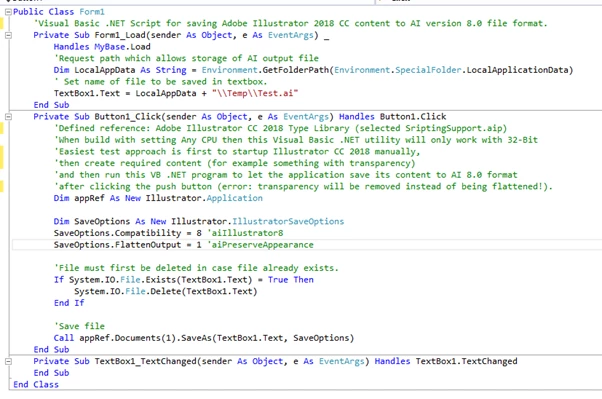
Maybe I might have missed something somewhere, because the outcome (Test.ai) is not according to Adobe specs, and, differs from the right outcome when done manually via the user interface of Adobe Illustrator CC 2018.
What went wrong here?
 AdChoices