


New Participant
December 12, 2016
Answered

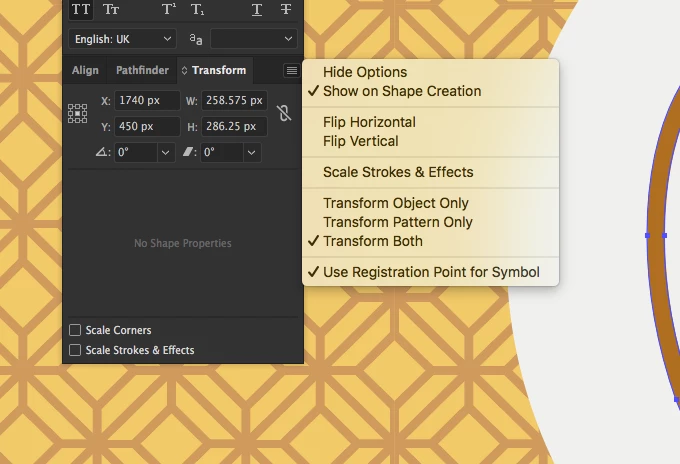
Align to pixel grid option not showing in transform panel.

  • December 12, 2016
  • 4 replies
  • 10771 views

Hello everybody,

As the title says, I am trying to move objects and they move in pixel increments, I know that I have to deselect the align to pixel grid, But... the option is nowhere to be found! I attach the appropriate images for your consideration, thanks in advance!
This topic has been closed for replies.
Correct answer Monika Gause

This is CC 2017?

The option is gone. There's a new align to pixel function. You find it in the control panel to the far right.

4 replies

New Participant
December 10, 2022

Hi everyone!

I'm haviing the same issue and followed your instruction but turning off th magnet symbol doesn't solve it 😕😕 moreover now I have the same issue when creating a shape, while before I had this problem only when moving or scaling points and shapes!!! Can you please help if you know how can I solve this? It's driving me crazy!!!! X(

Monika Gause
Adobe Expert
December 10, 2022
quote

Hi everyone!

I'm haviing the same issue and followed your instruction but turning off th magnet symbol doesn't solve it 😕😕 moreover now I have the same issue when creating a shape, while before I had this problem only when moving or scaling points and shapes!!! Can you please help if you know how can I solve this? It's driving me crazy!!!! X(


By @Violetta_38


Please describe your issue step by step and also the problem you wish to solve. Since this thread is 6 years old, please create a new one.

New Participant
February 7, 2018

Thanks so much. This was driving me insane! I too couldn't find the option in the Transform pallet. I might go and get a coffee to celebrate.

MB
aTomician
Inspiring
March 17, 2017

For everyone else that's going nuts with this and trying to sort it out, see below for a bit more detail on how to sort this:

I eventually found the menu referred to - it's the little menu icon under the X exit button, top right

Don't uncheck the "Snap to Pixel" - that's what I did and got frustrated when it didn't work.

Leave it checked, or check if it isn't already.

Then beside it, you'll see another icon - the little magnet symbol is the pixel snapping option.  Click it to turn on / off, or click the arrow beside it for a menu of options.

Hope this helps someone else!

Regards, aTomician
Monika Gause
Adobe Expert
March 17, 2017

or just read the "What's new" section in the documentation that has this covered.

New features summary for the 2017 release of Illustrator CC

Monika Gause
Monika GauseCorrect answer
Adobe Expert
December 12, 2016

This is CC 2017?

The option is gone. There's a new align to pixel function. You find it in the control panel to the far right.

New Participant
December 12, 2016

Oh my god! thank you so much. This was kind of driving me nuts.

Cheers!

New Participant
June 1, 2020

I can't find it anywhere. I'm going insane, I've tried everything and it's been hours. Can you help me where you found to disable align to pixel?