Participating Frequently
November 5, 2010
Question

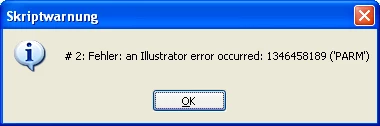
an Illustrator error occurred: 1346458189 ('PARM')

  • November 5, 2010
  • 8 replies
  • 26069 views

Hello everyone,

I am trying to open some documents in Illustrator CS4 by javascript, walk through all layers including sublayers, doing something (for now just reading the layernames and showing them at an alert), closing the document and continue with the next document in the given folder until all documents in that folder are done.

By doing so I found an error I never have seen so far and I cant figure out where it comes from exactly to get rid of it.

The Error an Illustrator error occurred: 1346458189 ('PARM') appears randomly when cycling through the layers of the document but only every second document, so I guess there might be something wrong with closing a document and realeasing all references but I could not figure out what.

Maybe someone got an idea on this problem? Posting my sourcecode (just a simple test-code) below.

#target illustrator

var sourceFolderPath = "/e/TestAI";

var destinationFolderPath = "/e/TestZielverzeichnis";

var fileNameDefinition = "*.ai";

var sourceFolder = new Folder(sourceFolderPath);

var destinationFolder = new Folder(destinationFolderPath);

runCheckTool();

function runCheckTool() {

var contentInput = sourceFolder.getFiles(fileNameDefinition);

var fileRef;

var docRef;

for (var i = 0; i < contentInput.length; i++) {

fileRef = null;

docRef = null;

try {

fileRef = new File(contentInput);

docRef = open(fileRef);

} catch(e) {

alert("# 1: " + e);

}

try{

checkLayers(docRef.layers);

} catch(e) {

alert("# 2: " + i + " " + e);

}

try {

docRef.close(SaveOptions.DONOTSAVECHANGES);

alert("end file index: " + i);

} catch(e) {

alert("#3: " + e);

}

}

}

function checkLayers(layerRef) {

var countLayers = layerRef.length;

for (var j = countLayers - 1; j >= 0; j--) {

if(layerRef.layers.length > 0) {

checkLayers(layerRef.layers);

}

alert ("Layer: " + layerRef.name);

}

}

This topic has been closed for replies.

8 replies

renél80416020
Inspiring
November 20, 2018

Salut,

Oui effectivement sous Windows il y a bien ce message d'erreur, je l'ai constaté à mon tour,

il suffit d'annuler la ligne //docRef.close(SaveOptions.DONOTSAVECHANGES);

ensuite après l'exécution du script clic droit et tout fermer.

Testé sur SC6 avec cette copie un peu modifiée (sous calques jusqu'à 10 niveaux et 6 fichiers)

#target illustrator
  var sourceFolderPath = "~/";
  var fileNameDefinition = "*.ai";
  var sourceFolder = new Folder(sourceFolderPath);
  var tab =  new Array();
      runCheckTool();
//--------------------------------
function runCheckTool() {
  var fileRef, docRef;
  var contentInput = sourceFolder.getFiles(fileNameDefinition);
    for (var i = 0; i < contentInput.length; i++) {
      fileRef = null;
      docRef = null;
        try {
          fileRef = new File(contentInput);
          docRef = open(fileRef);
        } catch(e) {
            alert("# 1: " + e);
          }
        try{
          checkLayers(docRef.layers);
        } catch(e) {
            alert("# 2: " + i + " " + e);
          }
          //docRef.close(SaveOptions.DONOTSAVECHANGES);
          alert("end file index: " + i);
    }
}
//--------------------------------
function checkLayers(relativeObjet) {
var name, obj;
  for (var j = 0; j < relativeObjet.length; j++) {
    checkLayers(relativeObjet.layers);
    name = "";
    obj = relativeObjet ;
      while (obj.parent.typename != "Document") {obj = obj.parent ; name = obj.name+ "/"+name;}
        name = obj.parent.name+"/"+name+relativeObjet.name;
          alert (name);
  }
}

de elleere

New Participant
March 15, 2023

I was running into this same problem.  Hitting Tab first to hide the panels worked a little better, but what seems to work all the time is if I already have a document open when I run my script.   Then it won't error.  If I run my script when there are no documents open (my script adds a new document), it will almost always fail.


Inspiring
November 20, 2018

So it's year 2018 and i have the same problem...

I have this code:

#target illustrator 


var doc = app.activeDocument; 

function createOutlines(){

var tFrames = doc.textFrames; 


for ( var i = 0; i < tFrames.length; i++ ) { 


    tFrames.createOutline(); 


};

};

createOutlines ();

when i'm running it separatly (no matter from AI or ESTK) it works fine,

but i want it to be a part of a bigger script, and no matter what i do the effect is the same

Silly-V
Brainiac
November 21, 2018

try to use app.activeDocument, or at least pass in the 'doc' into the function - maybe the problem is exacerbated by the function reaching back to a 'doc' variable out there.

xing4626
New Participant
June 17, 2016

I had the same problem. Anyone has a general solution for the problem?

Known Participant
November 8, 2016

Just upgraded from CS6 to creative cloud a few weeks ago, and now some of my scripts that worked fine with CS6 are getting random "parm" errors. I see other people are having the same problem, I will try the "tab" solution next chance I get because restarting Illustrator takes so long.

aiScripting
Inspiring
September 9, 2015

I'm having this error at random too... I have pined it down to a loop that is going threw the activeDocuments swatches looking for a specific name.

Its driving me crazy!

This has been working just fine and now it keeps doing this.

I think I need to find a better way to get the color of swatch I want. I have a custom color Palette I wish I knew how to just access that and use those colors rather than having to make a swatch for the active document.

-Boyd

Qwertyfly___
Brainiac
September 11, 2015

don't bother looping through the swatches.

there is a built in function to .getByName()

eg.

    function getColor(swatchName){

        try{

            return doc.swatches.getByName(swatchName);

        }catch(e){

            alert("no swatch by the name of " + swatchName + " was found");

        }

    }

wckdtall
Inspiring
October 27, 2014

Any fix for this? I ran into this error tonight, and found your post. My script is really simple and I'm using it to collect layers into a layer named "Collected", if there are more than 2 layers. I even tried the suggested fix in this readme: http://wwwimages.adobe.com/content/dam/Adobe/en/devnet/pdf/illustrator/scripting/Readme.txt. But  I'm getting an error simply when referencing a the current executing layer. I tried referencing the current layer in the loop directly, but it still causes issues. If I get rid of the move line(which is the entire reason for this script) it works just fine.

var layerCount = actDoc.layers.length;

$.write("\n//Layer Name\nLayer Count: "+layerCount+"\n////////////////////////////////")

var placeInLayer = actDoc.layers['Collected'];

if(layerCount > 0) {

    for(i=0;i<layerCount;i++) {

        try{var topLayers = actDoc.layers;}

        catch("    |    "+e) {

         $.write(e)

        }

        $.write("\nLayer Name: "+topLayers.name+"    |    Count: "+i+" ")

        subLayers = topLayers.layers;

        if(topLayers.name == "Collected") continue;

        topLayers.move(placeInLayer,ElementPlacement.PLACEATEND);

   }

}

New Participant
May 14, 2013

I've been debugging a script that gives me the same error if I close a file before moving to the next one. If I comment out the closing and leave all the files open then it works fine. When I use the debugger and step through the code I can see my array of layers that the script collects will sometimes have a bad layer which causes the crash because it has no layer properties or methods and I'm trying to use them. Illustrator has been the most frustrating adobe product for me to script for hands down.

James

CarlosCanto
Community Expert
May 14, 2013

I think I read somewhere that running a script a bunch of times causes the ESTK to crawl, it has a limit. Restart both the ESTK and Illustrator and try again, or also try running the script direct from within Illustrator...I may be wrong though.

Inspiring
May 14, 2013

The guide also suggests a max of 1000 files on mac and 500 on pc if you are performing a batch routine…

New Participant
November 29, 2010

Hey Jens,

I'm doing a lot of batch processing and I also received the PARM-error, but I found a solution to it:

Before you run your script, press the TAB-key. That's it.

It will remove all illustrator panels and my guess is that the panels try to keep up with the changes your script is doing, but when they're not visible they don't. And that freed me from my PARM-error. Hope it will do the same for you!

/Fredrik

www.borgstrom.biz

Jens_D_Author
Participating Frequently
November 30, 2010

Hello Fredrik,

unfortunatly this solution is not working with my error. I tested it out some time ago and it still appears.

Further on our scripts shall run on a server (doing some quality checks on input files mainly) so they have to run without user interaction.

As far as our development on this term has gone we are going to handle the opening and closing of documents by C# as well as the rest of the filehandling and just doing the quality check inside illustrator (and photoshop) with JavaScript.

But thanks for your answer.

Regards,

Jens

New Participant
November 30, 2010

I'm sorry to hear that it didn't help. You know, there might have been some other changes that I did to my code that in combination with the TAB-trick made things work. But I know I was struggling a lot with that PARM-error. I feel pretty certain that it's due to problems of making the javascript interpretator run in parallel with the illustrator GUI. And I know for certain that removing all GUI-panels was the thing that finally made things work for me.

I would try any measure possible to alleviate the workload on the illustrator application. And you can replicate the TAB-trick by closing all panels and saving it as a workspace. That way, whenever illustrator starts it will use your most recently selected workspace and you can have an environment that automatically starts up without any panels.

Because I remember taring my hair off for over a week with the PARM-error. And no matter how much I tried to correct my code, it would appear. But when it appeared at random times and with random files it made me suspect there were problems with the javascript runtime.

Btw, my code does quite heavy and extensie processing of printing templates in order to enable the creation of swf-files for an online editor as well as pdf-files that will be used for creating the final printing proofs based on the user-edited swf-files.

BUT, any working solution is a good one, so if you managed to get things running using C#, go for it!

Muppet_Mark-QAl63s
Inspiring
November 5, 2010

I've had this error number several times… Im still not sure what its down to (most likely my code I thinks). Does ESTK not give you any more indications than that dialog? I last got this error only last week when making a variable to a collection of objects then moving some where the reference to the index becomes broken. Your layer check worked without issue when repeatedly run with just an active doc…

Jens_D_Author
Participating Frequently
November 5, 2010

Hello,

yes, the layer check runs without problems when executed on an active document.

And no, no more information. This is all I get by just showing the catched error as you can see I just pipe the error message into a alert window to show it.

The Problem seems to occur somehow when I closed a document by the document.close(DONOTSAVECHANGES) function and then run the layer check on an other (or reopend the same) document. When I close the document manually and run the check again its no problem so I guess there is an issue with the closing of the document.

But I got no further clue and well, I need to be able to close the document as well as the script shall run on a few thousend documents for the next few years (some kind of server solution for mass document manipulation). Its also no solution to restart Illustrator after each run as that would take way to long.

Larry G. Schneider
Community Expert
November 5, 2010

It seems to be loosing track of which is the current document. It might help to define it.