


Jongware
Community Expert
September 12, 2010
Question

[Ann] A Monoline Text Drawing Script

  • September 12, 2010
  • 15 replies
  • 56000 views

Spurred into action by an ongoing discussion at Typophile: Technical Q: Monoline fonts, I decided to have a go at writing a Javascript. I'm pretty pleased with the result; perhaps it's of interest for the technical illustration drawers among you!

Enjoy.


Here is a link to the script I wrote for Illustrator CS4 (it might or might not work for any other version): monolinetext.v1.0.zip. It's a Javascript for Illustrator, and you can put it into the regular Illustrator Scripts folder to see it appear in the "Scripts" menu, or somewhere else (and you'd have to browse for it each time).

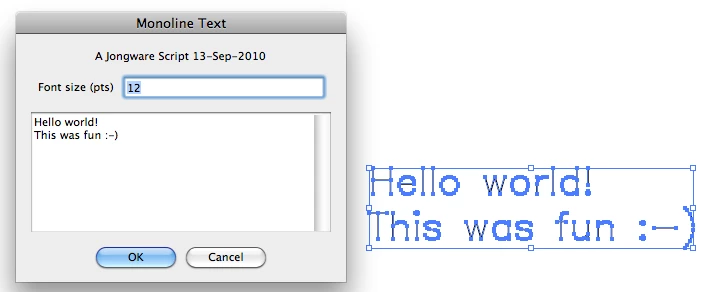
It shows a little tiny dialog (on which I spend most of the time) where you can enter a size in "points" (relative to the 29 units high Hershey characters) and enter some text. Use Shift+Enter to insert a 'Hard Return', or enter as much text as you want. The text is then drawn out in monoline characters in the center of the screen.

The script is intelligent, in that you can change a previously drawn text by simply selecting it and running the script. Note, however, that stuff like manual scaling and changed attributes (stroke width, color) will be lost. If that's important to you, I might look into it ...

It only supports a small subset of the Hershey Simplex set -- just ASCII, space up to tilde. (And it draws traditional K shapes.)
    This topic has been closed for replies.

    15 replies

    Kurt Gold
    Community Expert
    June 23, 2022

    Darrius,


    unfortunately, Jongware passed away some time ago. Obviously, his website has been closed in the meantime.


    I think (or hope) that today Jongware wouldn't mind to still share the script publicly.


    I've uploaded it onto another server, so you can download it there:


    Jongware – Monoline Text Script


    New Participant
    March 22, 2023

    Thanks. Its working but don't understand which font is this script using.

    Kurt Gold
    Community Expert
    March 22, 2023

    Naeem,


    in his initial post Jongware mentioned that it's based on a subset of one of the Hershey fonts.


    https://en.wikipedia.org/wiki/Hershey_fonts


    New Participant
    June 23, 2022

    Is this still available? The link seems to be broken.

    New Participant
    October 15, 2021

    Hello, 


    Is it possible to provide a step by step of how to set up and to use this script?

    Doug A Roberts
    Community Expert
    October 15, 2021

    All the information you need is in the original post. Where are you getting stuck?

    New Participant
    February 16, 2021

    I just tried it in Illustrator 2021 and it works fine.


    THANKS !


    IMO, there is a great need for this tool, and the hability to use REAL single-line type. Technical illustrators, hobbyists (scrapbooking), art coders working with plotters, etc.

    mariannam50928056
    New Participant
    April 3, 2019

    Firstly, thank you so much for this script! It's amazing!

    I was wondering; was there a way to adapt this to use a different typeface? Or to apply to a set of outlines? Thank you!

    Jongware
    JongwareAuthor
    Community Expert
    April 4, 2019

    No, this script does not use a "typeface". The current line font comes courtesy of A.V. Hershey (Hershey fonts - Wikipedia), and that is a limited set. Although there are a few different designs -- serifed, sans, blackletter --, these are constructed by repeatedly drawing in the internal area to mimic a real "fill".

    New Participant
    February 7, 2019

    Hello Jongware,

    Thank you for the helpful script.

    I need to convert non-Latin languages into monolines. Is it possible to use or modify your script to accommodate Greek, Hebrew, or CJK languages?

    Thanks.

    Jongware
    JongwareAuthor
    Community Expert
    February 8, 2019

    Of course! It would take a lot of work, but-- sure.

    The script does nothing special or "magic". It comes down to drawing x sets of lines (where x comes from the definition of each character) and then advance the cursor y units forward. The data for the characters I used come from the well-known Hershey fonts set.

    For Greek, all you need to do is find suitable line definitions of characters and then add these to the script. For Hebrew, you also need to make the script recognize runs of Hebrew, so they can be set in RTL. For "CJK languages", again, you only need to find suitable line definitions. (Unless you want to add vertical text as well. But there is nothing in the script that would forbid this -- it's still very much possible.)

    maria teresaa24298610
    New Participant
    February 2, 2019

    Hello Jongware,

    Thank you very much for the script.

    I'm using it with a pen plotter and I was wondering if there is a way to make the spacing depending on the pen thickness parameter.

    I understood in the single characters where I should eventually make the changes once seen the Hershey Vector font, and

    I was thinking about having the pen thickness as an input from me (as it is the font size).

    I tried to make a couple attempts but I'm always experiencing errors... I'm a real newbie in scripting so I'm sure it's just my fault I'm not making it and there should be a way to do it.

    Have you ever thought of it? Do you think there is a way to implement it?

    Thank you so much

    Jongware
    JongwareAuthor
    Community Expert
    February 6, 2019

    Hi Maria Teresa,

    The line thickness is explicitly set to 0.5pt in the script in two places: line 290 and line 306. Both read now

    p.strokeWidth = 0.5;

    but you can change that 0.5 to any other value. The spacing between the characters is independent from this -- it's been a while but reading the script, I think the design units are times 29, and so each line segment coordinates need dividing by that number. To change the horizontal spacing only, change the "/29" in line 309 to a lower number, such as "25".

    Changing that and the stroke width to 1pt makes the text display thicker and spaced further apart:

    New Participant
    January 14, 2019

    Hi there,

    I just downloaded the script and it works when creating new text. I can't, however, seem to get it to change text that I have already created. Is there something more that I need to do outside of selecting it, then going to file>scripts and then selecting the script? When I do this, it still opens the box and waits for me to input the text.

    Please excuse my naivete as I had no idea scripts were a thing prior to a google search for a single stroke typeface that led me here.

    Thanks in advance!

    fabianmoronzirfas
    Known Participant
    January 14, 2019

    Sorry, you can't change the text you've created. It's just vector paths

    New Participant
    January 14, 2019

    Are you saying that if they were vectors I would be able to do it? Because I tested that out by creating an outline of the text and I can't seem to get that to work either.

    heatherlmartin
    New Participant
    June 3, 2018

    When I try this in Adobe Illustrator CC, I get this error message:

    Ray Yorkshire
    Participating Frequently
    June 3, 2018

    is the layer locked?

    heatherlmartin
    New Participant
    June 3, 2018

    No. I even tried a new layer and received the same message.

    CTOverton
    Participating Frequently
    January 18, 2018

    Download link seems to be broken

    Kurt Gold
    Community Expert
    January 18, 2018

    Seems like a rascal stole a "p".

    Copy the link in the initial post and add a "p" at the end of the line. Then the download link should work.

    Or use this one:

    http://www.jongware.com/binaries/monolinetext.v1.0.zip