


Known Participant
June 4, 2024
Answered

Apply Character direction to textframe characters via Extendscript

  • June 4, 2024
  • 2 replies
  • 2311 views

Hi Folks,

How to apply character direction to TextFrame characters like LEFT_TO_RIGHT_DIRECTION | RIGHT_TO_LEFT_DIRECTION using extendscript.

Thanks in advance 

This topic has been closed for replies.
Correct answer sttk3

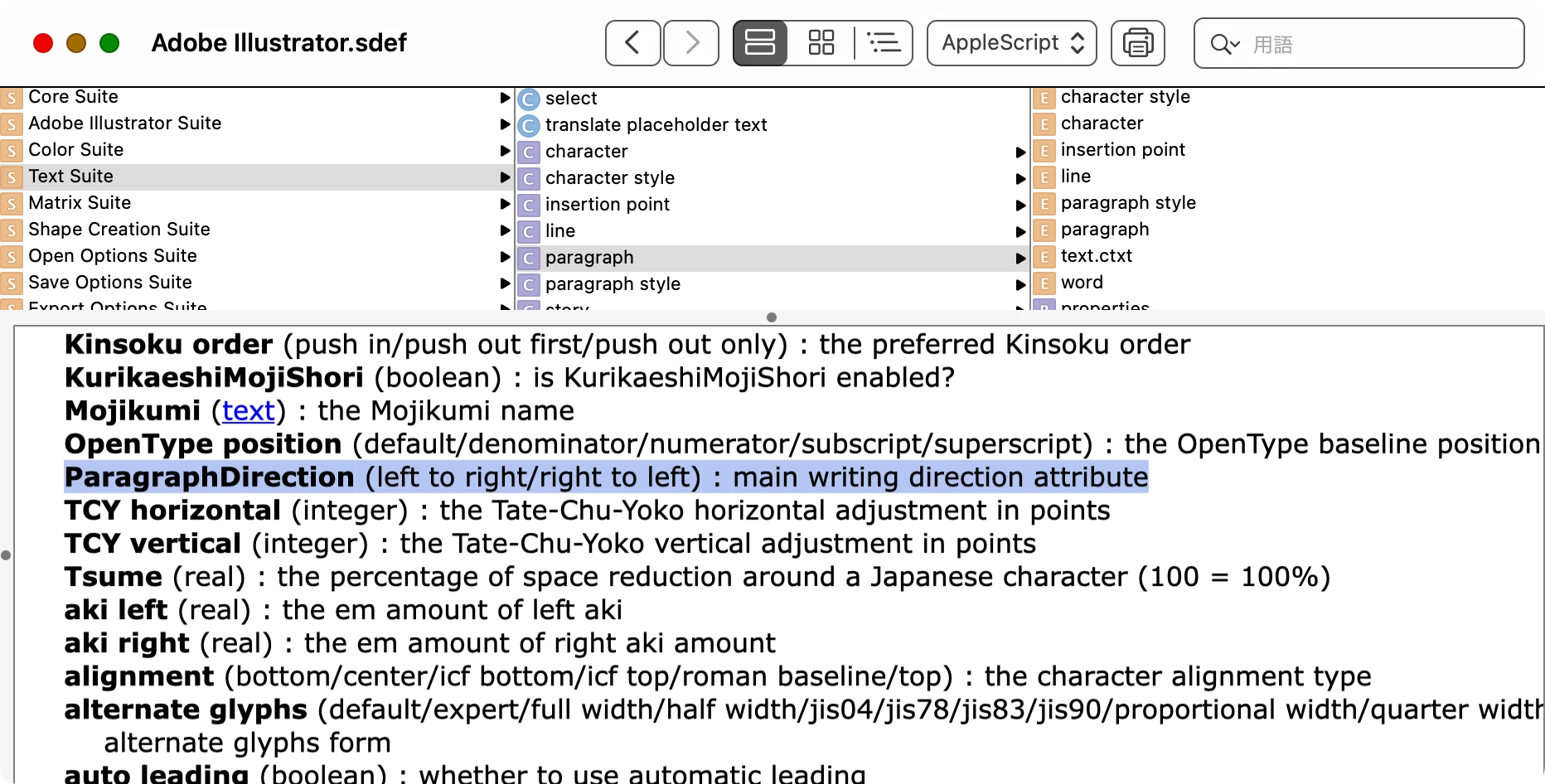
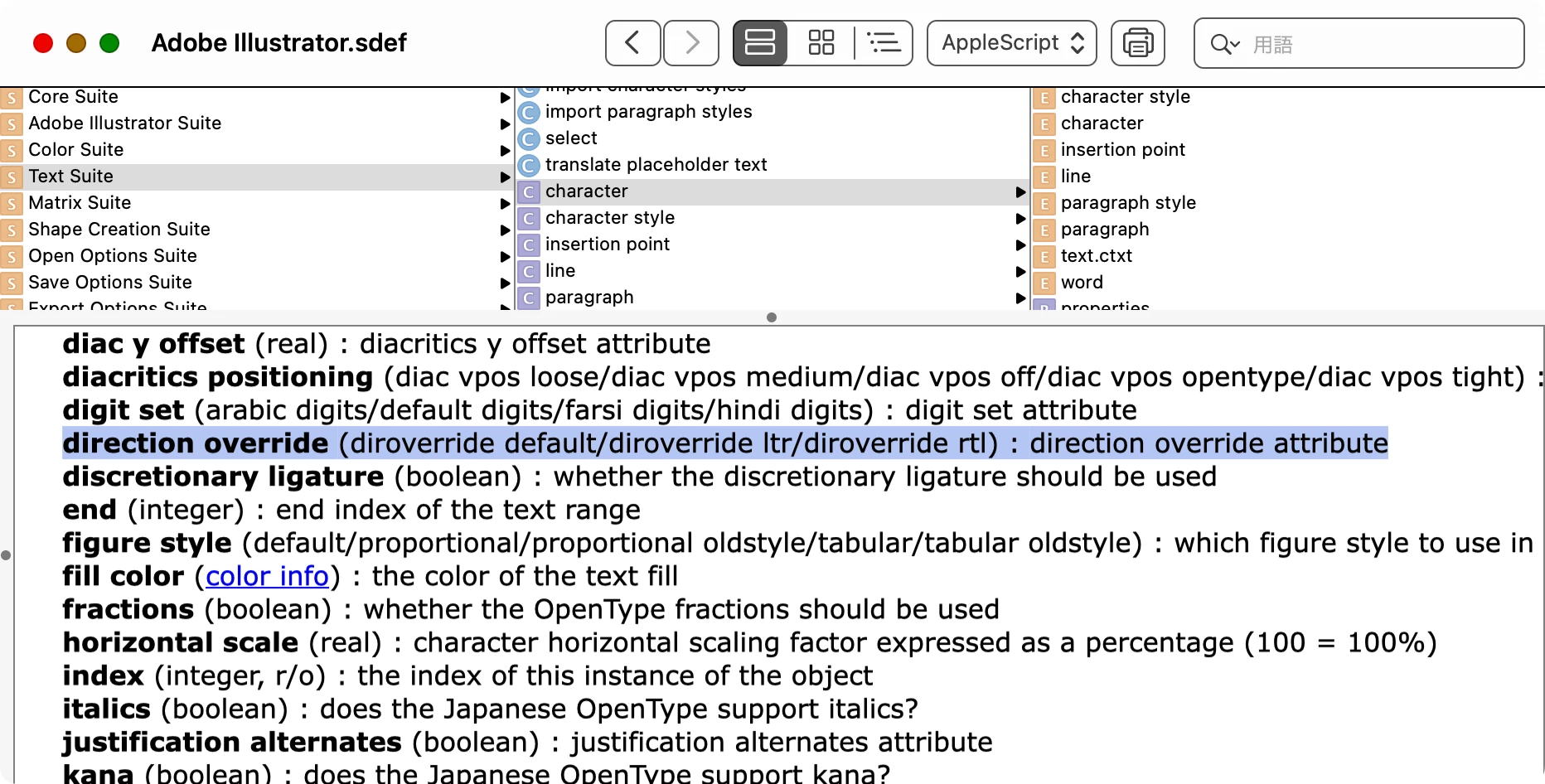
There have been a few similar topics recently, so I installed the Arabic version of Illustrator to investigate these items.


The conclusion is as follows:

/**
  * @File An example of ExtendScript to set paragraph direction and character direction
  * @version 1.0.0
  * @7111211 sttk3.com
*/

(function() {
  var doc = app.documents[0] ;
  var sel = doc.selection[0] ;

  /* Paragraph Direction
  ParagraphDirectionType.RIGHT_TO_LEFT_DIRECTION
  ParagraphDirectionType.LEFT_TO_RIGHT_DIRECTION
  */
  setParagraphDirection(sel.textRange, ParagraphDirectionType.RIGHT_TO_LEFT_DIRECTION) ;

  /* Character Direction
  DirOverrideType.DEFAULT_DIRECTION
  DirOverrideType.RIGHT_TO_LEFT_DIRECTION
  DirOverrideType.LEFT_TO_RIGHT_DIRECTION
  */
  sel.textRange.dirOverride = DirOverrideType.RIGHT_TO_LEFT_DIRECTION ;
})() ;

/**
  * Set the paragraph direction. This will succeed even if the specified property is the same as [Normal Paragraph Style]
  * @9397041 {TextRange} range target text range
  * @9397041 {ParagraphDirectionType} dstDirection destination paragraph direction
*/
function setParagraphDirection(range, dstDirection) {
  var appliedParagraphStyle = range.paragraphStyles[0] ;
  var styleDirection = appliedParagraphStyle.paragraphDirection ;

  if(styleDirection === dstDirection) {
    var swapMap = {
      'ParagraphDirectionType.RIGHT_TO_LEFT_DIRECTION': ParagraphDirectionType.LEFT_TO_RIGHT_DIRECTION, 
      'ParagraphDirectionType.LEFT_TO_RIGHT_DIRECTION': ParagraphDirectionType.RIGHT_TO_LEFT_DIRECTION
    } ;
    appliedParagraphStyle.paragraphDirection = swapMap[dstDirection.toString()] ;
    range.paragraphDirection = dstDirection ;
    appliedParagraphStyle.paragraphDirection = styleDirection ;
  } else {
    range.paragraphDirection = dstDirection ;
  }
}


Check the AppleScript scripting dictionary and you will find the properties that can be controlled.
2 replies

sttk3Correct answer
Legend
June 20, 2024

There have been a few similar topics recently, so I installed the Arabic version of Illustrator to investigate these items.


The conclusion is as follows:

/**
  * @File An example of ExtendScript to set paragraph direction and character direction
  * @version 1.0.0
  * @7111211 sttk3.com
*/

(function() {
  var doc = app.documents[0] ;
  var sel = doc.selection[0] ;

  /* Paragraph Direction
  ParagraphDirectionType.RIGHT_TO_LEFT_DIRECTION
  ParagraphDirectionType.LEFT_TO_RIGHT_DIRECTION
  */
  setParagraphDirection(sel.textRange, ParagraphDirectionType.RIGHT_TO_LEFT_DIRECTION) ;

  /* Character Direction
  DirOverrideType.DEFAULT_DIRECTION
  DirOverrideType.RIGHT_TO_LEFT_DIRECTION
  DirOverrideType.LEFT_TO_RIGHT_DIRECTION
  */
  sel.textRange.dirOverride = DirOverrideType.RIGHT_TO_LEFT_DIRECTION ;
})() ;

/**
  * Set the paragraph direction. This will succeed even if the specified property is the same as [Normal Paragraph Style]
  * @9397041 {TextRange} range target text range
  * @9397041 {ParagraphDirectionType} dstDirection destination paragraph direction
*/
function setParagraphDirection(range, dstDirection) {
  var appliedParagraphStyle = range.paragraphStyles[0] ;
  var styleDirection = appliedParagraphStyle.paragraphDirection ;

  if(styleDirection === dstDirection) {
    var swapMap = {
      'ParagraphDirectionType.RIGHT_TO_LEFT_DIRECTION': ParagraphDirectionType.LEFT_TO_RIGHT_DIRECTION, 
      'ParagraphDirectionType.LEFT_TO_RIGHT_DIRECTION': ParagraphDirectionType.RIGHT_TO_LEFT_DIRECTION
    } ;
    appliedParagraphStyle.paragraphDirection = swapMap[dstDirection.toString()] ;
    range.paragraphDirection = dstDirection ;
    appliedParagraphStyle.paragraphDirection = styleDirection ;
  } else {
    range.paragraphDirection = dstDirection ;
  }
}


Check the AppleScript scripting dictionary and you will find the properties that can be controlled.

Known Participant
July 10, 2024

Thanks @sttk3 

Character Direction working properly. 

In Illustrator Arabic Version ParagraphDirectionType.LEFT_TO_RIGHT_DIRECTION working properly. But ParagraphDirectionType.RIGHT_TO_LEFT_DIRECTION - ParagraphDirectionType.DEFAULT_DIRECTION not wroking as expected. Please help on this.

Note: Other than Arabic version both ParagraphDirectionType working properly.

Thanks in advance

Legend
September 30, 2024

ParagraphDirectionType.DEFAULT_DIRECTION should not work because the property does not exist.


As for ParagraphDirectionType.RIGHT_TO_LEFT_DIRECTION, the result is caused by Illustrator's specification that it is ignored if we set the same property as the paragraph style being applied.


The above script has a workaround function setParagraphDirection to avoid this. Instead of just setting the paragraphDirection property, try specifying it via setParagraphDirection.

Sergey Osokin
Inspiring
June 6, 2024

I'm not sure if this is what you're looking for, but you can try it.


activeDocument.selection[0].textRange.paragraphDirection = ParagraphDirectionType.LEFT_TO_RIGHT_DIRECTION


and


activeDocument.selection[0].textRange.paragraphDirection = ParagraphDirectionType.RIGHT_TO_LEFT_DIRECTION


Known Participant
June 17, 2024

Hi @Sergey Osokin 
For paragraphDirection ParagraphDirectionType.LEFT_TO_RIGHT_DIRECTION its working fine. But ParagraphDirectionType.RIGHT_TO_LEFT_DIRECTION not working in illustratror. Please help on this.

Thanks in advance

jduncan
Community Expert
Community Expert
June 19, 2024

I don't know much about character direction in Illustrator, and I don't have a choice of directions in the Character panel menu like in your screenshots.


@Sergey Osokin, where did you get that handy 'js console' plugin?