


Participant
May 1, 2021
Question

Arabic diacritics high above letters.

  • May 1, 2021
  • 1 reply
  • 1333 views

Hello, I seem to be having a problem with Arabic diacritics when typing in Illustrator.

The diacritics on some of my letters have risen above the letters and I don't know why.

The text in Illustrator looks like this:  
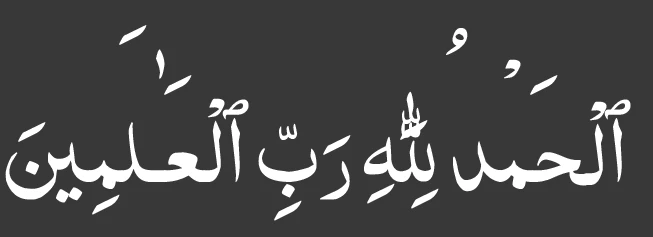
As seen here, the diacritics are way too high than normal.

But here's what stumped me, the exact same text I used in Illustrator in the program "Wordpad" is presented properly:
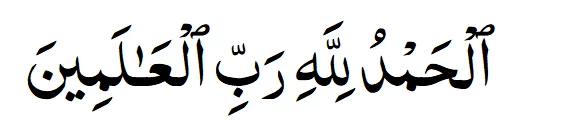
This (^) is how I want it to be, this is perfect for me. But in Illustrator this does not seem to work.

I really don't understand, I tried some other fonts with the same text, Adobe Arabic works, and other default fonts do as well, but fonts I installed don't work while some fonts I installed do work.

I've never had this problem before and I don't know what's causing it.


The font I am using is "al-Qalam Quran Majeed 1" and is available here: http://quran.mursil.com/Web-Print-Publishing-Quran-Text-Graphics-Fonts-and-Downloads/fonts-optimized-for-quran


Thanks in advance.

This topic has been closed for replies.

1 reply

Zaid Al Hilali
Community Expert
Community Expert
May 4, 2021

Salam alaikum Sajid.

It all comes to the font and how it was developed and tested, some will display characters, diacritics, numerals, and ornaments properly, and some won't.

InDesign has better diacritics controls and has a dedicated panel for it too. As for Illustrator, all you can do is open the Character Panel and adjust vertical and horizontal positions as shown below…

You can change diacritics positions for whole article after highlighting all text, or highlight a character or a word to selectively adjust the position for that word only.


Sajid5E0CAuthor
Participant
May 5, 2021

Walaikum salam,


if this has to do with the font, is there anyway I can find the problem with the font and try and fix it?

Also, I don't get any options in the Character Panel for diacritics...

Zaid Al Hilali
Community Expert
Community Expert
May 5, 2021

To display more options in any panel, you need to click on the top/bottom toggle arrows shown below as this will expand and collapse the panel each time you click on the arrows…

Having said that, if your Illustrator is not a Middle Eastern version, you will not see the diacritic control I mentioned earlier, as those diacritic options shows in the Middle Eastern version only.